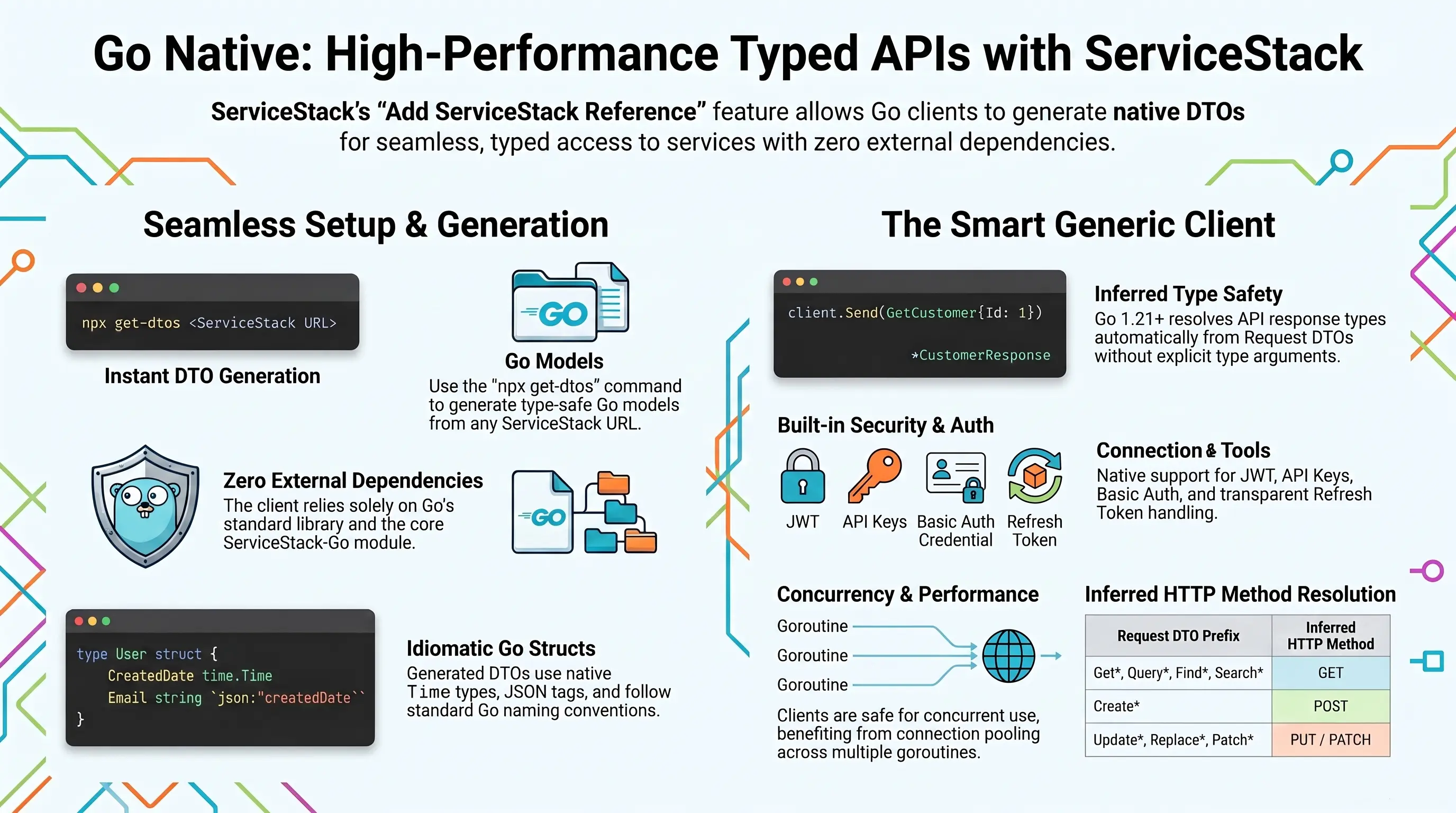
ServiceStack's Add ServiceStack Reference feature allows clients to generate Native Types for Go - providing a simple way to give Go clients typed access to your ServiceStack Services.
Go - Simple, typed APIs for cloud software
The new servicestack-go client preserves everything that makes Go appealing: simplicity, fast builds and straightforward deployment. Generated Request DTOs carry their response type and HTTP method, allowing Go's generic client to infer the complete API call:
res, err := ss.Send(client, dtos.Hello{Name: "World"})
if err != nil {
    log.Fatal(err)
}
fmt.Println(res.Result)
Built on Go's standard library with no external runtime dependencies. Provides context.Context variants for cancellation and deadlines, structured ResponseStatus errors, field validation errors, typed AutoQuery responses, multipart uploads, batched and one-way requests, and authentication using Basic Auth, API Keys, JWTs, refresh tokens or session cookies.
A configured Client is safe for concurrent use by multiple goroutines, so a single client can be shared by your App's workers where it benefits from the connection pooling of its underlying http.Client.
First class development experience
Go has become the language of choice for cloud infrastructure, CLI tooling and high-throughput network services thanks to its fast compile times, first-class concurrency and single-binary deployments. To maximize the experience for calling ServiceStack APIs from these environments, Go is supported as a 1st class Add ServiceStack Reference language which gives Go developers an end-to-end typed API for consuming ServiceStack APIs, with DTOs generated from a single command-line.
Ideal idiomatic Typed Message-based API
Go DTOs are generated as plain structs with json tags following Go's naming conventions, so they'll naturally fit into existing Go code bases. Generated DTOs are gofmt-formatted, use time.Time for Dates and embed the built-in types in the servicestack-go library.
Here's a sample of generated Go DTOs containing a string Enum, a data model with an embedded base type and an AutoQuery Request:
package dtos

import (
	ss "github.com/ServiceStack/servicestack-go"
	"time"
)

type RoomType string

const (
	RoomTypeSingle RoomType = "Single"
	RoomTypeDouble          = "Double"
	RoomTypeQueen           = "Queen"
	RoomTypeTwin            = "Twin"
	RoomTypeSuite           = "Suite"
)

/** @description Booking Details */
type Booking struct {
	ss.AuditBase
	Id               int        `json:"id,omitempty"`
	Name             string     `json:"name"`
	RoomType         RoomType   `json:"roomType,omitempty"`
	BookingStartDate time.Time  `json:"bookingStartDate,omitempty"`
	Discount         Coupon     `json:"discount"`
}

type HelloResponse struct {
	Result string `json:"result"`
}

// @Route("/hello/{Name}")
type Hello struct {
	Name *string `json:"name,omitempty"`
}

func (Hello) CreateResponse() (r HelloResponse) { return }
func (Hello) HttpMethod() string                { return "GET" }

/** @description Find Bookings */
// @Route("/bookings", "GET")
type QueryBookings struct {
	ss.QueryDb
	Id *int `json:"id,omitempty"`
}

func (QueryBookings) CreateResponse() (r ss.QueryResponse[Booking]) { return }
func (QueryBookings) HttpMethod() string                            { return "GET" }
The generated CreateResponse() and HttpMethod() methods are what enable the end-to-end typed API. Since Go 1.21 can infer type arguments from a method's return type, CreateResponse() lets the client resolve each API's Response Type from its Request DTO - so no explicit type arguments are needed when sending a Request.
Installation
The only requirements for Go Apps to perform typed API Requests are the generated Go DTOs and the generic Client in the servicestack-go module, which only uses the Go standard library:
go get github.com/ServiceStack/servicestack-go
Requires Go 1.21+.
Simple command-line utility for Go
Go DTOs can be generated from the command-line with the cross-platform get-dtos script which can be run with Node.js without needing to install anything:
npx get-dtos
Running it without any arguments displays the available options for adding and updating ServiceStack References.
Adding a ServiceStack Reference
Generated Go DTOs use the dtos package by default, so they're typically generated into their own folder:
mkdir dtos && cd dtos && npx get-dtos go https://blazor-vue.web-templates.io
Result:
Saved to: dtos.go
Calling npx get-dtos go with just a URL will save the DTOs using the Host name, you can override this by specifying a FileName as the 2nd argument:
npx get-dtos go https://blazor-vue.web-templates.io Bookings
Result:
Saved to: Bookings.dtos.go
Use the GlobalNamespace option to generate DTOs in a different Go package.
Updating a ServiceStack Reference
To Update an existing ServiceStack Reference, call npx get-dtos go with the Filename:
npx get-dtos go dtos.go
Result:
Updated: dtos.go
Which will update the File with the latest Go Server DTOs. You can also customize how DTOs are generated by uncommenting the Go DTO Customization Options and updating them again.
Updating all Go DTOs
Calling npx get-dtos go without any arguments will update all Go DTOs in the current directory:
npx get-dtos go
Smart Generic Client
The generic Client is a 1st class client with the same rich featureset of the smart ServiceClients in other 1st class supported languages sporting a terse, typed flexible API with support for additional untyped params, custom URLs and HTTP Methods and raw Response bodies.
It includes built-in support for a number of ServiceStack Auth options including HTTP Basic Auth and stateless Bearer Token Auth Providers like API Key and JWT Auth as well as stateful Sessions used by the popular credentials Auth Provider, whose Session Cookies are maintained in the client's cookie jar. Refresh Tokens are also supported, where expired JWT Bearer Tokens are transparently refreshed behind-the-scenes before automatically retrying the failed Request.
As Go's Generics can't be used on methods, the typed APIs are implemented as functions accepting the *Client as their first argument:
// Client configuration
func NewClient(baseUrl string) *Client            // sends Requests to /api
func NewJsonApiClient(baseUrl string) *Client     // alias of NewClient
func NewJsonServiceClient(baseUrl string) *Client // sends Requests to /json/reply
func (c *Client) SetBasePath(basePath string) *Client
func (c *Client) SetBearerToken(token string) *Client
func (c *Client) SetRefreshToken(token string) *Client
func (c *Client) SetCredentials(userName, password string) *Client
func (c *Client) SetHeader(name, value string) *Client
func (c *Client) SetTimeout(timeout time.Duration) *Client
func (c *Client) SetFollowRedirects(follow bool) *Client
func (c *Client) BearerToken() string
func (c *Client) RefreshToken() string
func (c *Client) ToAbsoluteUrl(pathOrUrl string) string
func (c *Client) CreateUrlFromDto(method string, request any) string
func (c *Client) Authenticate(userName, password string) (AuthenticateResponse, error)

// Typed API
func Send[T any](client *Client, request IReturn[T]) (T, error)
func Get[T any](client *Client, request IReturn[T], args ...map[string]any) (T, error)
func Post[T any](client *Client, request IReturn[T], args ...map[string]any) (T, error)
func Put[T any](client *Client, request IReturn[T], args ...map[string]any) (T, error)
func Patch[T any](client *Client, request IReturn[T], args ...map[string]any) (T, error)
func Delete[T any](client *Client, request IReturn[T], args ...map[string]any) (T, error)
func SendVoid(client *Client, request IReturnVoid, args ...map[string]any) error
func SendAs[T any](client *Client, request any, args ...map[string]any) (T, error)
func SendMethodAs[T any](client *Client, method string, request any, args ...map[string]any) (T, error)
func Api[T any](client *Client, request IReturn[T]) ApiResult[T]

// Batched and one-way Requests
func SendAll[TRequest IReturn[TResponse], TResponse any](client *Client, requests []TRequest) ([]TResponse, error)
func Publish(client *Client, request any) error
func PublishAll[T any](client *Client, requests []T) error

// URL API
func GetUrl[T any](client *Client, path string, args ...map[string]any) (T, error)
func PostUrl[T any](client *Client, path string, body any, args ...map[string]any) (T, error)
func PutUrl[T any](client *Client, path string, body any, args ...map[string]any) (T, error)
func PatchUrl[T any](client *Client, path string, body any, args ...map[string]any) (T, error)
func DeleteUrl[T any](client *Client, path string, args ...map[string]any) (T, error)
func SendUrl[T any](client *Client, method, path string, body any, args ...map[string]any) (T, error)

// File Uploads
func PostFileWithRequest[T any](client *Client, request IReturn[T], file UploadFile) (T, error)
func PostFilesWithRequest[T any](client *Client, request IReturn[T], files []UploadFile) (T, error)
Every API also has a *Ctx variant accepting a context.Context as its first argument, e.g. SendCtx, GetCtx, ApiCtx, SendAllCtx, PostFilesWithRequestCtx.
Making Typed API Requests
Making API Requests in Go is the same as all other ServiceStack's Service Clients by sending a populated Request DTO using a Client which returns a typed Response DTO:
package main

import (
	"fmt"

	ss "github.com/ServiceStack/servicestack-go"

	"myapp/dtos"
)

func main() {
	client := ss.NewClient("https://blazor-vue.web-templates.io")

	res, err := ss.Send(client, dtos.Hello{Name: "World"}) // res is a dtos.HelloResponse
	if err != nil {
		panic(err)
	}
	fmt.Println(res.Result)
}
Send uses the HTTP Method the API is annotated with, use Get, Post, Put, Patch or Delete to send a Request DTO with a specific HTTP Method:
res, err := ss.Post(client, dtos.CreateBooking{Name: "Booking"})
APIs that don't return a Response Body are sent with SendVoid, which accepts the Request DTOs generated with a CreateResponseVoid() method:
err := ss.SendVoid(client, dtos.DeleteBooking{Id: 1})
Resolving the HTTP Method
The Verb returned by a DTO's generated HttpMethod() also determines whether the Request DTO is sent in the QueryString or the JSON Request Body:
res, err := ss.Send(client, dtos.Hello{Name: "World"})           // GET /api/Hello?name=World
res, err := ss.Send(client, dtos.CreateBooking{Name: "Booking"}) // POST /api/CreateBooking {"name":"Booking"}
Request DTOs that aren't annotated with a Verb fall back to inferring it from the Request DTO name:
| Request DTO Name | HTTP Method |
|---|---|
Get* Query* Find* Search* |
GET |
Create* |
POST |
Update* Replace* |
PUT |
Patch* |
PATCH |
Delete* Remove* |
DELETE |
| (anything else) | POST |
Which can be resolved for any Request DTO with:
method := ss.ResolveHttpMethod(dtos.QueryBookings{}) // "GET"
Use SendMethodAs to send any Request DTO with an explicit Verb and Response Type, useful for calling APIs with hand-written DTOs that don't declare their Response Type:
res, err := ss.SendMethodAs[dtos.HelloResponse](client, ss.HttpGet, MyHello{Name: "World"})
Where SendAs does the same using the API's default Verb:
res, err := ss.SendAs[dtos.HelloResponse](client, MyHello{Name: "World"})
AutoQuery Requests
AutoQuery APIs return a typed QueryResponse[T], with the query params of their base type available on the embedded ss.QueryDb:
take := 5
res, err := ss.Send(client, dtos.QueryBookings{
QueryDb: ss.QueryDb{QueryBase: ss.QueryBase{Take: &take, OrderByDesc: "id"}},
})
for _, booking := range res.Results { // booking is a dtos.Booking
fmt.Println(booking.Id, booking.Name, booking.CreatedBy)
}
As Skip and Take are *int pointers they're only sent when populated, letting the Server apply its own defaults otherwise. In addition to Results, QueryResponse[T] returns the Offset of the current page and the Total number of matching results when requested with Include: "Total":
skip, take := 10, 10
res, err := ss.Send(client, dtos.QueryBookings{
QueryDb: ss.QueryDb{QueryBase: ss.QueryBase{
Skip: &skip,
Take: &take,
OrderBy: "id",
Include: "Total", // include the Total of matching results
Fields: "id,name,roomType", // limit the fields returned
}},
})
fmt.Println(res.Offset, res.Total, len(res.Results))
Sending additional arguments with Typed API Requests
Many AutoQuery Services utilize implicit conventions to query fields that aren't explicitly defined on AutoQuery Request DTOs, these can be queried by specifying additional arguments with the typed Request DTO, e.g:
res, err := ss.Get(client, dtos.QueryBookings{}, map[string]any{"nameStartsWith": "A"})
Making API Requests with URLs
In addition to making Typed API Requests you can also call Services using relative or absolute urls:
res, err := ss.GetUrl[dtos.HelloResponse](client, "/hello/World")

res, err := ss.GetUrl[dtos.HelloResponse](client, "/api/Hello", map[string]any{"name": "World"})

res, err := ss.PostUrl[dtos.HelloResponse](client, "/custom-path", request)
Raw Data Responses
Requesting a string or []byte Response Type returns the raw Response Body, useful for APIs returning content like CSV:
csv, err := ss.GetUrl[string](client, "/api/QueryBookings.csv")

data, err := ss.GetUrl[[]byte](client, "/api/QueryBookings.csv")
Batched Requests
Multiple Request DTOs of the same Type can be sent together in a single Request with SendAll, which returns all their Responses:
responses, err := ss.SendAll(client, []dtos.Hello{{Name: "A"}, {Name: "B"}})
Or send them to a one-way endpoint that ignores their Responses:
err := ss.Publish(client, dtos.Hello{Name: "World"})
err := ss.PublishAll(client, []dtos.Hello{{Name: "A"}, {Name: "B"}})
Which are sent to the Client's one-way base URL, i.e. /json/oneway when using NewJsonServiceClient.
Error Handling
Failed API Requests return a *WebServiceException containing the HTTP Status Code and the API's structured ResponseStatus error:
_, err := ss.Send(client, dtos.CreateBooking{})
if webEx, ok := ss.AsWebServiceException(err); ok {
    fmt.Println(webEx.StatusCode)          // 400
    fmt.Println(webEx.ErrorCode())         // "NotEmpty"
    fmt.Println(webEx.ErrorMessage())      // "'Name' must not be empty."
    fmt.Println(webEx.FieldError("Name"))  // "'Name' must not be empty."
    fmt.Println(webEx.IsUnauthorized())    // false
}
Which also works with the standard errors package:
var webEx *ss.WebServiceException
if errors.As(err, &webEx) { /* ... */ }
WebServiceException includes the HTTP Status Code helpers and structured error accessors you'd expect:
webEx.StatusCode        // HTTP Status Code, 0 for connection and transport errors
webEx.StatusDescription // HTTP Status Description
webEx.ResponseStatus    // structured error, nil when the API didn't return one
webEx.ResponseBody      // raw error body, e.g. when a HTML or plain text error was returned
webEx.ErrorCode()       // "NotEmpty"
webEx.ErrorMessage()    // "'Name' must not be empty."
webEx.StackTrace()      // Server StackTrace, only populated in DebugMode
webEx.FieldErrors()     // []ResponseError of all field validation errors
webEx.FieldError("Name")
webEx.IsValidationError()   // has field validation errors
webEx.IsUnauthorized()      // 401
webEx.IsForbidden()         // 403
webEx.IsNotFound()          // 404
webEx.IsAny(429, 502, 503, 504)
webEx.Unwrap()          // the underlying transport error, if any
Field validation errors are returned in a typed []ResponseError which can be mapped to the fields of your UI:
for _, fieldError := range webEx.FieldErrors() {
    fmt.Println(fieldError.FieldName, fieldError.ErrorCode, fieldError.Message)
}
Connection failures and invalid Responses are also returned as a *WebServiceException with a 0 Status Code and the underlying error accessible with errors.Is/errors.Unwrap, so a single error type can be used to handle all API failures:
_, err := ss.SendCtx(ctx, client, dtos.Hello{Name: "World"})
if errors.Is(err, context.Canceled) { /* the Request was cancelled */ }
The API's Status Code and structured error can also be read from any error with:
statusCode := ss.GetStatusCode(err)      // 0 if err wasn't a *WebServiceException
status := ss.GetResponseStatus(err)      // *ResponseStatus, nil if not returned

// e.g. retry API Requests that failed with a transient error
if webEx, ok := ss.AsWebServiceException(err); ok && webEx.IsAny(429, 502, 503, 504) {
    // ...
}
Alternatively Api returns errors in its result instead of a separate error, which can be preferable when handling validation errors is part of normal control flow:
api := ss.Api(client, dtos.CreateBooking{})
if api.Failed() {
    fmt.Println(api.ErrorCode(), api.FieldError("Name"))
} else {
    fmt.Println(api.Response.Id)
}
Where ApiResult[T] returns the typed Response and any *ResponseStatus Error alongside Succeeded(), Failed(), ErrorCode(), ErrorMessage() and FieldError() helpers. As all errors are converted into a ResponseStatus, transport errors are also returned in api.Error with an Exception Error Code.
Authenticating using Basic Auth
Basic Auth support is implemented in Client and follows the same API made available in the C# Service Clients:
client.SetCredentials(user, pass)

res, err := ss.Send(client, dtos.SecureRequest{})
Authenticating using Credentials
Alternatively you can authenticate using userName/password credentials with the Authenticate API:
authRes, err := client.Authenticate(userName, password)
This will populate the Client with Session Cookies which will transparently be sent on subsequent requests to make authenticated requests, as well as using any Bearer Token the Server returns.
Session Cookies are maintained in the http.Client's cookie jar, whilst any Bearer and Refresh Tokens returned are configured on the client and available from client.BearerToken() and client.RefreshToken(). The AuthenticateResponse also returns the authenticated User's info, roles and permissions:
authRes, err := client.Authenticate("test", "test")

fmt.Println(authRes.UserId, authRes.UserName, authRes.DisplayName, authRes.ProfileUrl)
fmt.Println(authRes.Roles, authRes.Permissions)
fmt.Println(client.BearerToken(), client.RefreshToken())

// All subsequent Requests are made with the Authenticated Session
res, err := ss.Send(client, dtos.HelloSecure{Name: "World"})
Authenticating using JWT
Use SetBearerToken to Authenticate with a ServiceStack JWT Provider using a JWT Token:
client.SetBearerToken(jwt)
Alternatively you can use just a Refresh Token instead:
client.SetRefreshToken(refreshToken)
Where the client will automatically fetch a new JWT Bearer Token using the Refresh Token for authenticated requests, i.e. when a Request fails with a 401 Unauthorized the client sends its Refresh Token to the GetAccessToken API, updates its Bearer Token then transparently retries the original Request:
POST /api/Hello           -> 401 Unauthorized
POST /api/GetAccessToken  -> 200 { "accessToken": "..." }
POST /api/Hello           -> 200 { "result": "Hello, World!" }
Use RefreshTokenUri to fetch Access Tokens from a different central Auth Server:
client.RefreshTokenUri = "https://auth.example.org/api/GetAccessToken"
Authenticating using an API Key
Use SetBearerToken to Authenticate with an API Key:
client.SetBearerToken(apiKey)
Built-in ServiceStack DTOs
The Go client library includes typed Request DTOs for ServiceStack's built-in APIs, letting you call them without needing to generate them:
// Authentication
authRes, err := ss.Send(client, ss.Authenticate{Provider: "credentials",
UserName: "test", Password: "test", RememberMe: &rememberMe})
regRes, err := ss.Send(client, ss.Register{UserName: "new-user",
Email: "user@example.org", Password: "p@55wOrd", AutoLogin: &autoLogin})
// JWT
tokenRes, err := ss.Send(client, ss.ConvertSessionToToken{}) // Session -> JWT
accessRes, err := ss.Send(client, ss.GetAccessToken{RefreshToken: refreshToken})
// API Keys
keysRes, err := ss.Send(client, ss.GetApiKeys{Environment: "live"})
newKeys, err := ss.Send(client, ss.RegenerateApiKeys{Environment: "live"})
// Roles and Permissions
rolesRes, err := ss.Send(client, ss.AssignRoles{UserName: "user", Roles: []string{"Employee"}})
_, err = ss.Send(client, ss.UnAssignRoles{UserName: "user", Roles: []string{"Employee"}})
// Navigation
navRes, err := ss.Send(client, ss.GetNavItems{})
Together with the built-in Response Types and base types that generated DTOs reference:
| Type | Description |
|---|---|
ss.ResponseStatus |
ServiceStack's structured error response |
ss.ResponseError |
An individual field validation error |
ss.EmptyResponse |
Response of APIs that don't return a Response Body |
ss.IdResponse |
Response returning the Id of the created or updated entity |
ss.StringResponse |
Response returning a single Result string |
ss.StringsResponse |
Response returning a list of string Results |
ss.AuditBase |
Audit fields embedded in AutoQuery CRUD data models |
ss.QueryBase |
Query params supported by all AutoQuery Requests |
ss.QueryDb |
Base type of AutoQuery RDBMS Requests |
ss.QueryData |
Base type of AutoQuery Data Requests |
ss.QueryResponse[T] |
Typed Response of AutoQuery Requests |
Transparently handle 401 Unauthorized Responses
If the server returns a 401 Unauthorized Response either because the client was Unauthenticated or the configured Bearer Token or API Key used had expired or was invalidated, you can use the OnAuthenticationRequired callback to re-configure the client before automatically retrying the original request, e.g:
client.OnAuthenticationRequired = func(c *ss.Client) error {
    _, err := c.Authenticate(userName, password)
    return err
}

// Automatically retries requests returning 401 Responses
res, err := ss.Send(client, dtos.Secured{})
Uploading Files
Use PostFileWithRequest to upload a file with an API Request:
file, _ := os.Open("photo.png")
defer file.Close()

res, err := ss.PostFileWithRequest(client, dtos.UploadPhoto{Album: "Holiday"}, ss.UploadFile{
    FieldName:   "file",
    FileName:    "photo.png",
    ContentType: "image/png",
    Reader:      file,
})
Any populated properties on the Request DTO are sent as form fields alongside the uploaded files, whilst FieldName defaults to file and ContentType is detected by the Server when omitted.
As Reader is an io.Reader, files can be uploaded from anywhere - a file on disk, an in-memory buffer or a streamed HTTP Response. To upload multiple files use PostFilesWithRequest:
res, err := ss.PostFilesWithRequest(client, dtos.UploadPhotos{Album: "Holiday"}, []ss.UploadFile{
    {FieldName: "files", FileName: "1.png", ContentType: "image/png", Reader: file1},
    {FieldName: "files", FileName: "2.txt", Reader: strings.NewReader("file contents")},
})
Use PostFilesWithRequestUrlCtx to upload files to a custom URL, e.g. a Managed File Upload route.
context.Context
Every API has a *Ctx variant accepting a context.Context for cancellation and timeouts:
ctx, cancel := context.WithTimeout(context.Background(), 5*time.Second)
defer cancel()

res, err := ss.SendCtx(ctx, client, dtos.Hello{Name: "World"})
Client Configuration
client := ss.NewClient("https://example.org")
client.SetHeader("X-Custom", "Value")
client.SetTimeout(10 * time.Second)
client.SetFollowRedirects(false)
client.UserAgent = "my-app/1.0"

// Inspect or modify each Request and Response
client.RequestFilter = func(req *http.Request) { log.Println(req.Method, req.URL) }
client.ResponseFilter = func(res *http.Response) { log.Println(res.Status) }

// Replace the underlying *http.Client to customize transports, proxies or TLS
client.HttpClient = &http.Client{Timeout: 30 * time.Second}
NewClient sends Requests to ServiceStack's pre-defined /api route. Use NewJsonServiceClient for older ServiceStack instances that only have the /json/reply routes enabled, or SetBasePath for a custom base path.
apiClient := ss.NewClient("https://example.org")             // /api/Hello
jsonClient := ss.NewJsonServiceClient("https://example.org") // /json/reply/Hello
customClient := ss.NewClient("https://example.org").SetBasePath("custom/api") // /custom/api/Hello
Global Request and Response Filters
In addition to per-client filters, global filters can be registered to inspect or decorate the Requests and Responses of every Client, useful for adding tracing headers or logging and diagnostics:
ss.GlobalRequestFilter = func(req *http.Request) {
    req.Header.Set("X-Correlation-Id", correlationId())
}
ss.GlobalResponseFilter = func(res *http.Response) {
    log.Println(res.Request.Method, res.Request.URL, res.Status)
}
Concurrent API Requests
Go's concurrency is a natural fit for calling APIs in parallel. A configured Client is safe for concurrent use by multiple goroutines so a single client should be shared to benefit from the connection pooling of its underlying http.Client:
client := ss.NewClient("https://blazor-vue.web-templates.io") // configure before sharing

var wg sync.WaitGroup
results := make([]string, len(names))
for i, name := range names {
    wg.Add(1)
    go func(i int, name string) {
        defer wg.Done()
        if res, err := ss.SendCtx(ctx, client, dtos.Hello{Name: name}); err == nil {
            results[i] = res.Result
        }
    }(i, name)
}
wg.Wait()
Auth Tokens updated with the Set* methods (incl. transparent Refresh Token fetches) are guarded, mutating the Client's exported fields whilst Requests are in-flight is not supported.
QueryString Serialization
Request DTO properties and additional args sent in the QueryString use ServiceStack's JS Object notation for complex types, and its Date and TimeSpan formats for time.Time and time.Duration:
| Go Value | QueryString |
|---|---|
"World" |
name=World |
true |
enabled=true |
1.5 |
rate=1.5 |
[]int{1,2,3} |
ids=[1,2,3] |
map[string]int{"a":1,"b":2} |
meta={a:1,b:2} |
time.Time of 2001-01-01 |
date=2001-01-01T00:00:00Z |
90 * time.Minute |
duration=PT1H30M |
nil / nil pointers |
(omitted) |
Values are URL encoded, pointers dereferenced and args sorted by name so the same args always generate the same URL - which is also important for caching and testing.
URL and DTO Utils
The utils the Client uses to construct API Requests are also exported for building your own URLs and integrations:
ss.NameOf(dtos.Hello{})                          // "Hello"
ss.ResolveHttpMethod(dtos.QueryBookings{})       // "GET"
ss.HasRequestBody(ss.HttpGet)                    // false
ss.CombineWith("https://example.org/", "/api/", "Hello") // "https://example.org/api/Hello"
ss.AppendQueryString("/api/Hello", map[string]any{"name": "World"}) // "/api/Hello?name=World"
ss.ToAbsoluteUrl("https://example.org", "/api/Hello") // "https://example.org/api/Hello"
ss.QsValue([]int{1, 2, 3})                       // "[1,2,3]"
ss.DtoToMap(dtos.Hello{Name: "World"})           // map[string]any{"name":"World"}

client.CreateUrlFromDto(ss.HttpGet, dtos.Hello{}) // "https://example.org/api/Hello"
client.ToAbsoluteUrl("/api/Hello")                // "https://example.org/api/Hello"
Along with the HTTP constants used in ServiceStack APIs, e.g. ss.HttpGet, ss.HttpPost, ss.HttpPut, ss.HttpPatch, ss.HttpDelete, ss.MimeTypeJson, ss.HeaderAccept, ss.HeaderContentType and ss.HeaderAuthorization.
Calling AI Chat and OpenAI compatible APIs
As Request DTOs are just structs, more advanced APIs like AI Chat's OpenAI-compatible ChatCompletion API can also be called with typed DTOs, where polymorphic content parts are sent in a []any:
res, err := ss.Send(client, dtos.ChatCompletion{
    Model: "openai/gpt-oss-120b",
    Messages: []dtos.AiMessage{
        {
            Role: "user",
            // Content parts are polymorphic, e.g. text, image_url or input_audio
            Content: []any{
                dtos.AiTextContent{
                    AiContent: dtos.AiContent{Type: "text"},
                    Text:      "Capital of France? Answer in 3 words",
                },
            },
        },
    },
})
if err != nil {
    // Handle rate limited or temporarily unavailable LLMs
    if webEx, ok := ss.AsWebServiceException(err); ok && webEx.IsAny(429, 502, 503, 504) { /* retry */ }
}

fmt.Println(res.Choices[0].Message.Content)
Testing
As the Client accepts any Base URL and lets you replace its *http.Client, APIs can be tested against Go's built-in httptest Server without needing to mock the client:
server := httptest.NewServer(http.HandlerFunc(func(w http.ResponseWriter, r *http.Request) {
    w.Header().Set(ss.HeaderContentType, ss.MimeTypeJson)
    _ = json.NewEncoder(w).Encode(dtos.HelloResponse{Result: "Hello, World!"})
}))
defer server.Close()

client := ss.NewClient(server.URL)
res, err := ss.Send(client, dtos.Hello{Name: "World"})
Which is how the client's own test suite verifies the Requests it sends, in addition to its integration tests which are run against the live test.servicestack.net Services:
go test -tags integration ./...
Example
The examples/hello command is a small runnable example of calling the live test.servicestack.net Services with typed APIs, batched Requests, structured validation errors and authenticated Requests:
go run ./examples/hello
DTO Customization Options
In most cases you'll just use the generated Go DTOs as-is, however you can further customize how the DTOs are generated by overriding the default options.
The header in the generated DTOs show the different options Go native types support with their defaults. To override a value, remove the // and specify the value to the right of the :. Any uncommented value will be sent to the server to override any server defaults.
/* Options:
Date: 2026-08-06 15:38:36
Version: 10.09
Tip: To override a DTO option, remove "//" prefix before updating
BaseUrl: https://blazor-vue.web-templates.io

//GlobalNamespace:
//MakePropertiesOptional: False
//AddServiceStackTypes: True
//AddResponseStatus: False
//AddImplicitVersion:
//AddDescriptionAsComments: True
//IncludeTypes:
//ExcludeTypes:
//DefaultImports:
*/
GlobalNamespace
Changes the Go package the DTOs are generated in, which defaults to dtos:
package myapi
AddResponseStatus
Automatically add a ResponseStatus property on all Response DTOs, regardless if it wasn't already defined:
type GetTechnologyResponse struct {
	ResponseStatus *ss.ResponseStatus `json:"responseStatus,omitempty"`
}
IncludeTypes
Is used as a Whitelist to specify only the types you would like to have code-generated:
/* Options:
IncludeTypes: GetTechnology,GetTechnologyResponse
*/
To include a Request DTO and all its dependent types, use the .* suffix:
/* Options:
IncludeTypes: GetTechnology.*
*/
Or include all types within a Tag Group with:
/* Options:
IncludeTypes: {tag}
*/
ExcludeTypes
Is used as a Blacklist to specify which types you would like excluded from being generated:
/* Options:
ExcludeTypes: GetTechnology,GetTechnologyResponse
*/
Change Default Server Configuration
The above defaults are also overridable on the ServiceStack Server by modifying the default config on the NativeTypesFeature Plugin, e.g:
//Server example in C#
var nativeTypes = this.GetPlugin<NativeTypesFeature>();
nativeTypes.MetadataTypesConfig.AddResponseStatus = true;
Go specific functionality can be added by the GoGenerator, e.g. to change the module generated DTOs reference:
GoGenerator.LibraryPackage = "github.com/myorg/servicestack-go";
Customize DTO Type generation
Additional Go specific customization can be statically configured like PreTypeFilter, InnerTypeFilter & PostTypeFilter (available in all languages) which can be used to inject custom code in the generated DTOs output, e.g:
GoGenerator.PreTypeFilter = (sb, type) => {
    if (type.IsInterface != true)
    {
        sb.AppendLine("// Generated DTO");
    }
};
There's also PrePropertyFilter & PostPropertyFilter for generating source before and after properties.
Whilst the generic [EmitCode] attribute lets you emit the same code in multiple languages with the same syntax.