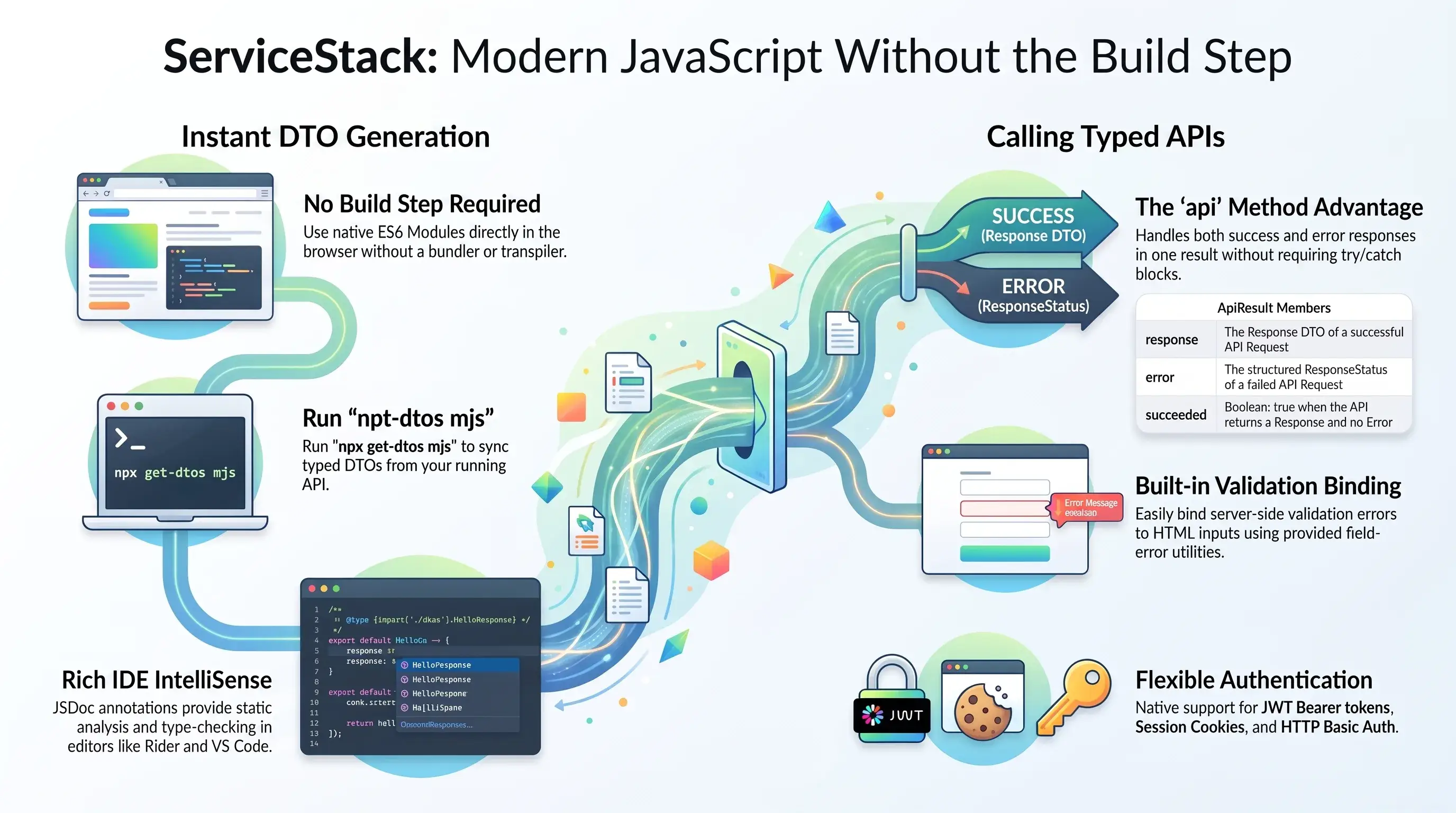
In addition to TypeScript support for generating typed Data Transfer Objects (DTOs), JavaScript is now supported in the form of JSDoc annotated typed ES6 classes that can be referenced natively from JavaScript Modules.
JavaScript - Typed APIs without a build step
Generated ES module DTOs are annotated with JSDoc types, so plain JavaScript gets the same editor intelli-sense TypeScript does - and they can be imported straight from a running API, with no bundler, transpiler or toolchain involved:
import { JsonServiceClient } from '@servicestack/client'
import { Hello } from 'https://example.org/types/mjs'

const client = new JsonServiceClient('https://example.org')
const api = await client.api(new Hello({ name: 'World' }))
Ideal for the code that isn't a SPA: server-rendered Razor and MVC pages, admin screens, embedded widgets, internal dashboards and quick Node scripts - anywhere adding a build pipeline would cost more than the feature - whilst annotating DTOs locally for static analysis.
Reference directly in JavaScript Modules
Unlike TypeScript, the JavaScript ES6 class DTOs can be referenced directly in a browser as-is, removing the need to keep your DTOs in sync with extra tooling by direct referencing them in a JavaScript Module:
<script type="module">
import { Hello } from '/types/mjs'
</script>
Then to make typed API Requests from web pages, you need only need to reference an ES Module (.mjs) build of the dependency-free @servicestack/client library which can be sourced directly from a npm CDN:
<script type="module">
import { JsonServiceClient } from 'https://unpkg.com/@servicestack/client@2/dist/servicestack-client.min.mjs'
import { Hello } from '/types/mjs'

const client = new JsonServiceClient()

const api = await client.api(new Hello({ name:'World' }))
if (api.succeeded) {
    console.log(api.response.result)
}
</script>
Import Maps
Although we recommend using an importmap to specify where to load @servicestack/client from, e.g:
<script async src="https://ga.jspm.io/npm:es-module-shims@1.6.3/dist/es-module-shims.js"></script><!--safari-->
<script type="importmap">
{
    "imports": {
        "@servicestack/client":"https://unpkg.com/@servicestack/client@2/dist/servicestack-client.min.mjs"
    }
}
</script>
ImportMap in Razor Pages or MVC
Razor Pages or MVC projects can use @Html.ImportMap() in _Layout.cshtml to use different builds for development and production, e.g:
@if (Context.Request.Headers.UserAgent.Any(x => x.Contains("Safari") && !x.Contains("Chrome")))
{
    <script async src="https://ga.jspm.io/npm:es-module-shims@1.6.3/dist/es-module-shims.js"></script>
}
@Html.ImportMap(new()
{
    ["@servicestack/client"] = ("/js/servicestack-client.mjs", "/js/servicestack-client.min.mjs"),
})
Usage
This lets us reference the @servicestack/client package name in our source code instead of its physical location:
<input type="text" id="txtName">
<div id="result"></div>
<script type="module">
import { JsonServiceClient, $1, on } from '@servicestack/client'
import { Hello } from '/types/mjs'

const client = new JsonServiceClient()
on('#txtName', {
    async keyup(el) {
        const api = await client.api(new Hello({ name:el.target.value }))
        $1('#result').innerHTML = api.response.result
    }
})
</script>
Enable static analysis and intelli-sense
For better IDE intelli-sense during development, save the annotated Typed DTOs to disk with the cross-platform get-dtos script which can be run with Node.js without needing to install anything:
npx get-dtos mjs
Then reference it instead to enable IDE static analysis when calling Typed APIs from JavaScript:
import { Hello } from '/js/dtos.mjs'
client.api(new Hello({ name }))
To also enable static analysis for @servicestack/client, install the dependency-free library as a dev dependency:
npm install -D @servicestack/client
Where only its TypeScript definitions are used by the IDE during development to enable its type-checking and intelli-sense.
Rich intelli-sense support
Where you'll be able to benefit from rich intelli-sense support in smart IDEs like Rider for both the client library:
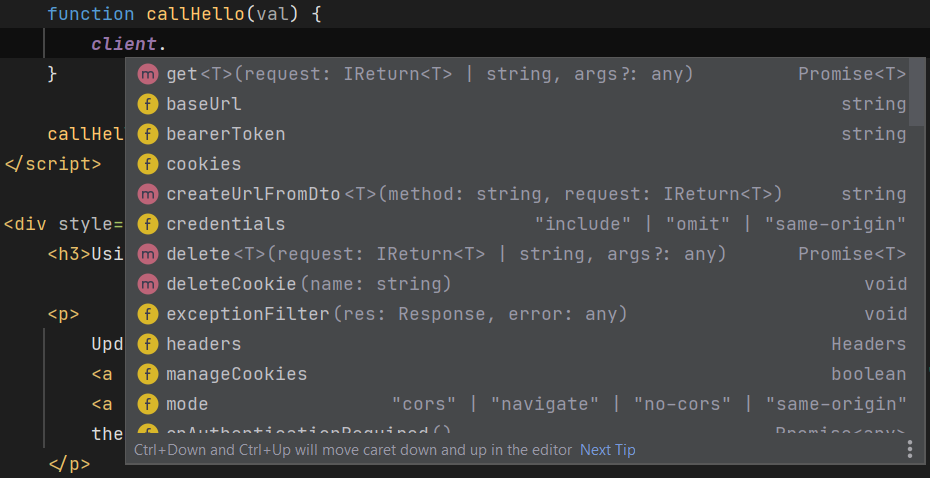
As well as your App's server generated DTOs:

Add ServiceStack Reference
A new ServiceStack reference containing the APIs typed DTOs can be added using the BaseUrl of the ServiceStack App, e.g:
npx get-dtos mjs https://localhost:5001
Update ServiceStack References
All existing ServiceStack References can later be updated with:
npx get-dtos mjs
Calling Typed APIs
The generated ES6 class DTOs are used with the same
@servicestack/client JsonServiceClient used in TypeScript
projects, whose complete feature-set is documented in
TypeScript Add ServiceStack Reference. The difference in JavaScript is that
its types are inferred from the JSDoc annotations in the generated DTOs instead of TypeScript's type system, so you
get the same intelli-sense and static analysis without generic type parameters or a build step.
Creating a Service Client
Apps served from the same origin as their APIs can create a client without any arguments:
import { JsonApiClient } from '@servicestack/client'

const client = JsonApiClient.create()
Which configures the client to send Requests to ServiceStack's JSON /api pre-defined route without any JSON HTTP Headers so Browser Requests can avoid the additional CORS preflight request.
Whilst APIs hosted on a different domain should specify their BaseUrl, which also accepts a configuration lambda:
const client = JsonApiClient.create('https://example.org', c => {
    c.bearerToken = apiKey
})
Alternatively all other Apps can use the JsonServiceClient constructor:
import { JsonServiceClient } from '@servicestack/client'

const client = new JsonServiceClient('https://example.org')
Both send Requests to the /api route by default, which older ServiceStack instances that only have the
/json/reply pre-defined routes registered can revert to with:
const client = new JsonServiceClient(baseUrl).useBasePath()
The api Method
The api method returns an ApiResult "Value Result" containing either the API's Typed Response or a structured
API Error in its error ResponseStatus, letting you handle both success and error responses without try/catch:
const api = await client.api(new Hello({ name }))
if (api.succeeded) {
    console.log(api.response.result)
} else {
    console.log(`${api.errorCode}: ${api.errorMessage}`)
}
Where an ApiResult provides access to both its Response and any structured Error information:
| Member | Description |
|---|---|
response |
The Response DTO of a successful API Request |
error |
The structured ResponseStatus of a failed API Request |
succeeded |
true when the API returned a Response and no Error |
failed |
true when the API returned an Error |
completed |
true when the API returned either a Response or an Error |
errorCode |
The Error's errorCode, e.g. NotFound |
errorMessage |
The Error's summary error message |
errors |
The collection of ResponseError field validation errors |
fieldError(name) |
The ResponseError for the specified field, if any (case-insensitive) |
fieldErrorMessage(name) |
The error message for the specified field, if any |
hasFieldError(name) |
Whether the specified field has an error |
showSummary(except) |
Whether to show the summary message, excluding fields displaying their own error |
summaryMessage(except) |
The summary error message to display, excluding the specified fields |
APIs annotated with IReturnVoid should use apiVoid, which returns an ApiResult with an EmptyResponse:
const api = await client.apiVoid(new DeleteContact({ id }))
if (api.failed) console.log(api.errorMessage)
Both accept optional args for sending additional QueryString arguments and a method to override the HTTP Method
the Request is sent with:
const api = await client.api(new Hello({ name }), null, 'GET')
Alternatively the get, post, put, patch, delete and send methods return the Response DTO directly and
throw an ErrorResponse on failure:
try {
    const r = await client.post(new Hello({ name }))
    console.log(r.result)
} catch (e) {
    console.log(e.responseStatus.message)
}
Binding Validation Errors to HTML
APIs with Declarative Validation or FluentValidation rules return each field validation
error in errors, with the first error also captured in the summary errorCode and errorMessage, which UIs can
bind to individual inputs with fieldError(), fieldErrorMessage() and hasFieldError():
<form>
    <input type="text" id="email">
    <div id="emailError" class="text-red-500"></div>
    <div id="summaryError" class="text-red-500"></div>
    <button type="submit">Submit</button>
</form>

<script type="module">
import { JsonApiClient, $1, on } from '@servicestack/client'
import { CreateContact } from '/types/mjs'

const client = JsonApiClient.create()

on('form', {
    async submit(e) {
        e.preventDefault()

        const api = await client.api(new CreateContact({ email: $1('#email').value }))

        $1('#emailError').innerHTML = api.fieldErrorMessage('email') ?? ''
        $1('#summaryError').innerHTML = api.showSummary(['email'])
            ? api.summaryMessage(['email'])
            : ''
    }
})
</script>
Where summaryMessage() displays the summary error message only for errors that aren't already being displayed next
to their own field inputs.
AutoQuery Requests
AutoQuery APIs return a QueryResponse containing the results matching the query and the total
number of matching results, where filters for properties not explicitly defined on the Request DTO can be sent as
additional untyped args:
// GET /api/FindTechnologies?take=3&orderBy=-viewCount&nameStartsWith=Am
const api = await client.api(new FindTechnologies({ take:3, orderBy:'-viewCount' }), {
    nameStartsWith: 'Am'
})

console.log(api.response.total)
console.log(api.response.results.map(x => x.name).join(', '))
Uploading Files
HTML Forms can be submitted with their typed Request DTO using apiForm which benefits from
FormData's native integration in browsers where it can be
populated directly from an HTML Form:
const api = await client.apiForm(new CreateContact(), new FormData(document.forms[0]))
Or by constructing the FormData programmatically:
const formData = new FormData()
formData.append('avatar', fileInput.files[0])

const api = await client.apiForm(new CreateContact({ name }), formData)
Where apiFormVoid can be used for IReturnVoid API Requests.
Batched Requests
Multiple Request DTOs of the same Type can be sent together in a single Request with sendAll which returns all
their Responses:
const requests = ["foo","bar","baz"].map(name => new Hello({ name }))

// POST /api/Hello[]
const responses = await client.sendAll(requests)

console.log(responses.map(x => x.result).join(', '))
// Hello, foo!, Hello, bar!, Hello, baz!
Or sendAllOneWay to send Requests you want to ignore the Responses of, whilst individual Requests can be sent to the
one-way endpoint with publish:
await client.sendAllOneWay(requests)

await client.publish(new HelloReturnVoid({ id:1 }))
Authentication
Apps using API Keys or JWT can populate the client's
bearerToken:
client.bearerToken = apiKey
Whilst Apps using Session Cookies can authenticate by sending a populated
Authenticate Request DTO, after which the Browser transparently sends its Session Cookies on subsequent Requests:
const api = await client.api(new Authenticate({
    provider: 'credentials',
    userName,
    password,
    rememberMe: true,
}))
HTTP Basic Auth credentials can be set with:
client.setCredentials(userName, password)
Client Configuration and Filters
Custom Headers can be added to all Requests by populating the client's Headers collection, whilst its Request, Response, Exception and URL filters let you decorate clients with generic functionality:
client.headers.set('X-Custom','Value')

client.requestFilter = req => console.log(`${req.method} ${req.url}`)
client.responseFilter = res => console.log(res.status, res.headers.get('X-Args'))
client.exceptionFilter = (res,error) => console.log('ERROR:', error.responseStatus.message)
client.urlFilter = url => console.log('URL:', url)

// Static filters apply to all clients
JsonServiceClient.globalRequestFilter = req => req.headers.set('X-Custom','Value')
JsonServiceClient.globalResponseFilter = res => console.log(res.status)
Where requestFilter is passed the W3C fetch
RequestInit extended with the url the Request will be sent to, letting you modify a Request before it's sent:
client.requestFilter = req => req.url += "?jsconfig=EmitCamelCaseNames:false"
DOM Utils
As @servicestack/client is already loaded in no-build-step Apps, it also includes a number of dependency-free DOM
utils that reduce the need for additional JavaScript libraries.
Selectors and Event Handlers
$1 returns the first matching element and $$ returns an Array of all matching elements, whilst on registers
event handlers on every matching element (where this is bound to the element the handler is registered on):
import { $1, $$, on } from '@servicestack/client'

$1('#result').innerHTML = api.response.result
$$('.btn').forEach(el => el.classList.add('btn-primary'))

on('#txtName', {
    keyup(e) {
        console.log(e.target.value)
    }
})
Alternatively bindHandlers uses declarative data-{event} attributes to invoke named handlers, letting you register
all your page's behavior in a single call:
<input type="text" data-keyup="sayHello">
<button data-click="reset">Reset</button>
import { bindHandlers } from '@servicestack/client'

bindHandlers({
    async sayHello(e) {
        const api = await client.api(new Hello({ name: e.target.value }))
        $1('#result').innerHTML = api.response.result
    },
    reset() {
        $1('#result').innerHTML = ''
    }
})
Handlers can also be invoked with arguments using a handler:arg1,arg2 syntax, e.g data-click="setColor:red".
Creating Elements and Loading Scripts
import { createElement, addScript, delaySet } from '@servicestack/client'

const el = createElement('div', {
    attrs: { className:'alert', id:'alert' },
    events: { click: () => el.remove() },
})
document.body.appendChild(el)
Where attrs accepts the className and htmlFor aliases and events registers event handlers on the new element,
which can also be inserted into the DOM directly with the insertAfter option.
Scripts can be lazily loaded on-demand with addScript which resolves after the script has loaded:
await addScript('/js/analytics.js')
Where delaySet is useful for avoiding flickering loading indicators for fast API calls by only showing them if the
Request takes longer than 300ms:
const done = delaySet(loading => $1('#spinner').style.display = loading ? 'block' : 'none')
const api = await client.api(new Hello({ name }))
done()
Form Utils
import { serializeToObject, serializeToUrlEncoded, serializeToFormData, populateForm } from '@servicestack/client'

const form = document.forms[0]

serializeToObject(form)      // { name:'World', title:'Dr' }
serializeToUrlEncoded(form)  // name=World&title=Dr
serializeToFormData(form)    // FormData

populateForm(form, { name:'World', title:'Dr' })
Other Utils
The library's remaining utils - URL, String, Date, Object and Serialization utils, the Inspect API Response
visualizers, JSV, StringBuffer and its Event Bus - are the same in JavaScript as they are in TypeScript and are
documented in TypeScript Client Utils.
DTO Customization Options
In most cases you'll just use the generated JavaScript DTO's as-is, however you can further customize how the DTOs are generated by overriding the default options.
The header in the generated DTOs show the different options JavaScript types support with their
defaults. Default values are shown with the comment prefix of //. To override a value, remove the //
and specify the value to the right of the :. Any uncommented value will be sent to the server to override
any server defaults.
The DTO comments allows for customizations for how DTOs are generated. The default options that were used
to generate the DTOs are repeated in the header comments of the generated DTOs, options that are preceded
by a TypeScript comment // are defaults from the server, any uncommented value will be sent to the server
to override any server defaults.
/* Options:
Date: 2025-06-04 09:52:13
Version: 8.80
Tip: To override a DTO option, remove "//" prefix before updating
BaseUrl: https://blazor-vue.web-templates.io

//AddServiceStackTypes: True
//AddDocAnnotations: True
//AddDescriptionAsComments: True
//IncludeTypes:
//ExcludeTypes:
//DefaultImports:
*/
We'll go through and cover each of the above options to see how they affect the generated DTO's:
Change Default Server Configuration
The above defaults are also overridable on the ServiceStack Server by modifying the NativeTypesFeature Plugin, e.g:
//Server example in CSharp
var nativeTypes = this.GetPlugin<NativeTypesFeature>();
nativeTypes.MetadataTypesConfig.AddDescriptionAsComments = false;
...
We'll go through and cover each of the above options to see how they affect the generated DTO's:
IncludeTypes
Is used as a Whitelist to specify only the types you would like to have code-generated:
/* Options:
IncludeTypes: Hello, HelloResponse
Will only generate Hello and HelloResponse DTOs:
export class Hello {
/** @param {{name?:string}} [init] */
constructor(init) { Object.assign(this, init) }
/** @type {string} */
name;
getTypeName() { return 'Hello' }
getMethod() { return 'POST' }
createResponse() { return new HelloResponse() }
}
export class HelloResponse {
/** @param {{result?:string,responseStatus?:ResponseStatus}} [init] */
constructor(init) { Object.assign(this, init) }
/** @type {string} */
result;
/** @type {ResponseStatus} */
responseStatus;
}
Include Generic Types
Use .NET's Type Name to include Generic Types, i.e. the Type name separated by the backtick followed by the number of generic arguments, e.g:
IncludeTypes: IReturn`1,MyPair`2
Include Request DTO and its dependent types
You can include a Request DTO and all its dependent types with a .* suffix on the Request DTO, e.g:
/* Options:
IncludeTypes: GetTechnology.*
Which will include the GetTechnology Request DTO, the GetTechnologyResponse Response DTO and all Types that they both reference.
Include All Types within a C# namespace
If your DTOs are grouped into different namespaces they can be all included using the /* suffix, e.g:
/* Options:
IncludeTypes: MyApp.ServiceModel.Admin/*
This will include all DTOs within the MyApp.ServiceModel.Admin C# namespace.
Include All Services in a Tag Group
Services grouped by Tag can be used in the IncludeTypes where tags can be specified using braces in the format {tag} or {tag1,tag2,tag3}, e.g:
/* Options:
IncludeTypes: {web,mobile}
Or individually:
/* Options:
IncludeTypes: {web},{mobile}
ExcludeTypes
Is used as a Blacklist to specify which types you would like excluded from being generated:
/* Options:
ExcludeTypes: GetTechnology,GetTechnologyResponse
Will exclude GetTechnology and GetTechnologyResponse DTOs from being generated.
Cache
When using /types/mjs directly from a script tag, the server will cache the result by default when not running in DebugMode.
This caching process can be disabled if required by using ?cache=false.