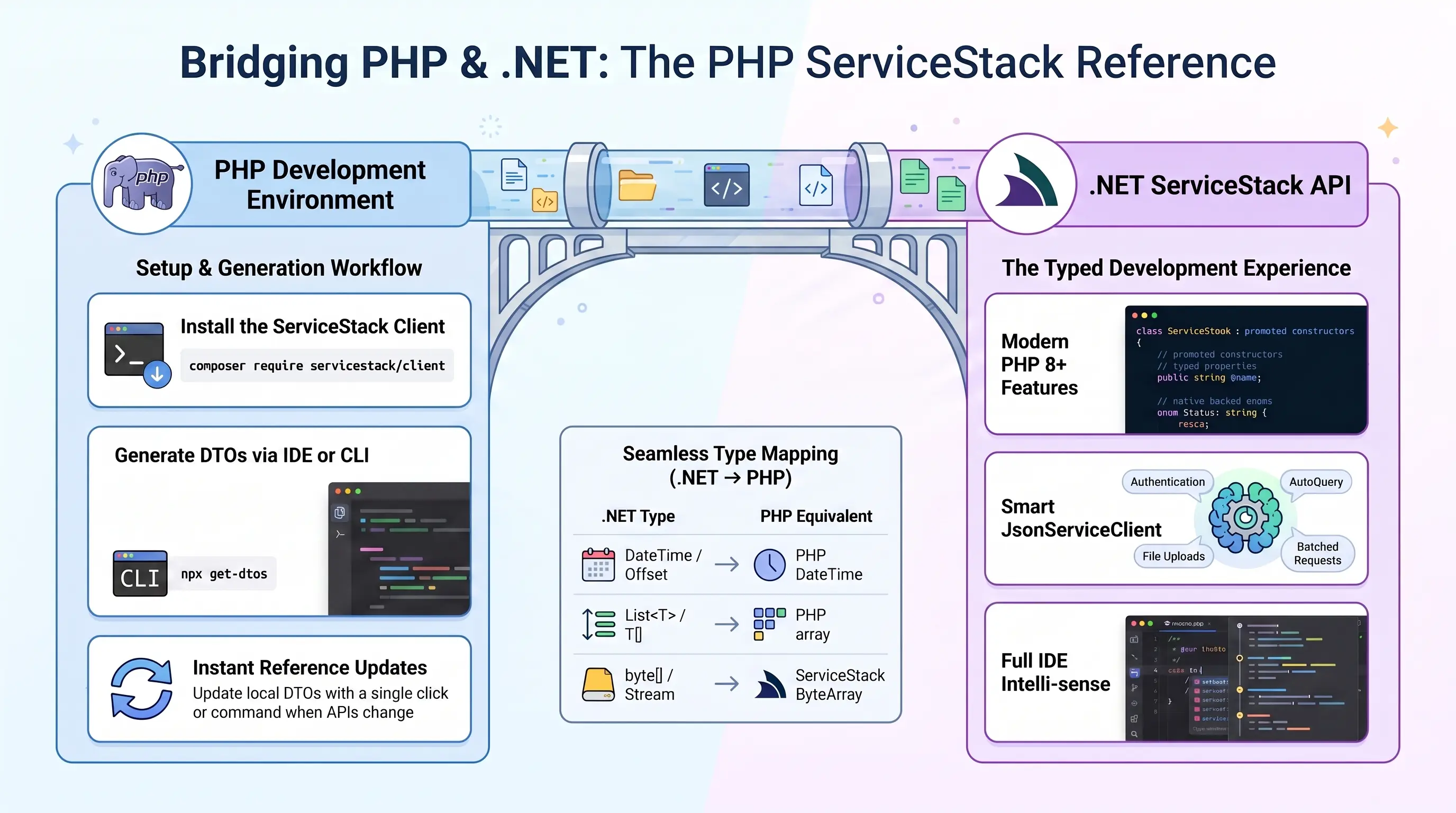
ServiceStack's Add ServiceStack Reference feature allows clients to generate Native Types from directly within PhpStorm using ServiceStack IntelliJ Plugin - providing a simple way to give clients typed access to your ServiceStack Services.
PHP - Typed APIs for the web's most deployed stack
The servicestack/client Composer package generates DTOs using PHP 8's promoted constructors and typed properties, so requests are populated with named arguments and checked by static analysis:
$client = new JsonServiceClient($baseUrl);

/** @var HelloResponse $response */
$response = $client->send(new Hello(name: "World"));
echo $response->result;
For organizations with an established PHP presence - Laravel and Symfony Apps, CMS and intranet sites, hosting and billing portals - it's the shortest path to consuming a .NET backend without either side changing platforms. Includes structured errors with field validation details, authentication, typed AutoQuery, batch and one-way requests and file uploads.
First class development experience
PHP is one of the worlds most popular programming languages thanks to its ease of use, platform independence, large standard library, flexibility and fast development experience which sees it excels as a popular language for web development and for development of popular CMS products like WordPress, Drupal and Joomla thanks to its flexibility, embeddability and ease of customization.
To maximize the experience for calling ServiceStack APIs within these environments ServiceStack now supports PHP as a 1st class Add ServiceStack Reference supported language which gives PHP developers an end-to-end typed API for consuming ServiceStack APIs, complete with IDE integration in PhpStorm as well as built-in support in the get-dtos script to generate Typed and annotated PHP DTOs for a remote ServiceStack instance from a single command-line.
Ideal idiomatic Typed Message-based API
To maximize the utility of PHP DTOs and enable richer tooling support and greater development experience, PHP DTOs are generated as Typed JsonSerializable classes with promoted constructors and annotated with PHPDoc Types - that's invaluable when scaling large PHP code-bases and greatly improves discoverability of a remote API. DTOs are also enriched with interface markers and Annotations which enables its optimal end-to-end typed API:
The PHP DTOs and JsonServiceClient library follow
PHP naming conventions
so they'll naturally fit into existing PHP code bases. Here's a sample of techstacks.io
generated PHP DTOs containing string and int Enums, an example AutoQuery and a standard Request & Response DTO showcasing
the rich typing annotations and naming conventions used:
enum TechnologyTier : string
{
    case ProgrammingLanguage = 'ProgrammingLanguage';
    case Client = 'Client';
    case Http = 'Http';
    case Server = 'Server';
    case Data = 'Data';
    case SoftwareInfrastructure = 'SoftwareInfrastructure';
    case OperatingSystem = 'OperatingSystem';
    case HardwareInfrastructure = 'HardwareInfrastructure';
    case ThirdPartyServices = 'ThirdPartyServices';
}

enum Frequency : int
{
    case Daily = 1;
    case Weekly = 7;
    case Monthly = 30;
    case Quarterly = 90;
}

// @Route("/technology/search")
#[Returns('QueryResponse')]
/**
 * @template QueryDb of Technology
 * @template QueryDb1 of TechnologyView
 */
class FindTechnologies extends QueryDb implements IReturn, IGet, JsonSerializable
{
    public function __construct(
        /** @var array<int>|null */
        public ?array $ids=null,
        /** @var string|null */
        public ?string $name=null,
        /** @var string|null */
        public ?string $vendorName=null,
        /** @var string|null */
        public ?string $nameContains=null,
        /** @var string|null */
        public ?string $vendorNameContains=null,
        /** @var string|null */
        public ?string $descriptionContains=null
    ) {
    }

    /** @throws Exception */
    public function fromMap($o): void {
        parent::fromMap($o);
        if (isset($o['ids'])) $this->ids = JsonConverters::fromArray('int', $o['ids']);
        if (isset($o['name'])) $this->name = $o['name'];
        if (isset($o['vendorName'])) $this->vendorName = $o['vendorName'];
        if (isset($o['nameContains'])) $this->nameContains = $o['nameContains'];
        if (isset($o['vendorNameContains'])) $this->vendorNameContains = $o['vendorNameContains'];
        if (isset($o['descriptionContains'])) $this->descriptionContains = $o['descriptionContains'];
    }

    /** @throws Exception */
    public function jsonSerialize(): mixed
    {
        $o = parent::jsonSerialize();
        if (isset($this->ids)) $o['ids'] = JsonConverters::toArray('int', $this->ids);
        if (isset($this->name)) $o['name'] = $this->name;
        if (isset($this->vendorName)) $o['vendorName'] = $this->vendorName;
        if (isset($this->nameContains)) $o['nameContains'] = $this->nameContains;
        if (isset($this->vendorNameContains)) $o['vendorNameContains'] = $this->vendorNameContains;
        if (isset($this->descriptionContains)) $o['descriptionContains'] = $this->descriptionContains;
        return empty($o) ? new class(){} : $o;
    }
    public function getTypeName(): string { return 'FindTechnologies'; }
    public function getMethod(): string { return 'GET'; }
    public function createResponse(): mixed { return QueryResponse::create(genericArgs:['TechnologyView']); }
}

// @Route("/orgs/{Id}", "DELETE")
class DeleteOrganization implements IReturnVoid, IDelete, JsonSerializable
{
    public function __construct(
        /** @var int */
        public int $id=0
    ) {
    }

    /** @throws Exception */
    public function fromMap($o): void {
        if (isset($o['id'])) $this->id = $o['id'];
    }

    /** @throws Exception */
    public function jsonSerialize(): mixed
    {
        $o = [];
        if (isset($this->id)) $o['id'] = $this->id;
        return empty($o) ? new class(){} : $o;
    }
    public function getTypeName(): string { return 'DeleteOrganization'; }
    public function getMethod(): string { return 'DELETE'; }
    public function createResponse(): void {}
}
The smart PHP JsonServiceClient available in the servicestack/client
packagist package enables the same productive, typed API development experience available in our other 1st-class supported
client platforms.
Using promoted constructors enables DTOs to be populated using a single constructor expression utilizing named parameters
which together with the generic JsonServiceClient enables end-to-end typed API Requests in a single LOC:
use ServiceStack\JsonServiceClient;
use dtos\Hello;

$client = new JsonServiceClient("https://test.servicestack.net");

/** @var HelloResponse $response */
$response = $client->get(new Hello(name:"World"));
The
HelloResponseoptional type hint doesn't change runtime behavior but enables static analysis tools and IDEs like PyCharm to provide rich intelli-sense and development time feedback.
Installation
Ensure you have PHP and Composer installed.
The only requirements for PHP apps to perform typed API Requests are the generated PHP DTOs and the generic JsonServiceClient
which can be installed in Composer projects with:
$ composer require servicestack/client
Or by adding the package to your composer.json then installing the dependencies:
{
  "require": {
    "servicestack/client": "^1.0"
  }
}
PhpStorm ServiceStack Plugin
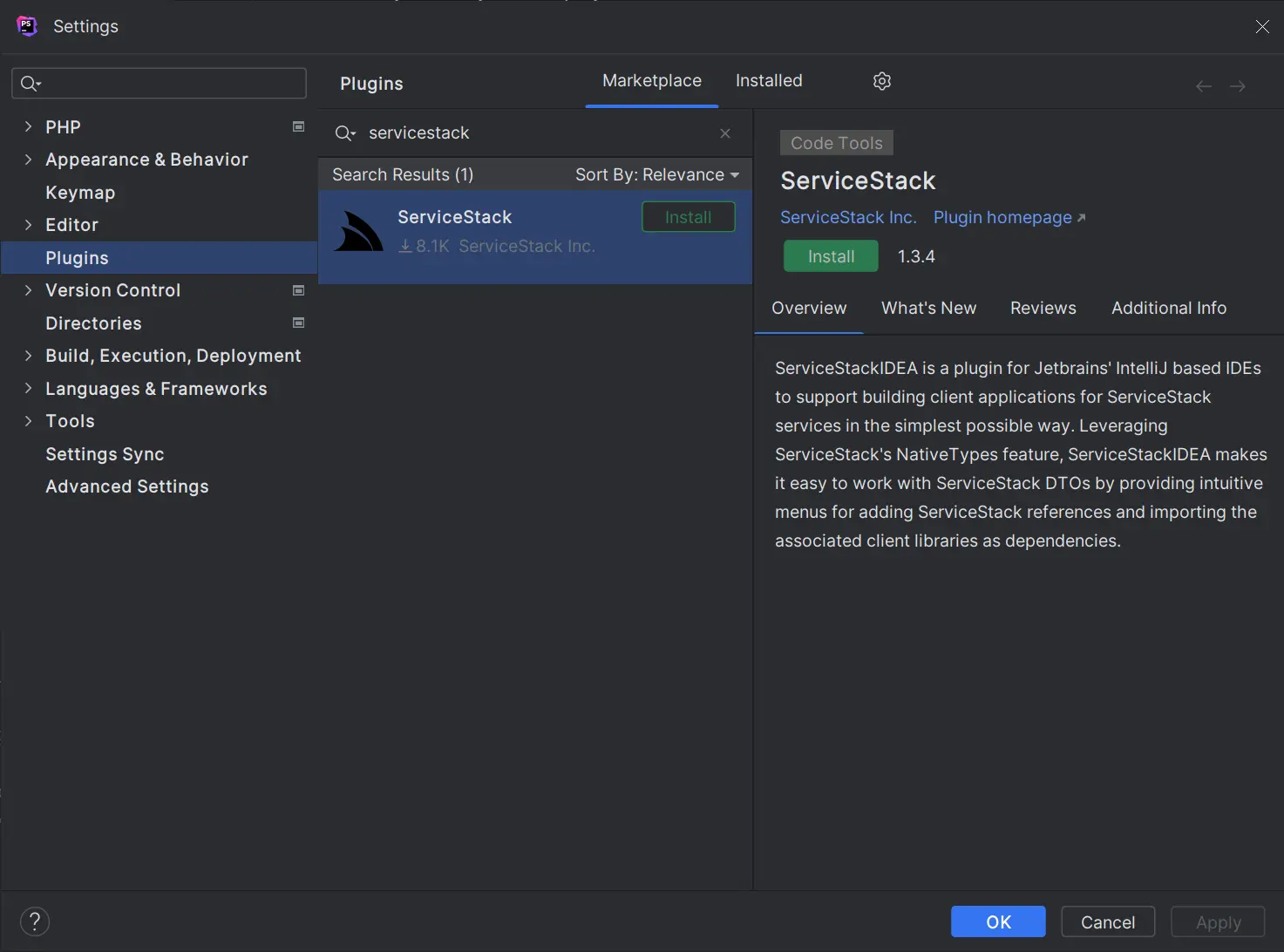
PHP developers of PhpStorm can get a simplified development experience for consuming ServiceStack Services by installing the ServiceStack Plugin from the JetBrains Marketplace:
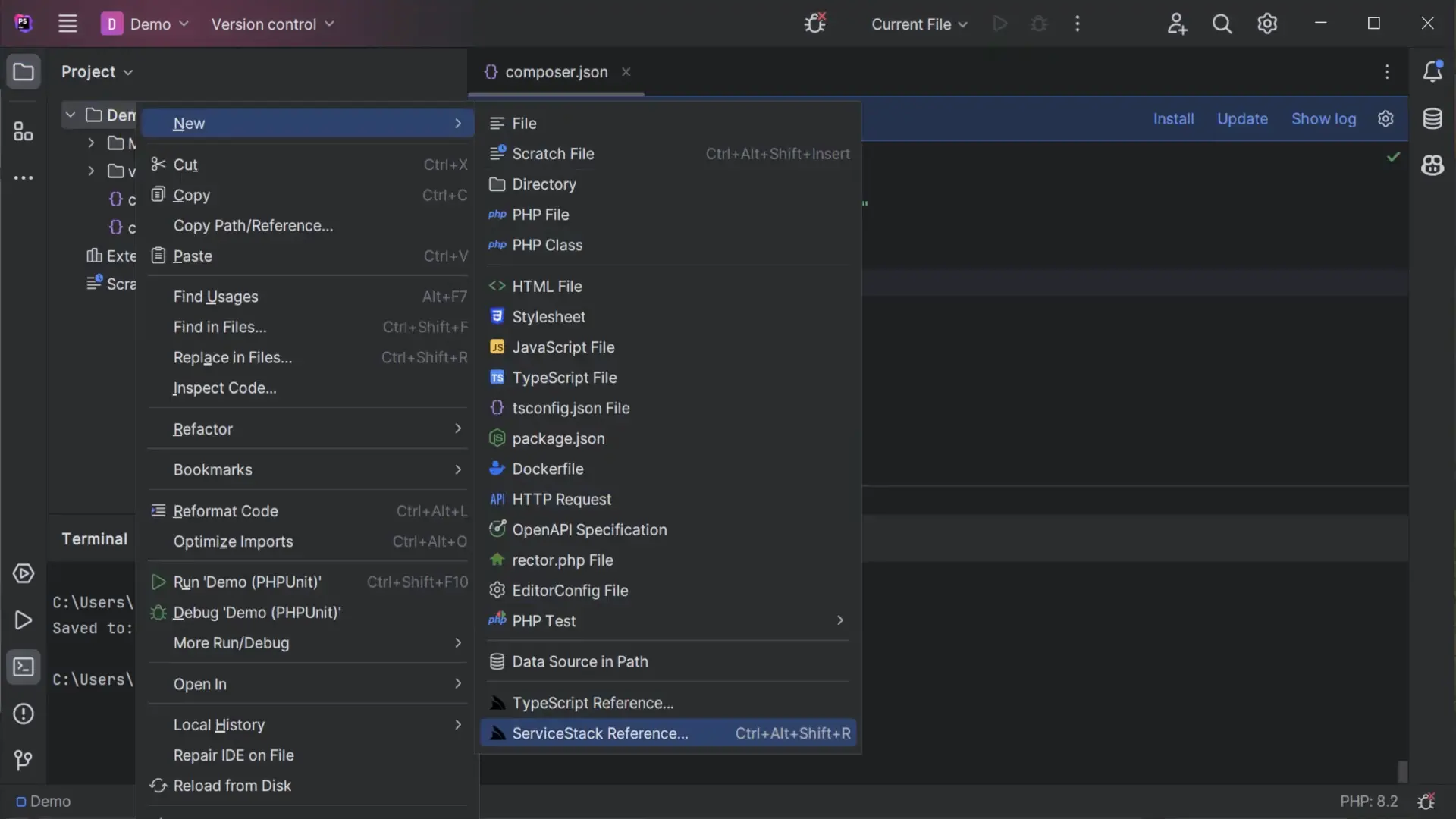
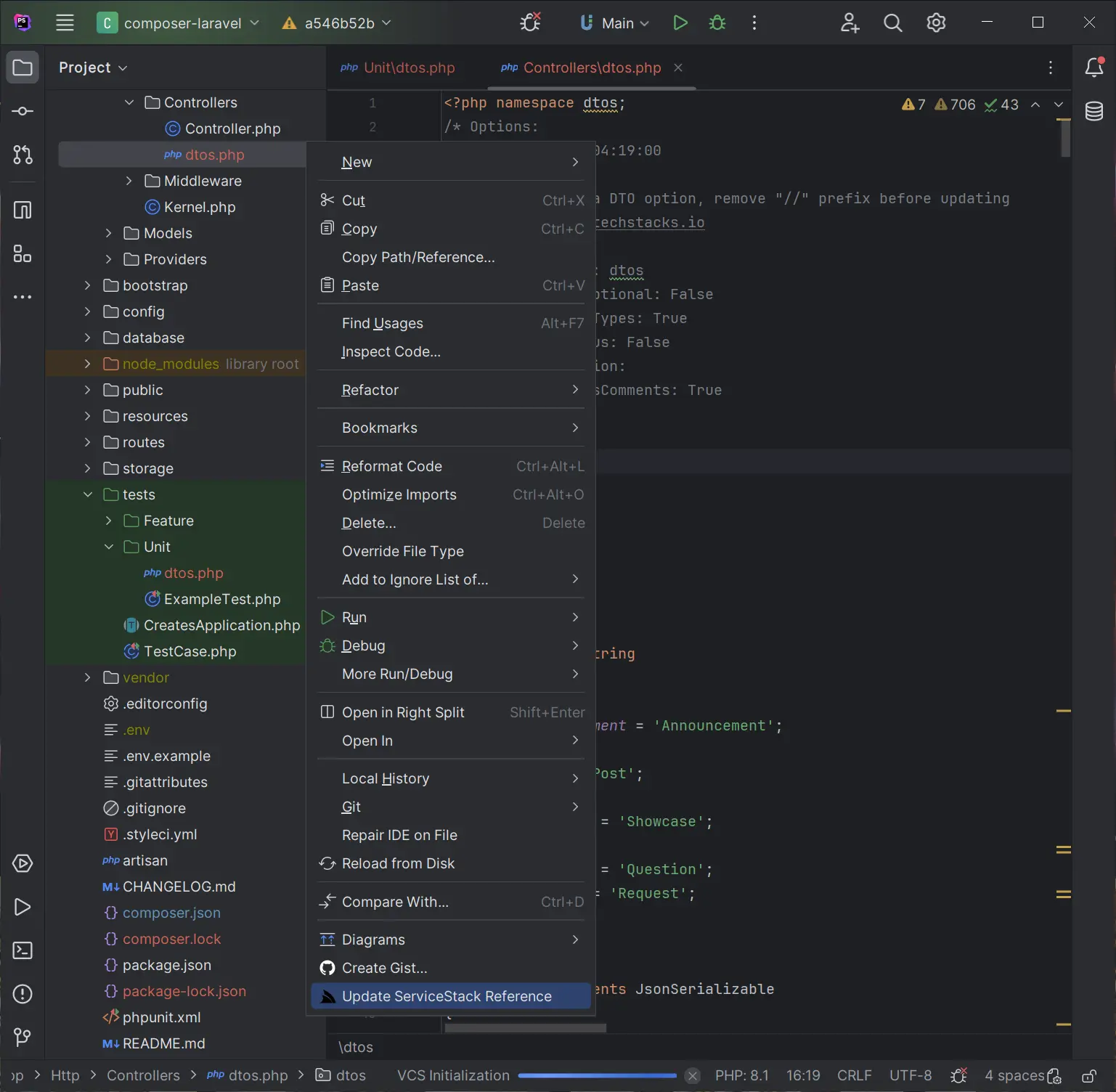
Where you'll be able to right-click on a directory and click on ServiceStack Reference on the context menu:
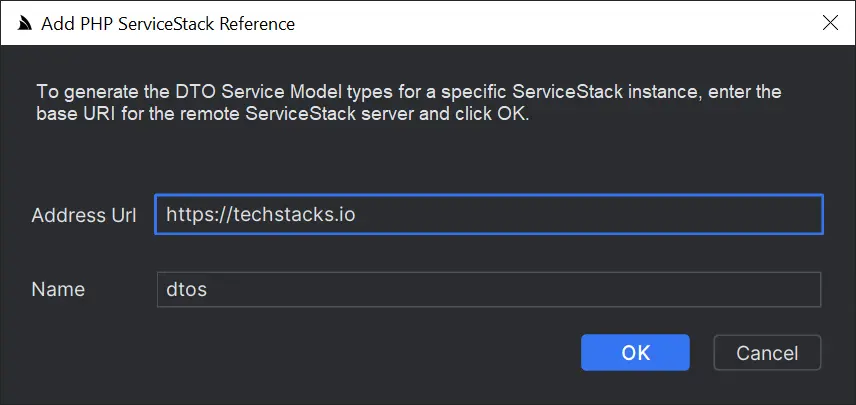
To launch the Add PHP ServiceStack Reference dialog where you can enter the remote URL of the ServiceStack endpoint you wish to call to generate the Typed PHP DTOs for all APIs which by default will saved to dtos.php:
Then just import the DTOs and JsonServiceClient to be able to consume any of the remote ServiceStack APIs:
<?php

require_once __DIR__ . '/vendor/autoload.php'; // Autoload files using Composer autoload
require_once 'dtos.php';

use dtos\FindTechnologies;
use ServiceStack\JsonServiceClient;

$client = JsonServiceClient::create("https://techstacks.io");

$response = $client->send(new FindTechnologies(
    ids: [1,2,4,6],
    vendorName: "Google"));

print_r($response);
If any of the the remote APIs change their DTOs can be updated by right-clicking on dtos.php and clicking Update ServiceStack Reference:
Simple command-line utility for PHP
Developers using other PHP IDEs and Text Editors like VS Code can generate PHP DTOs from the command-line with the cross-platform get-dtos script which can be run with Node.js without needing to install anything:
$ npx get-dtos
Running it without any arguments displays the available options for adding and updating ServiceStack References.
Adding a ServiceStack Reference
To Add a PHP ServiceStack Reference just call npx get-dtos php with the URL of a remote ServiceStack instance:
$ npx get-dtos php https://techstacks.io
Result:
Saved to: dtos.php
Calling npx get-dtos php with just a URL will save the DTOs using the Host name, you can override this by specifying a FileName as the 2nd argument:
$ npx get-dtos php https://techstacks.io Tech
Result:
Saved to: Tech.dtos.php
Updating a ServiceStack Reference
To Update an existing ServiceStack Reference, call npx get-dtos php with the Filename:
$ npx get-dtos php dtos.php
Result:
Updated: dtos.php
Which will update the File with the latest PHP Server DTOs from techstacks.io. You can also customize how DTOs are generated by uncommenting the PHP DTO Customization Options and updating them again.
Updating all PHP DTOs
Calling npx get-dtos php without any arguments will update all PHP DTOs in the current directory:
$ npx get-dtos php
Result:
Updated: Tech.dtos.php
Updated: dtos.php
Smart Generic JsonServiceClient
The generic JsonServiceClient is a 1st class client with the same rich feature-set of the smart ServiceClients in other
1st class supported languages sporting a terse,
typed flexible API with support for additional untyped params, custom URLs and HTTP Methods, dynamic response types including
consuming API responses in raw text and binary data formats. Clients can be decorated to support generic functionality
using instance and static Request, Response and Exception Filters.
It includes built-in support for a number of ServiceStack Auth options
including HTTP Basic Auth and stateless Bearer Token Auth Providers like
API Key and JWT Auth as well as
stateful Sessions used by the popular credentials Auth Provider and an
onAuthenticationRequired callback for enabling custom authentication methods.
The built-in auth options include auto-retry support for transparently authenticating and retrying authentication required requests as well as Refresh Token Cookie support where it will transparently fetch new JWT Bearer Tokens automatically behind-the-scenes for friction-less stateless JWT support.
A snapshot of these above features is captured in the high-level public API below:
class JsonServiceClient
{
    public static ?RequestFilter $globalRequestFilter;
    public ?RequestFilter $requestFilter;
    public static ?ResponseFilter $globalResponseFilter;
    public ?ResponseFilter $responseFilter;
    public static ?ExceptionFilter $globalExceptionFilter;
    public ?ExceptionFilter $exceptionFilter;
    public ?Callback $onAuthenticationRequired;

    public string $baseUrl;
    public string $replyBaseUrl;
    public string $oneWayBaseUrl;
    public ?string $userName;
    public ?string $password;
    public ?string $bearerToken;
    public ?string $refreshToken;
    public ?string $refreshTokenUri;
    public bool $useTokenCookie;
    public array $headers = [];
    public array $cookies = [];

    public function __construct(string $baseUrl);
    public static function create(string $baseUrl): JsonServiceClient;

    public function setBasePath(string $path): void;
    public function setCredentials(?string $userName = null, ?string $password = null) : void;
    public function setBearerToken(?string $bearerToken): void;
    public function setRefreshToken(?string $refreshToken): void;
    public function getTokenCookie();
    public function getRefreshTokenCookie();

    public function get(IReturn|IReturnVoid|string $request, ?array $args = null): mixed;
    public function post(IReturn|IReturnVoid|string $request, mixed $body = null, ?array $args = null): mixed;
    public function put(IReturn|IReturnVoid|string $request, mixed $body = null, ?array $args = null): mixed;
    public function patch(IReturn|IReturnVoid|string $request, mixed $body = null, ?array $args = null): mixed;
    public function delete(IReturn|IReturnVoid|string $request, ?array $args = null): mixed;
    public function options(IReturn|IReturnVoid|string $request, ?array $args = null): mixed;
    public function head(IReturn|IReturnVoid|string $request, ?array $args = null): mixed;
    public function send(IReturn|IReturnVoid|null $request, ?string $method = null, mixed $body = null,
        ?array $args = null): mixed;

    public function getUrl(string $path, mixed $responseAs = null, mixed $args = null): mixed;
    public function postUrl(string $path, mixed $responseAs = null, mixed $body = null, ?array $args = null): mixed;
    public function putUrl(string $path, mixed $responseAs = null, mixed $body = null, ?array $args = null): mixed;
    public function patchUrl(string $path, mixed $responseAs = null, mixed $body = null, ?array $args = null): mixed;
    public function deleteUrl(string $path, mixed $responseAs = null, mixed $args = null): mixed;
    public function optionsUrl(string $path, mixed $responseAs = null, mixed $args = null): mixed;
    public function headUrl(string $path, mixed $responseAs = null, mixed $args = null): mixed;
    public function sendUrl(string $path, ?string $method = null, mixed $responseAs = null, mixed $body = null,
        mixed $args = null): mixed;

    public function postFileWithRequest(IReturn|IReturnVoid|string $request, UploadFile $file): mixed;
    public function postFileWithRequestUrl(string $requestUri, mixed $request, UploadFile $file): mixed;
    public function postFilesWithRequest(IReturn|IReturnVoid|string $request, UploadFile|array $files): mixed;
    public function postFilesWithRequestUrl(string $requestUri, mixed $request, UploadFile|array $files): mixed;

    public function sendAll(array $requestDtos): mixed;       # Auto Batch Reply Requests
    public function sendAllOneWay(array $requestDtos): void;  # Auto Batch Oneway Requests
Change Default Server Configuration
The above defaults are also overridable on the ServiceStack Server by modifying the default config on the NativeTypesFeature Plugin, e.g:
var nativeTypes = this.GetPlugin<NativeTypesFeature>();
nativeTypes.MetadataTypesConfig.AddResponseStatus = true;
...
PHP specific functionality can be added by PhpGenerator
PhpGenerator.ServiceStackImports.Add("MyNamespace\\Type");
Customize DTO Type generation
Additional PHP specific customization can be statically configured like PreTypeFilter, InnerTypeFilter & PostTypeFilter
(available in all languages) can be used to inject custom code in the generated DTOs output.
Use the PreTypeFilter to generate source code before and after a Type definition, e.g. this will append a custom MyAnnotation
annotation on non enum & interface types:
PhpGenerator.PreTypeFilter = (sb, type) => {
    if (!type.IsEnum.GetValueOrDefault() && !type.IsInterface.GetValueOrDefault())
    {
        sb.AppendLine("#[MyAnnotation]");
    }
};
The InnerTypeFilter gets invoked just after the Type Definition which can be used to generate common members for all Types and interfaces, e.g:
PhpGenerator.InnerTypeFilter = (sb, type) => {
    sb.AppendLine("public ?int $id;");
    sb.AppendLine("public function getId(): int { return $this->id ?? ($this->id=rand()); }");
};
There's also PrePropertyFilter & PostPropertyFilter for generating source before and after properties, e.g:
PhpGenerator.PrePropertyFilter = (sb , prop, type) => {
    if (prop.Name == "Id")
    {
        sb.AppendLine("#[IsInt]");
    }
};
Emit custom code
To enable greater flexibility when generating complex Typed DTOs, you can use [Emit{Language}] attributes to generate code before each type or property.
These attributes can be used to generate different attributes or annotations to enable client validation for different validation libraries in different languages, e.g:
[EmitCode(Lang.Php, "// App User")]
[EmitPhp("#[Validate]")]
public class User : IReturn<User>
{
    [EmitPhp("#[IsNotEmpty]", "#[IsEmail]")]
    [EmitCode(Lang.Swift | Lang.Dart, new[]{ "@isNotEmpty()", "@isEmail()" })]
    public string Email { get; set; }
}
Which will generate [EmitPhp] code in PHP DTOs:
// App User
#[Validate]
class User implements JsonSerializable
{
    public function __construct(
        #[IsNotEmpty]
        #[IsEmail]
        /** @var string|null */
        public ?string email=null
    ) {
    }
    //...
}
Whilst the generic [EmitCode] attribute lets you emit the same code in multiple languages with the same syntax.
PHP Reference Example
Lets walk through a simple example to see how we can use ServiceStack's PHP DTO annotations in our PHP JsonServiceClient.
Firstly we'll need to add a PHP Reference to the remote ServiceStack Service by right-clicking on a project folder and clicking on ServiceStack Reference... (as seen in the above screenshot).
This will import the remote Services dtos into your local project which looks similar to:
<?php namespace dtos;
/* Options:
Date: 2025-06-04 09:50:43
Version: 8.71
Tip: To override a DTO option, remove "//" prefix before updating
BaseUrl: https://techstacks.io

//GlobalNamespace: dtos
//MakePropertiesOptional: False
//AddServiceStackTypes: True
//AddResponseStatus: False
//AddImplicitVersion:
//AddDescriptionAsComments: True
//IncludeTypes:
//ExcludeTypes:
//DefaultImports:
*/

// @Route("/technology/{Slug}")
#[Returns('GetTechnologyResponse')]
class GetTechnology implements IReturn, IRegisterStats, IGet, JsonSerializable
{
    public function __construct(
        /** @var string|null */
        public ?string $slug=null
    ) {
    }

    /** @throws Exception */
    public function fromMap($o): void {
        if (isset($o['slug'])) $this->slug = $o['slug'];
    }

    /** @throws Exception */
    public function jsonSerialize(): mixed
    {
        $o = [];
        if (isset($this->slug)) $o['slug'] = $this->slug;
        return empty($o) ? new class(){} : $o;
    }
    public function getTypeName(): string { return 'GetTechnology'; }
    public function getMethod(): string { return 'GET'; }
    public function createResponse(): mixed { return new GetTechnologyResponse(); }
}

class GetTechnologyResponse implements JsonSerializable
{
    public function __construct(
        /** @var DateTime */
        public DateTime $created=new DateTime(),
        /** @var Technology|null */
        public ?Technology $technology=null,
        /** @var array<TechnologyStack>|null */
        public ?array $technologyStacks=null,
        /** @var ResponseStatus|null */
        public ?ResponseStatus $responseStatus=null
    ) {
    }

    /** @throws Exception */
    public function fromMap($o): void {
        if (isset($o['created'])) $this->created = JsonConverters::from('DateTime', $o['created']);
        if (isset($o['technology'])) $this->technology = JsonConverters::from('Technology', $o['technology']);
        if (isset($o['technologyStacks'])) $this->technologyStacks = JsonConverters::fromArray('TechnologyStack', $o['technologyStacks']);
        if (isset($o['responseStatus'])) $this->responseStatus = JsonConverters::from('ResponseStatus', $o['responseStatus']);
    }

    /** @throws Exception */
    public function jsonSerialize(): mixed
    {
        $o = [];
        if (isset($this->created)) $o['created'] = JsonConverters::to('DateTime', $this->created);
        if (isset($this->technology)) $o['technology'] = JsonConverters::to('Technology', $this->technology);
        if (isset($this->technologyStacks)) $o['technologyStacks'] = JsonConverters::toArray('TechnologyStack', $this->technologyStacks);
        if (isset($this->responseStatus)) $o['responseStatus'] = JsonConverters::to('ResponseStatus', $this->responseStatus);
        return empty($o) ? new class(){} : $o;
    }
}
By default the generated PHP DTOs use the default dtos namespace which you can reference as individual classes:
use dtos\GetTechnology;
use dtos\GetTechnologyResponse;
Or combined within a single line with:
use dtos\{GetTechnology,GetTechnologyResponse};

$request = new GetTechnology();
Making Typed API Requests
Making API Requests in PHP is the same as all other ServiceStack's Service Clients
by sending a populated Request DTO using a JsonServiceClient which returns typed Response DTO.
So the only things we need to make any API Request is the JsonServiceClient from the servicestack/client package and any
DTO's we're using from generated PHP ServiceStack Reference, e.g:
<?php

require_once __DIR__ . '/vendor/autoload.php'; // Autoload files using Composer autoload
require_once 'dtos.php';

use dtos\GetTechnology;
use dtos\GetTechnologyResponse;
use ServiceStack\JsonServiceClient;

$client = JsonServiceClient::create("https://techstacks.io");

/** @var GetTechnologyResponse $response */
$response = $client->get(new GetTechnology(slug:"ServiceStack"));

$tech = $response->technology; // typed to Technology

echo "$tech->name by $tech->vendorName from $tech->productUrl\n";
echo "$tech->name TechStacks:\n";
print_r($response->technologyStacks);
Resolving the HTTP Method
send uses the HTTP Method its API is annotated with, which generated DTOs return from the getMethod() implementation
that's populated from the API's @Route Verb or from its IGet, IPost, IPut, IPatch, IDelete and IOptions
interface markers:
// @Route("/technology/{Slug}")
class GetTechnology implements IReturn, IGet, JsonSerializable
{
    //...
    public function getMethod(): string { return 'GET'; }
}

// GET /api/GetTechnology?slug=ServiceStack
/** @var GetTechnologyResponse $response */
$response = $client->send(new GetTechnology(slug:"ServiceStack"));
Request DTOs that aren't annotated with a Verb default to POST (whilst AutoQuery Requests inheriting
QueryDb default to GET), which can be overridden per Request by using the explicit get, post, put, patch,
delete, head and options methods:
$client->get(new SendReturnVoid(id:1));     // GET
$client->post(new SendReturnVoid(id:2));    // POST
$client->put(new SendReturnVoid(id:3));     // PUT
$client->delete(new SendReturnVoid(id:4));  // DELETE
The HTTP Method also determines whether a Request DTO's populated properties are sent in the QueryString or the JSON
Request Body, where only GET, DELETE, HEAD and OPTIONS Requests send their properties in the QueryString.
APIs that don't return a Response Body implement IReturnVoid and can be sent with any of the client's methods:
$client->post(new HelloReturnVoid(id:1));
Use resolveHttpMethod to resolve what HTTP Method a Request DTO will be sent with:
use function ServiceStack\resolveHttpMethod;

resolveHttpMethod(new SendGet());   // GET
resolveHttpMethod(new SendPost());  // POST
resolveHttpMethod(new SendPut());   // PUT
PHPDoc Typed Annotations
Whilst PHP is a dynamic language with limited support for static typing and generics included in the PHP language itself, you can get many of the static type and intelli-sense benefits of a typed language by using PHPDoc type hints to annotate the APIs Typed Responses which lights up static analysis and intelli-sense benefits in smart IDEs like PhpStorm:
/** @var GetTechnologyResponse $response */
$response = $client->get(new GetTechnology(slug:"ServiceStack"));
echo $response->technology->name . PHP_EOL; //intelli-sense

/** @var QueryResponse<TechnologyView> $response */
$response = $client->get(new FindTechnologies(ids:[2,4,8]));

/** @var TechnologyView[] $results */
$results = $response->results;
echo $results[0]->name . PHP_EOL; //intelli-sense
Constructors Initializer
All PHP Reference DTOs also implements promoted constructors making them much nicer to populate using a constructor expression with named params syntax we're used to in C#, so instead of:
$request = new Authenticate();
$request->provider = "credentials";
$request->userName = $userName;
$request->password = $password;
$request->rememberMe = true;
$response = $client->post($request);
You can populate DTOs with a single constructor expression without any loss of PHP's Typing benefits:
$response = $client->post(new Authenticate(
    provider: "credentials",
    userName: "test",
    password: "test",
    rememberMe: true));
AutoQuery Requests
AutoQuery APIs return a typed QueryResponse<T> whose results are typed to the Response Type declared
in the Request DTO's #[Returns] annotation, e.g:
use ServiceStack\QueryResponse;
use dtos\{FindTechnologies,TechnologyView};

/** @var QueryResponse<TechnologyView> $response */
$response = $client->get(new FindTechnologies(ids:[1,2,3], vendorName:"Google"));

/** @var array<TechnologyView> $results */
$results = $response->results;

foreach ($results as $tech) {
    echo "$tech->id $tech->name ($tech->viewCount)\n";
}
As generated AutoQuery DTOs use promoted constructors for their own properties, the query params they inherit from their
QueryDb base class are populated as properties:
$request = new FindTechnologies(vendorName:"Google");
$request->take = 5;
$request->orderByDesc = "viewCount";
$request->fields = "id,name,vendorName,viewCount";

/** @var QueryResponse<TechnologyView> $response */
$response = $client->get($request);

echo "Showing " . count($response->results) . " of $response->total\n";
Which can also be called with a custom URL by specifying the generic Response Type with QueryResponse::create():
$args = ["take" => 3, "vendorName" => "Amazon"];

/** @var QueryResponse<TechnologyView> $response */
$response = $client->getUrl("/technology/search", args:$args,
    responseAs: QueryResponse::create(["TechnologyView"]));
Sending additional arguments with Typed API Requests
Many AutoQuery Services utilize implicit conventions to query fields that aren't explicitly defined on AutoQuery Request DTOs, these can be queried by specifying additional arguments with the typed Request DTO, e.g:
/** @var QueryResponse<TechnologyView> $response */
$response = $client->get(new FindTechnologies(), args:["vendorName" => "ServiceStack"]);
Making API Requests with URLs
In addition to making Typed API Requests you can also call Services using relative or absolute urls, e.g:
$client->getUrl("/technology/ServiceStack", responseAs:new GetTechnologyResponse());

$client->getUrl("https://techstacks.io/technology/ServiceStack",
    responseAs:new GetTechnologyResponse());

// https://techstacks.io/technology?slug=ServiceStack
$args = ["slug" => "ServiceStack"];
$client->getUrl("/technology", args:$args, responseAs:new GetTechnologyResponse());
as well as POST Request DTOs to custom urls:
$client->postUrl("/custom-path", body:$request, args:["slug" => "ServiceStack"]);

$client->postUrl("http://example.org/custom-path", body:$request);
Where responseAs can be populated with an instance of the Response DTO the Response should be deserialized into, the
'string' Type to return the raw JSON or left unspecified to return the parsed JSON in a PHP associative array:
// Deserialized into a typed Response DTO
$response = $client->getUrl("/hello", args:["name" => "World"], responseAs:new HelloResponse());
echo $response->result;   // Hello, World!

// Raw JSON string
$json = $client->getUrl("/hello", args:["name" => "World"], responseAs:'string');
// {"result":"Hello, World!"}

// Associative array
$obj = $client->postUrl("/hello", body:json_encode(new Hello(name:"World")));
echo $obj['result'];      // Hello, World!
Sending a Request DTO in the body of a *Url method uses its Response Type when responseAs isn't specified:
/** @var HelloResponse $response */
$response = $client->postUrl("/hello", body:new Hello(name:"World"));
Built-in ServiceStack DTOs
The servicestack/client package includes typed Request DTOs for ServiceStack's built-in APIs, letting you call them
without needing to generate them:
use ServiceStack\{Authenticate,AuthenticateResponse,AssignRoles,UnAssignRoles,
    ConvertSessionToToken,GetAccessToken,GetAccessTokenResponse};

// Authentication
/** @var AuthenticateResponse $auth */
$auth = $client->post(new Authenticate(
    provider:"credentials", userName:"test", password:"test", rememberMe:true));

// JWT
$client->post(new ConvertSessionToToken());  // Session -> JWT Cookies

/** @var GetAccessTokenResponse $access */
$access = $client->post(new GetAccessToken(refreshToken:$auth->refreshToken));

// Roles and Permissions
$client->post(new AssignRoles(userName:"user", roles:["Employee"]));
$client->post(new UnAssignRoles(userName:"user", roles:["Employee"]));
Together with the built-in Response Types, interface markers and base types that generated DTOs reference:
| Type | Description |
|---|---|
ResponseStatus |
ServiceStack's structured error response |
ResponseError |
An individual field validation error |
EmptyResponse |
Response of APIs that don't return a Response Body |
IdResponse |
Response returning the Id of the created or updated entity |
StringResponse / StringsResponse |
Response returning a single result string or results array |
QueryResponse<T> |
Typed Response of AutoQuery Requests |
QueryDb QueryDb2 QueryData QueryData2 QueryBase |
Base types of generated AutoQuery Request DTOs |
IGet IPost IPut IPatch IDelete IOptions |
Interface markers resolving a Request DTO's HTTP Method |
IReturn / IReturnVoid |
Interface markers resolving a Request DTO's Response Type |
ICreateDb IUpdateDb IPatchDb IDeleteDb ISaveDb |
Interface markers of AutoQuery CRUD APIs |
IHasSessionId / IHasBearerToken / IHasVersion |
Interface markers for Requests carrying auth and versioning info |
AuditBase |
Base type of Tables with Audit fields |
KeyValuePair2 / Tuple2 / Tuple3 |
.NET's KeyValuePair<K,V>, Tuple<A,B> and Tuple<A,B,C> |
ByteArray |
Binary byte[] and Stream data, serialized as Base64 |
ArrayList |
Response of APIs returning a naked collection |
UploadFile |
A file uploaded in a multipart/form-data Request |
WebServiceException / RefreshTokenException |
Structured error details of a failed Request |
As well as NavItem and GetNavItems, Register, GetApiKeys, RegenerateApiKeys, UserApiKey, CancelRequest
and UpdateEventSubscriber DTOs for calling their built-in APIs.
Uploading Files
Use postFileWithRequest to upload a file with an API Request, where the Request DTO's populated properties are sent
as form fields alongside the file in a multipart/form-data Request:
use ServiceStack\UploadFile;

/** @var TestFileUploadsResponse $response */
$response = $client->postFileWithRequest(new TestFileUploads(id:1, refId:"zid"),
    new UploadFile(
        filePath: '/path/to/test.txt',
        fileName: 'test.txt',
        fieldName: 'file',
        contentType: 'text/plain'
    ));
Where UploadFile describes each file to upload:
| Property | Description |
|---|---|
filePath |
Path of the file to upload |
fileName |
File name the file is uploaded with |
fieldName |
Name of the form field the file is uploaded in, defaults to upload |
contentType |
Content-Type of the file, inferred from its file extension when not specified |
Use postFilesWithRequest to upload multiple files in the same Request:
$uploads = [
    new UploadFile(filePath:$textFile, fileName:'test.txt',
        fieldName:'audio',   contentType:'text/plain'),
    new UploadFile(filePath:$mdFile,   fileName:'test.md',
        fieldName:'content', contentType:'text/markdown'),
];

/** @var TestFileUploadsResponse $response */
$response = $client->postFilesWithRequest(new TestFileUploads(id:1, refId:"zid"), $uploads);

foreach ($response->files as $file) {
    echo "$file->name $file->fileName $file->contentType $file->contentLength\n";
}
Or postFileWithRequestUrl and postFilesWithRequestUrl to upload files to a custom relative or absolute URL:
$response = $client->postFilesWithRequestUrl('/api/TestFileUploads',
    new TestFileUploads(id:1, refId:"zid"), $uploads);
INFO
contentType is optional where it's otherwise inferred from the file name extension, defaulting to application/octet-stream
PHP Speech to Text
Here's an example calling AI Server's SpeechToText API:
$client = JsonServiceClient::create($aiServerUrl);
$client->setBearerToken($aiServerApiKey);

$audioFile = __DIR__ . '/files/audio.wav';

/** @var GenerationResponse $response */
$response = $client->postFileWithRequest(new SpeechToText(),
    new UploadFile(
        filePath: $audioFile,
        fileName: 'audio.wav',
        fieldName: 'audio',
        contentType: 'audio/wav'
    ));

echo $response->textOutputs[0]->text;
Which can be used to call any of AI Server's APIs that accept file uploads.
Raw Data Responses
The JsonServiceClient also supports Raw Data responses like string and byte[] which also get a Typed API once
declared on Request DTOs using the IReturn<T> marker:
public class ReturnString : IReturn<string> {}
public class ReturnBytes : IReturn<byte[]> {}
Which can then be accessed as normal, with their Response typed to a PHP string or ByteArray for raw byte[] responses:
/** @var string $str */
$str = $client->get(new ReturnString());

/** @var ByteArray $data */
$data = $client->get(new ReturnBytes());
Batched Requests
Multiple Request DTOs of the same Type can be sent together in a single Request with sendAll which returns all
their Responses:
$requests = array_map(fn($name) => new Hello(name:$name), ["foo", "bar", "baz"]);

// POST /api/Hello[]
$responses = $client->sendAll($requests);

echo implode(", ", array_map(fn($x) => $x->result, $responses));
// Hello, foo!, Hello, bar!, Hello, baz!
Or use sendAllOneWay to send Requests you want to ignore the Responses of:
$requests = array_map(fn($id) => new HelloReturnVoid(id:$id), [1, 2, 3]);

// POST /api/HelloReturnVoid[]
$client->sendAllOneWay($requests);
All Requests in a batch are sent to the same /api/{Request}[] endpoint (or to /json/reply/{Request}[] and
/json/oneway/{Request}[] when the client is configured with setBasePath('')) where the Server executes them in order
and returns the number of Requests it completed in the X-AutoBatch-Completed HTTP Response Header:
$client->responseFilter = new class implements ResponseFilter {
    public function call(mixed $response, SendContext $ctx) {
        echo $ctx->responseHeaders['X-AutoBatch-Completed'];
    }
};
Sending Raw Request Bodies
APIs that accept a custom Request Body can be sent by populating the body param, where the Request DTO's properties
are sent in the QueryString and the body is sent as the Request Body:
// POST /api/SendJson?id=1&name=name {"foo":"bar"}
$json = $client->post(new SendJson(id:1, name:"name"), body:json_encode(["foo" => "bar"]));

// POST /api/SendText?id=1&name=name foo
$text = $client->post(new SendText(id:1, name:"name", contentType:"text/plain"), body:"foo");
A string body is sent as-is whilst a JsonSerializable DTO is serialized to JSON.
Error Handling
Failed API Requests throw a WebServiceException containing the HTTP Status Code and the API's structured
ResponseStatus error:
use ServiceStack\WebServiceException;

try {
    $client->put(new ThrowType(type:"NotFound", message:"not here"));
} catch (WebServiceException $ex) {
    echo $ex->statusCode;                 // 404
    echo $ex->responseStatus->errorCode;  // NotFound
    echo $ex->responseStatus->message;    // not here
}
| Property | Description |
|---|---|
statusCode |
HTTP Status Code of the error Response, e.g. 404 |
statusDescription |
HTTP Status Description, e.g. "Not Found" |
responseStatus |
The API's structured ResponseStatus with its errorCode, message and errors |
getMessage() |
The ResponseStatus Error Message, otherwise the HTTP Status Description |
APIs with Declarative Validation or FluentValidation rules return each field validation
error in errors, with the first error also captured in the summary errorCode and message:
try {
    $client->post(new ThrowValidation(email:"invalidemail"));
} catch (WebServiceException $ex) {
    $status = $ex->responseStatus;

    echo $status->errorCode;  // InclusiveBetween
    echo $status->message;    // 'Age' must be between 1 and 120. You entered 0.

    foreach ($status->errors as $error) {
        echo "$error->fieldName: $error->errorCode $error->message\n";
    }
    // Age: InclusiveBetween 'Age' must be between 1 and 120. You entered 0.
    // Required: NotEmpty 'Required' must not be empty.
    // Email: Email 'Email' is not a valid email address.
}
Requests failing before reaching the Server, e.g. connection errors, also throw a WebServiceException with a 500
Status Code:
$client = new JsonServiceClient("http://unknown-zzz.net");
try {
    $client->get(new Hello(name:"World"));
} catch (WebServiceException $ex) {
    echo $ex->statusCode;         // 500
    echo $ex->statusDescription;  // Request Failed
}
Whilst Requests to APIs requiring Authentication that the client wasn't able to authenticate with throw a 401:
try {
    $client->post(new RequiresAdmin());
} catch (WebServiceException $ex) {
    echo $ex->statusCode;                 // 401
    echo $ex->responseStatus->errorCode;  // 401
    echo $ex->responseStatus->message;    // Unauthorized
}
INFO
Requests that fail to fetch a new JWT with a Refresh Token throw a RefreshTokenException which extends WebServiceException
Authenticating using Basic Auth
Basic Auth support is implemented in JsonServiceClient and follows the same API made available in the C# Service Clients where the userName/password properties can be set individually, e.g:
$client = new JsonServiceClient($baseUrl);
$client->userName = $user;
$client->password = $pass;

$response = $client->get(new SecureRequest());
Or use $client->setCredentials($user, $pass) to have them set both together.
Authenticating using Credentials
Alternatively you can authenticate using userName/password credentials by
adding a PHP Reference
to your remote ServiceStack Instance and sending a populated Authenticate Request DTO, e.g:
use ServiceStack\{Authenticate,AuthenticateResponse};

/** @var AuthenticateResponse $response */
$response = $client->post(new Authenticate(
    provider: "credentials",
    userName: $userName,
    password: $password,
    rememberMe: true));

echo $response->userId;
echo $response->sessionId;
This will populate the JsonServiceClient with Session Cookies
which will transparently be sent on subsequent requests to make authenticated requests.
All Cookies the Server returns are maintained in the client's cookies property, with the JWT Token and Refresh Token
Cookies also accessible from:
$client->getTokenCookie();         // ss-tok
$client->getRefreshTokenCookie();  // ss-reftok
Authenticating using JWT
Use the bearerToken property to Authenticate with a ServiceStack JWT Provider
using a JWT Token:
$client->bearerToken = $jwt;
Which can also be configured with setBearerToken():
$client->setBearerToken($jwt);
Alternatively you can use just a Refresh Token instead:
$client->refreshToken = $refreshToken;
Where the client will automatically fetch a new JWT Bearer Token using the Refresh Token for authenticated requests.
Authenticating using an API Key
Use the bearerToken property to Authenticate with an API Key:
$client->bearerToken = $apiKey;
Transparently handle 401 Unauthorized Responses
If the server returns a 401 Unauthorized Response either because the client was Unauthenticated or the
configured Bearer Token or API Key used had expired or was invalidated, you can use onAuthenticationRequired
callback to re-configure the client before automatically retrying the original request, e.g:
$client = new JsonServiceClient(BASE_URL);
$authClient = new JsonServiceClient(AUTH_URL);

$client->onAuthenticationRequired = new class($client, $authClient) implements Callback {
    public function __construct(public JsonServiceClient $client, public JsonServiceClient $authClient) {}
    public function call(): void {
        // Authenticate with the Auth Server then use its JWT Token to retry the original Request
        $this->authClient->post(new Authenticate(
            provider:"credentials", userName:"test", password:"test"));
        $this->client->bearerToken = $this->authClient->getTokenCookie();
    }
};

// Automatically retries requests returning 401 Responses with new bearerToken
$response = $client->get(new Secured());
Which can also be used to re-configure the client itself, e.g. to authenticate with Basic Auth credentials:
$client->onAuthenticationRequired = new class($client) implements Callback {
    public function __construct(public JsonServiceClient $client) {}
    public function call(): void {
        $this->client->setCredentials("test", "test");
    }
};

$response = $client->get(new TestAuth());
Automatically refresh Access Tokens
With the Refresh Token support in JWT
you can use the refreshToken property to instruct the Service Client to automatically fetch new JWT Tokens behind
the scenes before automatically retrying failed requests due to invalid or expired JWTs, e.g:
// Authenticate to get new Refresh Token
$authClient = new JsonServiceClient(AUTH_URL);
$authClient->setCredentials($userName, $password);

/** @var AuthenticateResponse $authResponse */
$authResponse = $authClient->get(new Authenticate());

// Configure client with RefreshToken
$client->refreshToken = $authResponse->refreshToken;

// Call authenticated Services and clients will automatically retrieve new JWT Tokens as needed
$response = $client->get(new Secured());
Use the refreshTokenUri property when refresh tokens need to be sent to a different ServiceStack Server, e.g:
$client->refreshToken = $refreshToken;
$client->refreshTokenUri = AUTH_URL . "/access-token";
Or enable useTokenCookie to have the client refresh Access Tokens using the
Refresh Token Cookie the Server returned
instead of needing to manage Tokens yourself:
$client->useTokenCookie = true;
If the Refresh Token has itself expired or is invalid the client throws a RefreshTokenException:
use ServiceStack\RefreshTokenException;

try {
    $client->get(new Secured());
} catch (RefreshTokenException $ex) {
    echo $ex->responseStatus->errorCode;  // TokenException
    echo $ex->responseStatus->message;    // Token has expired
}
Client Configuration
JsonServiceClient sends Requests to ServiceStack's pre-defined /api route, use setBasePath to change the base
path Requests are sent to, e.g. for older ServiceStack instances that only have the pre-defined /json/reply routes
enabled:
$client->setBasePath("");     // /json/reply/{Request} and /json/oneway/{Request}
$client->setBasePath("api");  // /api/{Request} (default)
Custom headers can be added to all Requests by populating headers:
$client = new JsonServiceClient($baseUrl);
$client->headers["X-Custom"] = "Value";
$client->setBearerToken($apiKey);
Whilst options lets you customize the PHP stream context its Requests
are sent with, e.g. to configure custom SSL options:
$client->options = [
    'ssl' => [
        'cafile' => '/path/to/ca.pem',
    ],
];
The client maintains any Cookies the Server returns in its cookies property which are sent on subsequent Requests,
so use a separate client instance where you need to maintain different Authenticated Sessions.
Request, Response and Exception Filters
Clients can be decorated with generic functionality using instance and static Request, Response and Exception filters,
useful for logging, adding headers or inspecting Responses. Filters implement the RequestFilter, ResponseFilter and
ExceptionFilter interfaces which can be implemented inline with an anonymous class:
use ServiceStack\{RequestFilter,ResponseFilter,ExceptionFilter,SendContext};

// Instance filters only apply to this client
$client->requestFilter = new class implements RequestFilter {
    public function call(SendContext $ctx) {
        echo "$ctx->method $ctx->url\n";
    }
};
$client->responseFilter = new class implements ResponseFilter {
    public function call(mixed $response, SendContext $ctx) {
        echo $ctx->responseHeaders['statusCode'] . "\n";
    }
};
$client->exceptionFilter = new class implements ExceptionFilter {
    public function call(mixed $response, Exception $e) {
        echo "ERROR: " . $e->getMessage() . "\n";
    }
};

// Static filters apply to all clients
JsonServiceClient::$globalRequestFilter = $requestFilter;
JsonServiceClient::$globalResponseFilter = $responseFilter;
JsonServiceClient::$globalExceptionFilter = $exceptionFilter;
Instance filters are invoked before global filters, where the SendContext passed to Request filters lets you inspect
and modify the Request before it's sent:
| Property | Description |
|---|---|
method |
HTTP Method the Request is sent with |
url |
Absolute URL the Request is sent to, including its QueryString |
headers |
The Request Headers, a copy of the client's headers |
cookies |
The Cookies sent with the Request |
request |
The Request DTO being sent |
body |
Custom Request Body, when sent |
args |
Additional untyped arguments sent with the Request |
responseAs |
The Type the Response will be deserialized into |
responseHeaders |
The Response HTTP Headers, populated in Response Filters |
responseCookies |
The Cookies returned in the Response |
State can be captured by declaring it in the anonymous class constructor, e.g. to capture a custom Response Header:
$header = '';
$client->responseFilter = new class($header) implements ResponseFilter {
    public function __construct(public string &$header) {}
    public function call(mixed $response, SendContext $ctx) {
        $this->header = $ctx->responseHeaders['X-AutoBatch-Completed'];
    }
};
Complex Type Support
Generated DTOs support the full breadth of .NET Types used in ServiceStack APIs, including nested POCOs, Lists, Arrays, Dictionaries and Dictionaries of Lists of POCOs which are all serialized into their equivalent PHP types:
$request = new AllCollectionTypes(
    intArray: [1, 2, 3],
    intList: [4, 5, 6],
    stringArray: ["A", "B", "C"],
    stringList: ["D", "E", "F"],
    byteArray: ByteArray::fromRaw(b"ABC"),                // sent as base64
    pocoArray: [new Poco(name:"pocoArray")],
    pocoList: [new Poco(name:"pocoList")],
    pocoLookup: ["A" => [new Poco(name:"B"), new Poco(name:"C")]],
    pocoLookupMap: ["A" => [["B" => new Poco(name:"C")], ["D" => new Poco(name:"E")]]]);
.NET's built-in Types are mapped to their closest PHP equivalent, where their different serialization formats are transparently converted to and from native PHP types:
| .NET Type | PHP Type | Serialized as |
|---|---|---|
string / char |
string |
"string" |
bool |
bool |
true |
int long short byte uint |
int |
1 |
float double decimal |
float |
1.1 |
DateTime / DateTimeOffset |
DateTime |
"/Date(978307200000)/" |
TimeSpan |
DateInterval |
"PT1H" |
Guid |
string |
"ea762009b66c410b9bf5ce21ad519249" |
byte[] / Stream |
ByteArray |
base64 encoded string |
List<T> / T[] |
array |
[1,2,3] |
Dictionary<K,V> |
array |
{"A":"B"} |
KeyValuePair<K,V> |
KeyValuePair2 |
{"key":"A","value":"B"} |
APIs returning a naked collection are deserialized into an ArrayList which can be counted and iterated like an array
or converted into one with jsonSerialize():
/** @var ArrayList $response */
$response = $client->get(new GetNakedItems());
echo count($response);

$names = array_map(fn($item):string => $item->name, $response->jsonSerialize());
Enum Support
C# enum Types are generated as PHP backed enums
whose values are sent as strings, using their [EnumMember] value where they have one, whilst [Flags] enums and enums
annotated with [EnumAsInt] are generated as int backed enums which are sent as their integer values:
enum EnumType : string
{
    case Value1 = 'Value1';
    case Value2 = 'Value2';
}

enum EnumWithValues : string
{
    case None = 'None';
    case Value1 = 'Member 1';   // [EnumMember(Value = "Member 1")]
}

// @Flags()
enum EnumFlags : int
{
    case Value1 = 1;
    case Value2 = 2;
    case Value3 = 4;
}
As they're declared as typed properties on generated DTOs they're checked by PHP and static analysis tools when populated, then serialized in the format the Server expects:
// ?enumProp=Value2&enumWithValues=Member+1&enumFlags=2&enumStyle=UPPER
$client->get(new HelloWithEnum(
    enumProp: EnumType::Value2,
    enumWithValues: EnumWithValues::Value1,
    enumFlags: EnumFlags::Value2,
    enumStyle: EnumStyle::UPPER));
They can also be used in Lists and Dictionaries of enums, e.g:
$client->post(new HelloWithEnumMap(
enumProp: [EnumType::Value2->name => EnumType::Value2],
enumFlags: [EnumFlags::Value2->name => EnumFlags::Value2]));
// {"enumProp":{"Value2":"Value2"},"enumFlags":{"Value2":2}}
QueryString Serialization
Request DTO properties sent in the QueryString use ServiceStack's JS Object notation for complex types,
which qsValue can be used to inspect:
use function ServiceStack\qsValue;

qsValue(null);                           // ""
qsValue("A");                            // "A"
qsValue(1);                              // "1"
qsValue(true);                           // "true"
qsValue([1, 2, 3]);                      // "[1,2,3]"
qsValue(['a', 'b', 'c']);                // "[a,b,c]"
qsValue(['a' => 1, 'b' => 2]);           // "{a:1,b:2}"
qsValue(new SubType(id:1, name:"foo"));  // "{id:1,name:foo}"
qsValue(ByteArray::fromRaw(b"PHP"));     // "UEhQ" (base64)
Names and values are URL encoded whilst null properties are omitted from the QueryString so the Server can apply
its own defaults.
Serialization Utils
As all generated DTOs implement JsonSerializable they can be serialized with PHP's json_encode whilst fromMap()
populates a DTO from a decoded JSON object:
$json = json_encode(new Hello(name:"World"));    // {"name":"World"}

$dto = new Hello();
$dto->fromMap(json_decode($json, associative:true));
The JsonConverters the client uses to convert .NET Types to and from their native PHP types can also be used
directly, e.g:
use ServiceStack\JsonConverters;

/** @var HelloResponse $dto */
$dto = JsonConverters::from('HelloResponse', json_decode($json, associative:true));

$dtos = JsonConverters::fromArray('Poco', json_decode($jsonArray, associative:true));

JsonConverters::to('DateTime', new DateTime("2001-01-01"));  // /Date(978307200000)/
JsonConverters::to('DateInterval', new DateInterval("PT1H")); // PT1H
JsonConverters::to('ByteArray', ByteArray::fromRaw(b"ABC"));  // QUJD
JsonConverters::toArray('int', [1,2,3]);                      // [1,2,3]
Types are resolved from the ServiceStack and dtos namespaces by default, DTOs generated into a different
GlobalNamespace are automatically registered when they're sent with the client, otherwise they can
be registered with:
JsonConverters::registerNamespace("techstacks");
Logging
The client logs its Requests and Responses through a pluggable Logger, use the built-in ConsoleLogger and enable
the Debug log level to inspect the raw HTTP Requests and Responses it sends:
use ServiceStack\{Log,LogLevel,ConsoleLogger};

Log::$logger = new ConsoleLogger();
Log::$levels[] = LogLevel::Debug;
Which logs each Request's URL and HTTP Options, its Response Status Code, Headers, Cookies and raw JSON Response. Only
LogLevel::Warn and LogLevel::Error are enabled by default, implement Logger to route logging to your App's
preferred logging library, e.g:
use ServiceStack\{Log,LogLevel,Logger};

class ErrorLogLogger implements Logger {
    function log(LogLevel $logLevel, mixed $message=null, ?Exception $error=null) {
        error_log("[{$logLevel->value}] " . (is_string($message) ? $message : print_r($message, true)));
        if (isset($error))
            error_log("[{$logLevel->value}] ERROR: " . $error->getMessage());
    }
}

Log::$logger = new ErrorLogLogger();
Testing
As JsonServiceClient accepts any Base URL, APIs can be tested against a local instance of your App or a remote
ServiceStack instance without needing to mock the client itself, which is how the client's own
test suite verifies its Requests against the live
test.servicestack.net Services:
<?php declare(strict_types=1);

require_once __DIR__ . '/../vendor/autoload.php';
require_once 'dtos.php';

use PHPUnit\Framework\TestCase;
use ServiceStack\JsonServiceClient;
use dtos\{Hello,HelloResponse};

final class ClientTests extends TestCase
{
    public JsonServiceClient $client;

    protected function setUp(): void {
        $this->client = new JsonServiceClient("https://test.servicestack.net");
    }

    public function testCanGetHello() {
        /** @var HelloResponse $response */
        $response = $this->client->get(new Hello(name:"World"));
        $this->assertEquals("Hello, World!", $response->result);
    }
}
Which can be run with PHPUnit:
vendor/bin/phpunit
DTO Customization Options
In most cases you'll just use the generated PHP DTO's as-is, however you can further customize how the DTO's are generated by overriding the default options.
The header in the generated DTO's show the different options PHP native types support with their defaults.
Default values are shown with the comment prefix of //. To override a value, remove the // and specify the value to
the right of the :. Any uncommented value will be sent to the server to override any server defaults.
The DTO comments allows for customizations for how DTOs are generated. The default options that were used to generate the
DTO's are repeated in the header comments of the generated DTOs, options that are preceded by a PHP comment // are defaults
from the server, any uncommented value will be sent to the server to override any server defaults.
<?php namespace dtos;
/* Options:
Date: 2023-10-14 08:05:09
Version: 6.111
Tip: To override a DTO option, remove "//" prefix before updating
BaseUrl: https://techstacks.io

//GlobalNamespace: dtos
//MakePropertiesOptional: False
//AddServiceStackTypes: True
//AddResponseStatus: False
//AddImplicitVersion:
//AddDescriptionAsComments: True
//IncludeTypes:
//ExcludeTypes:
//DefaultImports:
*/
We'll go through and cover each of the above options to see how they affect the generated DTO's:
Change Default Server Configuration
The above defaults are also overridable on the ServiceStack Server by modifying the default config on the
NativeTypesFeature Plugin, e.g:
//Server example in C#
var nativeTypes = this.GetPlugin<NativeTypesFeature>();
nativeTypes.MetadataTypesConfig.AddResponseStatus = true;
...
We'll go through and cover each of the above options to see how they affect the generated DTO's:
GlobalNamespace
This lets you specify which namespace you want the DTOs to be generated in:
<?php namespace dtos;
AddResponseStatus
Automatically add a $responseStatus property on all Response DTOs, regardless if it wasn't already defined:
class GetTechnologyResponse implements JsonSerializable
{
    ...
    /** @var ResponseStatus|null */
    public ?ResponseStatus $responseStatus=null
}
AddImplicitVersion
Lets you specify the Version number to be automatically populated in all Request DTOs sent from the client:
class GetTechnology implements IReturn, IRegisterStats, IGet, JsonSerializable
{
    public int $version = 1;
    ...
}
This lets you know what Version of the Service Contract that existing clients are using making it easy to implement ServiceStack's recommended versioning strategy.
IncludeTypes
Is used as a Whitelist to specify only the types you would like to have code-generated:
/* Options:
IncludeTypes: GetTechnology,GetTechnologyResponse
Will only generate GetTechnology and GetTechnologyResponse DTOs:
class GetTechnology implements IReturn, IRegisterStats, IGet, JsonSerializable

// ...
class GetTechnologyResponse implements JsonSerializable
// ...
Include Generic Types
Use .NET's Type Name to include Generic Types, i.e. the Type name separated by the backtick followed by the number of generic arguments, e.g:
IncludeTypes: IReturn`1,MyPair`2
Include Request DTO and its dependent types
You can include a Request DTO and all its dependent types with a .* suffix on the Request DTO, e.g:
/* Options:
IncludeTypes: GetTechnology.*
Which will include the GetTechnology Request DTO, the GetTechnologyResponse Response DTO and all Types that they both reference.
Include All Types within a C# namespace
If your DTOs are grouped into different namespaces they can be all included using the /* suffix, e.g:
/* Options:
IncludeTypes: MyApp.ServiceModel.Admin/*
This will include all DTOs within the MyApp.ServiceModel.Admin C# namespace.
Include All Services in a Tag Group
Services grouped by Tag can be used in the IncludeTypes
where tags can be specified using braces in the format {tag} or {tag1,tag2,tag3}, e.g:
/* Options:
IncludeTypes: {web,mobile}
Or individually:
/* Options:
IncludeTypes: {web},{mobile}
ExcludeTypes
Is used as a Blacklist to specify which types you would like excluded from being generated:
/* Options:
ExcludeTypes: GetTechnology,GetTechnologyResponse
Will exclude GetTechnology and GetTechnologyResponse DTOs from being generated.
DefaultImports
Use DefaultImports for specifying additional imports in your generated PHP DTOs.
/* Options:
...
DefaultImports: MyType
*/
Which will include the type in the generated DTOs:
use MyType;
Customize Serialization
The servicestack/client client lib allows for flexible serialization customization where you can change how different
.NET Types are serialized and deserialized into native PHP types.
To illustrate this we'll walk through how serialization of properties containing binary data to Base64 is implemented.
First we specify the PHP DTO generator to emit ByteArray type hint for the popular .NET binary data types:
PhpGenerator.TypeAliases[typeof(byte[]).Name] = "ByteArray";
PhpGenerator.TypeAliases[typeof(Stream).Name] = "ByteArray";
In the PHP app we can then specify the serializers and deserializers to use for deserializing properties with the ByteArray
data type which converts binary data to/from Base64:
use JsonSerializable;

class ByteArray implements JsonSerializable
{
    public ?string $data;

    public function __construct(?string $data=null)
    {
        $this->data = isset($data) ? base64_decode($data) : null;
    }

    public function jsonSerialize(): mixed
    {
        return base64_encode($this->data);
    }
}
Which is registered as the ByteArray Converter so byte[] and Stream properties are transparently converted
to and from Base64:
JsonConverters::registerConverter('ByteArray', new ByteArrayConverter());
Custom Converters implement the Converter interface which can be registered for any Type name used in
generated DTOs, e.g:
use ServiceStack\{Converter,JsonConverters,TypeContext};

class UnixTimeConverter implements Converter
{
    function fromJson($o, TypeContext $ctx): mixed {
        return (new DateTime())->setTimestamp(intval($o));
    }
    function toJson($value, TypeContext $ctx): mixed {
        return $value->getTimestamp();
    }
}

JsonConverters::registerConverter('UnixTime', new UnixTimeConverter());
INFO
Converters for string, int, float, bool, DateTime, DateInterval, ByteArray, Lists, Dictionaries and
enums are registered by default
Inspect Utils
To help clients with inspecting API Responses the servicestack/client library also includes a number of helpful utils
to quickly visualizing API outputs.
For a basic indented object graph you can use Inspect::dump to capture and Inspect::printDump to print the output
of any API Response, e.g:
$orgName = "php";

$opts = [
    "http" => [
        "header" => "User-Agent: gist.cafe\r\n"
    ]
];
$context = stream_context_create($opts);
$json = file_get_contents("https://api.github.com/orgs/{$orgName}/repos", false, $context);
$orgRepos = array_map(function($x) {
    $x = get_object_vars($x);
    return [
        "name"        => $x["name"],
        "description" => $x["description"],
        "url"         => $x["url"],
        "lang"        => $x["language"],
        "watchers"    => $x["watchers"],
        "forks"       => $x["forks"],
    ];
}, json_decode($json));
usort($orgRepos, function($a,$b) { return $b["watchers"] - $a["watchers"]; });

echo  "Top 3 {$orgName} GitHub Repos:\n";
Inspect::printDump(array_slice($orgRepos, 0, 3));

echo  "\nTop 10 {$orgName} GitHub Repos:\n";
Inspect::printTable(array_map(function($x) {
    return [
        "name"        => $x["name"],
        "lang"        => $x["lang"],
        "watchers"    => $x["watchers"],
        "forks"       => $x["forks"],
    ];
}, array_slice($orgRepos, 0, 10)));
Output:
Top 3 php GitHub Repos:
[
    {
        name: php-src,
        description: The PHP Interpreter,
        url: https://api.github.com/repos/php/php-src,
        lang: C,
        watchers: 36122,
        forks: 7653
    },
    {
        name: web-php,
        description: The www.php.net site,
        url: https://api.github.com/repos/php/web-php,
        lang: PHP,
        watchers: 785,
        forks: 532
    },
    {
        name: php-gtk-src,
        description: The PHP GTK Bindings,
        url: https://api.github.com/repos/php/php-gtk-src,
        lang: C++,
        watchers: 201,
        forks: 59
    }
]
For tabular result-sets you can use Inspect::table to capture and Inspect::printTable to print API result-sets in a
human-friendly markdown table, e.g:
echo "\nTop 10 $orgName Repos:\n";
Inspect::printTable(array_slice($orgRepos, 0, 10));
Output:
Top 10 php GitHub Repos:
+------------------------------------------------+
|      name      |    lang    | watchers | forks |
|------------------------------------------------|
| php-src        | C          |    36122 |  7653 |
| web-php        | PHP        |      785 |   532 |
| php-gtk-src    | C++        |      201 |    59 |
| web-qa         | PHP        |       68 |    39 |
| phd            | PHP        |       68 |    44 |
| web-bugs       | PHP        |       58 |    68 |
| presentations  | HTML       |       45 |    27 |
| web-doc-editor | JavaScript |       43 |    37 |
| systems        | C          |       41 |    27 |
| web-wiki       | PHP        |       35 |    29 |
+------------------------------------------------+
Both Inspect::printDump and Inspect::printTable accept the same data structures, so they can be used to inspect
any API Response or its results collection, e.g:
/** @var QueryResponse<TechnologyView> $response */
$response = $client->get(new FindTechnologies(ids:[1,2,3], vendorName:"Google"));

Inspect::printDump($response);
Inspect::printTable($response->results);
Whilst Inspect::vars captures a JSON snapshot of any variables to the path in the INSPECT_VARS Environment
Variable, letting you inspect the state of an App's variables from outside the process:
Inspect::vars(["response" => $response]);