Commands are the recommended way to implement Background Jobs. They encapsulate units of logic
into reusable classes that are auto registered in the IOC, can be executed with any of the IBackgroundJobs
APIs, and are inspectable from the Commands Admin UI in addition to the
Background Jobs Admin UI.
This page covers using Commands with Background Jobs. See the Commands Feature docs for an
overview of Commands, including executing them directly or with the ICommandExecutor, retry policies,
the Commands Admin UI and using them with Background MQ.
Execute Commands in Durable Background Jobs
In addition to being able to execute Commands with the ICommandExecutor or from the UI, they can also be
executed as part of a Durable Background Job where you'll be able to track and monitor
their progress in real-time.
Background Jobs is already configured in all new Identity Auth Templates in order to send all Identity Auth Emails. Whilst existing Projects can enable it in their .NET 10 Apps with either RDBMS Background Jobs:
npx add-in db-jobs
npx add-in jobs
Which both register the CommandsFeature alongside the Background Jobs plugin in their
Modular Startup configuration, e.g:
public class ConfigureBackgroundJobs : IHostingStartup
{
    public void Configure(IWebHostBuilder builder) => builder
        .ConfigureServices(services => {
            services.AddPlugin(new CommandsFeature());
            services.AddPlugin(new DatabaseJobFeature());
            services.AddHostedService<JobsHostedService>();
         }).ConfigureAppHost(afterAppHostInit: appHost => {
            var services = appHost.GetApplicationServices();
            var jobs = services.GetRequiredService<IBackgroundJobs>();
            // Example of registering a Recurring Job to run Every Hour
            //jobs.RecurringCommand<MyCommand>(Schedule.Hourly);
        });
}
Queue Commands
Any API, Controller or Minimal API can queue Commands with the IBackgroundJobs dependency, where
EnqueueCommand persists a durable Job that's tracked, retried and monitored, whilst RunCommand executes
a transient (i.e. non-durable) Job that isn't persisted:
public class AddTodoCommand(IDbConnection db, IBackgroundJobs jobs) : SyncCommand<MyArgs>
{
    protected override void Run(MyArgs request)
    {
        var newTodo = request.ConvertTo<Todo>();
        newTodo.Id = db.Insert(newTodo, selectIdentity:true);

        // Non Durable Example
        jobs.RunCommand<SendNotificationCommand>(
            new SendNotification { TodoCreated = newTodo });

        // Durable Example
        jobs.EnqueueCommand<SendNotificationCommand>(
            new SendNotification { TodoCreated = newTodo });
    }
}
Commands executed by Background Jobs are run using the Commands Feature where they'll also be visible in the Commands Admin UI. See Using Background Jobs for all the options available when queueing Jobs, and Recurring Tasks for running Commands on a schedule.
Implementing Commands
At a minimum a command need only implement the simple IAsyncCommand interface:
public interface IAsyncCommand<in T>
{
    Task ExecuteAsync(T request);
}
Which is the singular interface that can execute any command.
However commands executed via Background Jobs have additional context your commands may need to
access during execution, including the BackgroundJob itself, the CancellationToken and
an Authenticated User Context.
To reduce the effort in creating commands with a IRequest context we've added a number ergonomic
base classes to better capture the different call-styles a unit of logic can have including
Sync or Async execution, whether they require Input Arguments or have Result Outputs.
Choosing the appropriate Abstract base class benefits from IDE tooling in generating the method signature that needs to be implemented whilst Async commands with Cancellation Tokens in its method signature highlights any missing async methods that are called without the token.
Sync Commands
SyncCommand- Requires No ArgumentsSyncCommand<TRequest>- Requires TRequest ArgumentSyncCommandWithResult<TResult>- Requires No Args and returns ResultSyncCommandWithResult<TRequest,TResult>- Requires Argument and returns Result
public record MyArgs(int Id);
public record MyResult(string Message);

public class MyCommandNoArgs(ILogger<MyCommandNoArgs> log) : SyncCommand
{
    protected override void Run()
    {
        log.LogInformation("Called with No Args");
    }
}

public class MyCommandArgs(ILogger<MyCommandNoArgs> log) : SyncCommand<MyArgs>
{
    protected override void Run(MyArgs request)
    {
        log.LogInformation("Called with {Id}", request.Id);
    }
}

public class MyCommandWithResult(ILogger<MyCommandNoArgs> log) : SyncCommandWithResult<MyResult>
{
    protected override MyResult Run()
    {
        log.LogInformation("Called with No Args and returns Result");
        return new MyResult("Hello World");
    }
}

public class MyCommandWithArgsAndResult(ILogger<MyCommandNoArgs> log)
    : SyncCommandWithResult<MyArgs,MyResult>
{
    protected override MyResult Run(MyArgs request)
    {
        log.LogInformation("Called with {Id} and returns Result", request.Id);
        return new MyResult("Hello World");
    }
}
Async Commands
AsyncCommand- Requires No ArgumentsAsyncCommand<TRequest>- Requires TRequest ArgumentAsyncCommandWithResult<TResult>- Requires No Args and returns ResultAsyncCommandWithResult<TReq,TResult>- Requires Argument and returns Result
public class MyAsyncCommandNoArgs(ILogger<MyCommandNoArgs> log) : AsyncCommand
{
    protected override async Task RunAsync(CancellationToken token)
    {
        log.LogInformation("Async called with No Args");
    }
}

public class MyAsyncCommandArgs(ILogger<MyCommandNoArgs> log)
    : AsyncCommand<MyArgs>
{
    protected override async Task RunAsync(MyArgs request, CancellationToken token)
    {
        log.LogInformation("Async called with {Id}", request.Id);
    }
}

public class MyAsyncCommandWithResult(ILogger<MyCommandNoArgs> log)
    : AsyncCommandWithResult<MyResult>
{
    protected override async Task<MyResult> RunAsync(CancellationToken token)
    {
        log.LogInformation("Async called with No Args and returns Result");
        return new MyResult("Hello World");
    }
}

public class MyAsyncCommandWithArgsAndResult(ILogger<MyCommandNoArgs> log)
    : AsyncCommandWithResult<MyArgs,MyResult>
{
    protected override async Task<MyResult> RunAsync(
        MyArgs request, CancellationToken token)
    {
        log.LogInformation("Called with {Id} and returns Result", request.Id);
        return new MyResult("Hello World");
    }
}
Access the executing Job
Commands can resolve the BackgroundJob they're executing in to log, check for cancellation and record
progress and status updates, see Logging, Cancellation and Status Updates
for examples.
Serialize DB Writes with named Workers
As we've started to use server-side SQLite databases for our new Apps given its many benefits we needed a solution to workaround its limitation of not being able to handle multiple writes concurrently.
One of the benefits of using SQLite is creating and managing multiple databases is relatively cheap, so we can mitigate this limitation somewhat by maintaining different subsystems in separate databases, e.g:
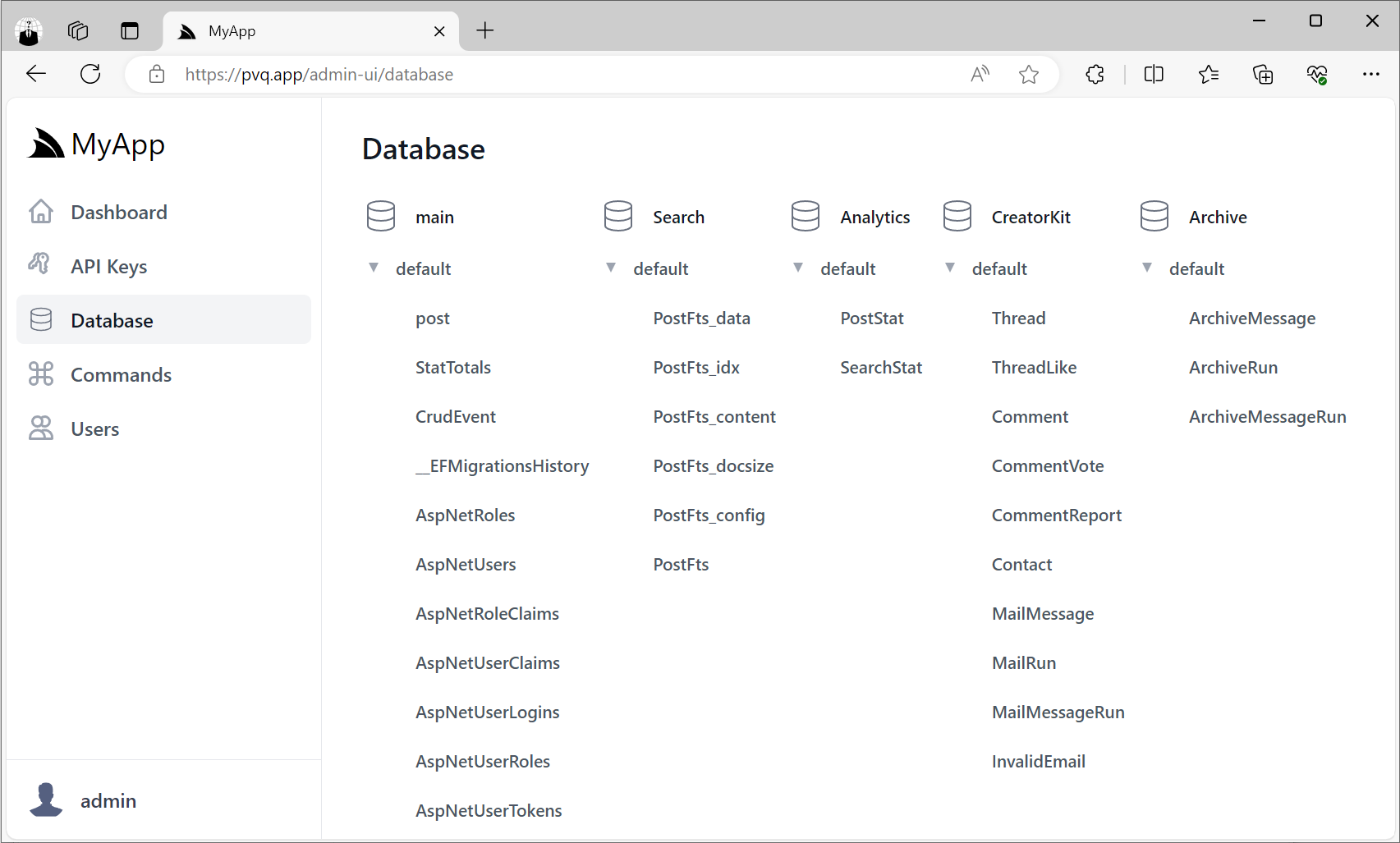
But each database can only be written to by a single thread at a time, which we can easily facilitate with Background Jobs named Workers, or alternatively with MQ Command DTOs if you're using Background MQ.
In all cases we recommend using Sync DB APIs for SQLite since their underlying implementation always blocks.
Queuing DB Writes with SyncCommand Background Jobs
One way to remove contention is to serially execute DB Writes which we can do by executing DB Writes within SyncCommand* and using a named [Worker(Workers.AppDb)] attribute for Writes to the primary database, e.g:
[Worker(Workers.AppDb)]
public class DeleteCreativeCommand(IDbConnection db)
    : SyncCommand<DeleteCreative>
{
    protected override void Run(DeleteCreative request)
    {
        var artifactIds = request.ArtifactIds;
        db.Delete<AlbumArtifact>(x => artifactIds.Contains(x.ArtifactId));
        db.Delete<ArtifactReport>(x => artifactIds.Contains(x.ArtifactId));
        db.Delete<ArtifactLike>(x => artifactIds.Contains(x.ArtifactId));
        db.Delete<Artifact>(x => x.CreativeId == request.Id);
        db.Delete<CreativeArtist>(x => x.CreativeId == request.Id);
        db.Delete<CreativeModifier>(x => x.CreativeId == request.Id);
        db.Delete<Creative>(x => x.Id == request.Id);
    }
}
Other databases should use its named connection for its named worker, e.g:
[Worker(Databases.Search)]
public class DeleteSearchCommand(IDbConnectionFactory dbFactory)
    : SyncCommand<DeleteSearch>
{
    protected override void Run(DeleteSearch request)
    {
        using var db = dbFactory.Open(Databases.Search);
        db.DeleteById<ArtifactFts>(request.Id);
        //...
    }
}
Example of a DB Write command with result:
[Worker(Databases.Albums)]
public class CreateAlbumCommand(IDbConnectionFactory dbFactory)
    : SyncCommandWithResult<CreateAlbum,Album>
{
    protected override Album Run(CreateAlbum request)
    {
        using var db = dbFactory.Open(Databases.Albums);
        var album = request.ConvertTo<Album>();
        album.Id = db.Insert(album, selectIdentity:true);
        foreach (var artifact in request.Artifacts)
        {
            artifact.AlbumId = album.Id;
            db.Insert(artifact);
        }
        return album;
    }
}
Where it will be executed within its Database Lock.
Running Commands
You'll typically want to run DB Write Commands with RunCommand* APIs which are a faster and lighter weight
alternative then durable jobs which are persisted in the Jobs database before execution.
Everytime commands are executed they'll be added to a ConcurrentQueue of the specified worker. Commands delegated to different named workers execute concurrently, whilst commands with the same worker are executed serially.
When using any SyncCommand* base class, its execution still uses database locks
but any contention is alleviated as they're executed serially by a single worker thread.
public class MyServices(IBackgroundJobs jobs) : Service
{
    // Returns immediately with a reference to the Background Job
    public object Any(DeleteCreative request)
    {
        // Queues a durable job to execute the command with the AppDb Worker
        var jobRef = jobs.EnqueueCommand<DeleteCreativeCommand>(request);

        // Executes Command with Databases.Search worker
        jobs.EnqueueCommand<DeleteSearchCommand>(new DeleteSearch {
            Id = request.ArtifactId
        });

        return jobRef;
    }

    // Returns after the command is executed with its result (if any)
    public async Task Any(CreateAlbum request)
    {
        // Executes a transient (i.e. non-durable) job with the named worker
        var album = await jobs.RunCommandAsync<CreateAlbumCommand>(request);
        return album;
    }
}
See Named Workers for how named Workers relate to queues.