Add ServiceStack Reference gives every consumer of your API an end-to-end typed client, generated from a single URL.
Your C# Request and Response DTOs are the only contract that exists. From them ServiceStack can emit native DTOs for 15 languages, which drop into a client project alongside that language's generic Service Client to give it a fully typed API - with no schema to maintain, no build-time code generation and no DTO assembly to distribute.
How it works
Behind the scenes ServiceStack captures the metadata on your Service DTOs - routes, the IReturn<T> response type,
sub-classes, attributes and textual descriptions - into a serializable model published at /types/metadata, which each
language generator renders as idiomatic source code. Adding a reference is a plain HTTP request to /types/<lang>; the
options used are written into a comment header at the top of the generated file so a later update reproduces them.
Native Types is enabled by default. It can be removed with:
Plugins.RemoveAll(x => x is NativeTypesFeature);
Adding and updating a reference
Keeping your own clients in sync automatically
If the client lives in the same solution as the API, you don't need to run anything. Registering the built-in dtos
Startup Task regenerates the App's own DTO references every time it restarts in development:
StartupTasks.Register("dtos", () =>
    appHost.GetPlugin<NativeTypesFeature>().GenerateDtos());
The easiest way to add it to existing projects is to run:
npx add-in startup-dtos
Generation happens in-process without HTTP or Node.js, preserves each reference's existing options and doesn't rewrite
unchanged files - so a contract change shows up in your client build immediately, without triggering a needless frontend
rebuild. All project templates with TypeScript .ts or JavaScript .mjs client DTOs ship with it configured. See
Startup Tasks for DTO discovery, BaseUrl matching and generation options.
From the command-line
Alternative (without .NET): npx get-dtos
Alternatively API consumers can use npx get-dtos to Add/Update ServiceStack References without needing .NET installed, where any command starting with:
x <lang>
Can be replaced with:
npx get-dtos <lang>
To instead Add / Update ServiceStack references using the npm get-dtos package.
The x dotnet tool provides the same commands for .NET developers who already have the SDK installed,
where x <lang> is interchangeable with npx get-dtos <lang>:
dotnet tool install --global x
Both tools follow the same three usages - add a reference from a URL, update one by filename, or update all references in the current directory (recursively) by passing only the language:
npx get-dtos ts https://blazor-vue.web-templates.io
Saved to: dtos.ts
Pass a name as the 2nd argument to save it under a different file, e.g. when a project consumes more than one API:
npx get-dtos ts https://blazor-vue.web-templates.io Bookings
Saved to: Bookings.dtos.ts
Then later update every TypeScript reference in the directory with:
npx get-dtos ts
Updated: Bookings.dtos.ts
Updated: dtos.ts
From your IDE
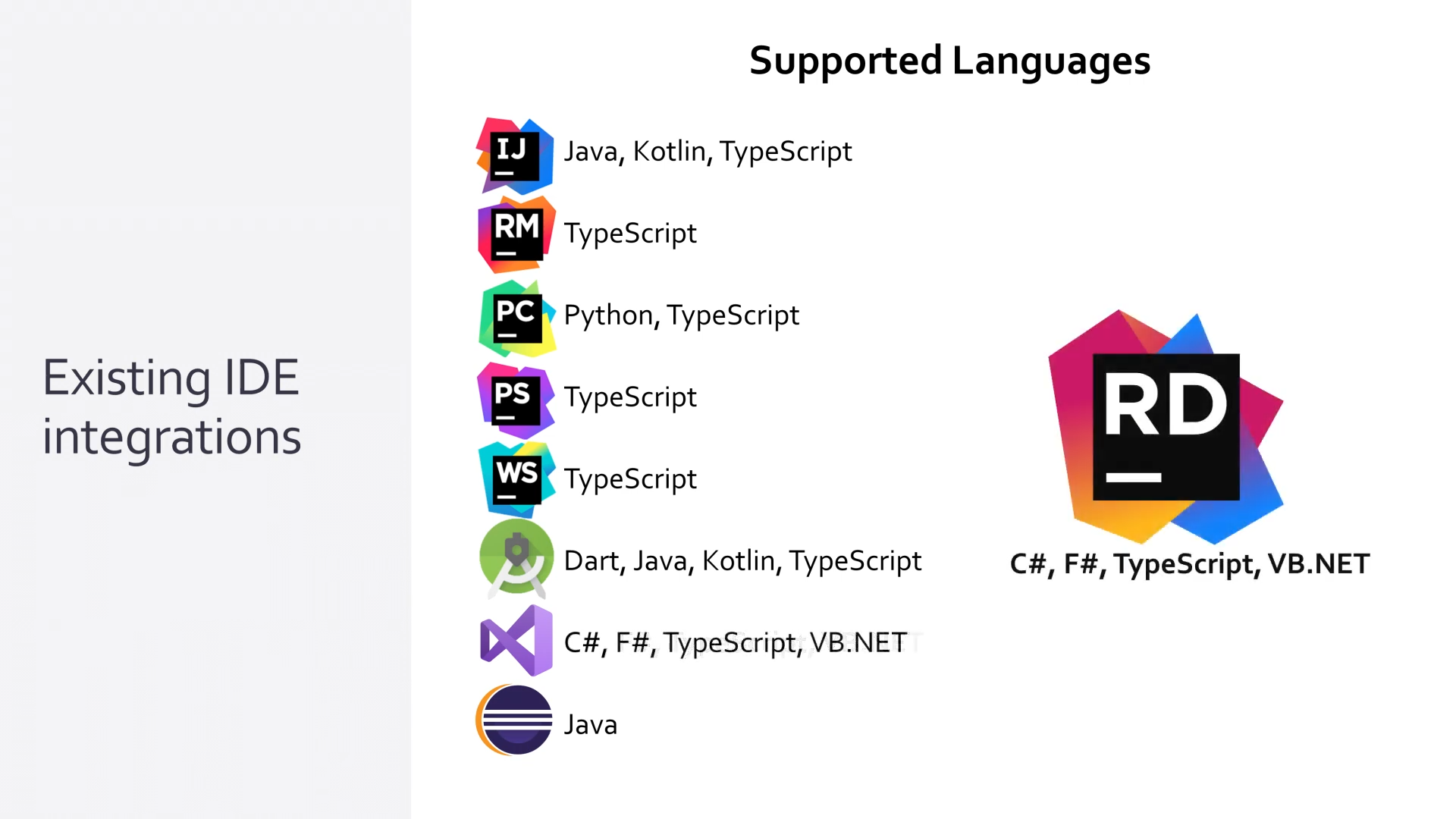
Add ServiceStack Reference is available as a plugin for JetBrains Rider, IntelliJ IDEA, Android Studio, PyCharm, WebStorm, PhpStorm, RubyMine and Eclipse, letting API consumers add and update a typed reference from the IDE's context menu with just a URL:
What you get with the DTOs
The generated DTOs are just data - they're not coupled to an endpoint or format, so the same file works with every built-in Service Client in that language. In .NET that includes the JSON, JSV, MessagePack and ProtoBuf clients, all sharing the same interface so swapping between them is a one-line change.
Because only DTOs are generated, the client library itself is reusable: DTOs generated against a hosted instance work against any deployment of that API, and the same client instance can call any other ServiceStack API.
Multiple file uploads
Every language's client supports uploading files alongside a typed Request DTO, which is what makes APIs like
AI Server's SpeechToText callable from anywhere:
using var fsAudio = File.OpenRead("audio.wav");
var response = client.PostFileWithRequest(new SpeechToText(),
    new UploadFile("audio.wav", fsAudio, "audio"));
A PostFilesWithRequest variant accepts multiple files in a single request. See each language's reference page for its
idiomatic equivalent.
Customizing what's generated
Consumers customize their own output by uncommenting options in the header of their generated file - each language exposes the options that make sense for it. See the language pages for the full list:
- C# Options
- TypeScript Options
- JavaScript Options
- Python Options
- Swift Options
- Java Options
- Kotlin Options
- Dart Options
- F# Options
- VB.NET Options
Restricting a type is the important one - an API annotated with [Restrict(InternalOnly = true)] is generated for a
reference added from your internal network but is invisible to an external consumer, so internal APIs can't leak into a
public client. Metadata.ForceInclude goes the other way, overriding the default rules for types you do want emitted:
Metadata.ForceInclude = new() {
    typeof(AdminQueryUsers),
    typeof(AdminGetUser),
    typeof(AdminCreateUser),
};
Why code-first
Add ServiceStack Reference exists because a message-based API doesn't need a client generated for it - only its DTOs do. Everything else is a reusable generic client, which is what keeps the generated output small enough to read and review.
C# is a good language to define an API contract in: POCO data models are about as terse as a DSL, but come with real IDE support and can carry richer metadata than a schema - attributes, interfaces, doc comments and response types:
[Route("/technology/{Slug}")]
public class GetTechnology : IReturn<GetTechnologyResponse>
{
    public string Slug { get; set; }
}
Starting from that model rather than an interim schema avoids the impedance mismatch of adapting your types to a spec and then adapting them back again. In ServiceStack your code-first DTOs are the master authority that every other feature - OpenAPI, gRPC, Locode and Add ServiceStack Reference - is projected from.
Language paths
Each generator is served directly, so you can inspect what a client will receive from a browser:
| Path | Language |
|---|---|
| /types/csharp | C# |
| /types/typescript | TypeScript |
| /types/typescript.d | Ambient TypeScript Definitions |
| /types/mjs | JavaScript (ES Modules) |
| /types/js | ES3 Common.js |
| /types/python | Python |
| /types/php | PHP |
| /types/swift | Swift |
| /types/java | Java |
| /types/kotlin | Kotlin |
| /types/dart | Dart |
| /types/go | Go |
| /types/rust | Rust |
| /types/ruby | Ruby |
| /types/zig | Zig |
| /types/fsharp | F# |
| /types/vbnet | VB.NET |
| /types/metadata | Metadata |
Advanced Native Type Code gen
To enable greater flexibility when generating complex Typed DTOs, you can use [Emit{Language}] attributes to generate code before each type or property.
These attributes can be used to generate different attributes or annotations to enable client validation for different validation libraries in different languages, e.g:
[EmitCSharp("[Validate]")]
[EmitTypeScript("@Validate()")]
[EmitCode(Lang.Swift | Lang.Dart, "@validate()")]
public class User : IReturn<User>
{
    [EmitCSharp("[IsNotEmpty]","[IsEmail]")]
    [EmitTypeScript("@IsNotEmpty()", "@IsEmail()")]
    [EmitCode(Lang.Swift | Lang.Dart, new[]{ "@isNotEmpty()", "@isEmail()" })]
    public string Email { get; set; }
}
Which will generate [EmitCsharp] code in C# DTOs:
[Validate]
public partial class User
    : IReturn<User>
{
    [IsNotEmpty]
    [IsEmail]
    public virtual string Email { get; set; }
}
[EmitTypeScript] annotations in TypeScript DTOs:
@Validate()
export class User implements IReturn<User>
{
    @IsNotEmpty()
    @IsEmail()
    public email: string;

    public constructor(init?: Partial<User>) { (Object as any).assign(this, init); }
    public createResponse() { return new User(); }
    public getTypeName() { return 'User'; }
}
Whilst the generic [EmitCode] attribute lets you emit the same code in multiple languages with the same syntax.
Type Generation Filters
In addition you can use the PreTypeFilter, InnerTypeFilter & PostTypeFilter to generate source code before and after a Type definition, e.g. this will append the @validate() annotation on non enum types:
TypeScriptGenerator.PreTypeFilter = (sb, type) => {
    if (!type.IsEnum.GetValueOrDefault())
    {
        sb.AppendLine("@Validate()");
    }
};
The InnerTypeFilter gets invoked just after the Type Definition which can be used to generate common members for all Types and interfaces, e.g:
TypeScriptGenerator.InnerTypeFilter = (sb, type) => {
    sb.AppendLine("id:string = `${Math.random()}`.substring(2);");
};
There's also PrePropertyFilter & PostPropertyFilter for generating source before and after properties, e.g:
TypeScriptGenerator.PrePropertyFilter = (sb , prop, type) => {
    if (prop.Name == "Id")
    {
        sb.AppendLine("@IsInt()");
    }
};
Live examples
This model is then used to generate the generated types, which for C# is at /types/csharp.
Limitations
In order for Add ServiceStack Reference to work consistently across all supported languages without .NET semantic namespaces, DTOs includes an additional restriction due to the semantic differences and limitations in different languages there are some limitations of highly-discouraged bad practices that's not supported across all languages including:
All DTO Type Names must be unique
ServiceStack only requires Request DTO's to be unique, but non .NET languages also require all DTO names to be unique.
No object or Interface properties
It's not possible to generate typed metadata and type information for deserializing unknown types like object or Interface properties.
Base types must be marked abstract
When using inheritance in DTO's any Base types must be marked abstract.
For C#, VB .NET and F# languages you can get around these limitations by sharing the ServiceModel.dll where your DTOs are defined instead.
Using with IIS Windows Authentication
If you have configured your NativeTypes service to run on IIS with Windows Authentication enabled, you need to ensure that the /types routes are reachable and do not require the system-level authentication from IIS. To accomplish this, add the following to <system.web> in Web.config.
<authorization>
    <allow users="?" />
</authorization>