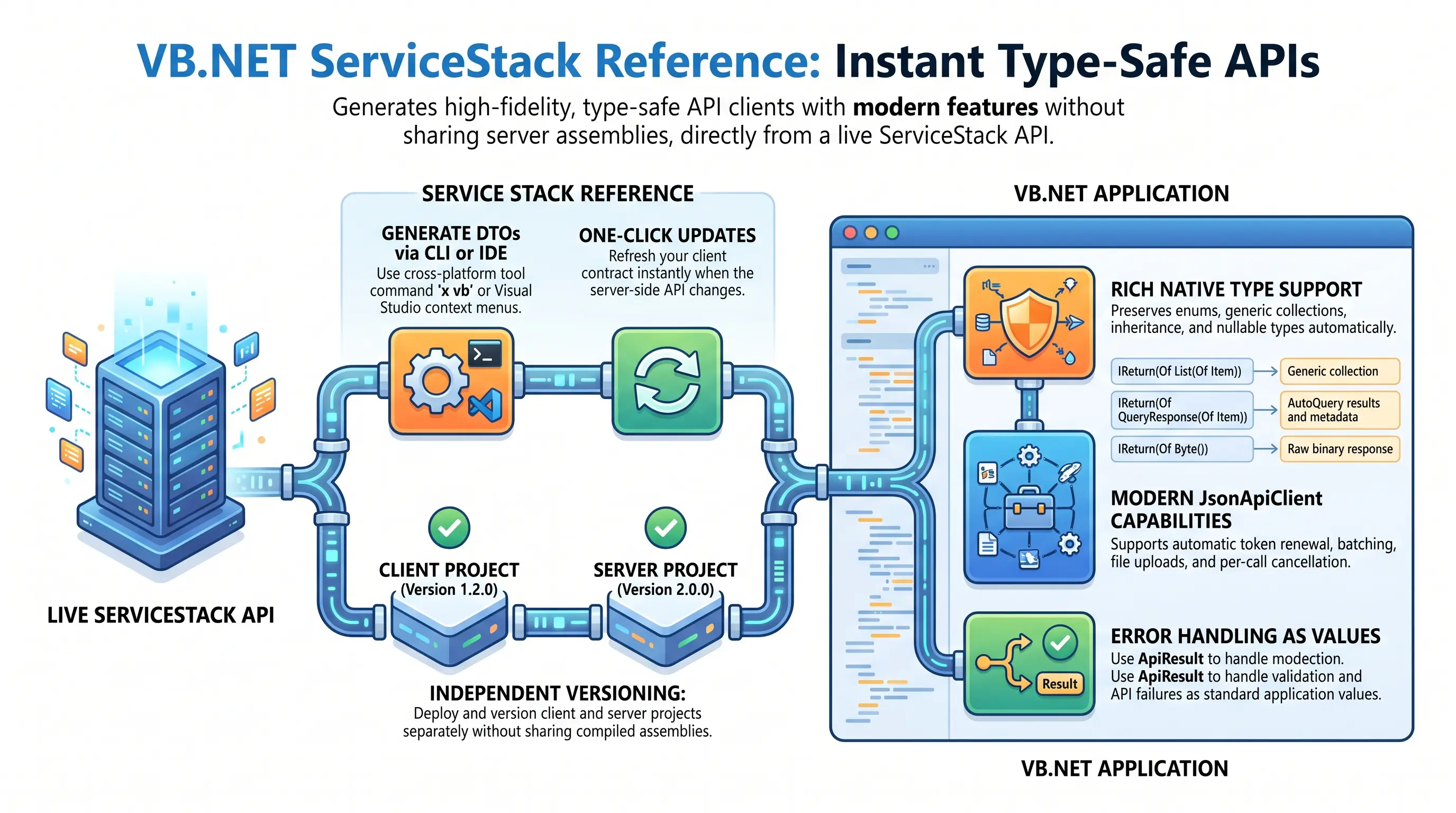
Add ServiceStack Reference generates your API's VB.NET DTOs from a running ServiceStack App. It gives VB.NET clients an end-to-end typed API without sharing the server's ServiceModel assembly, so client and server projects can be versioned, deployed and updated independently.
The generated source retains routes, HTTP verb markers, response types, validation metadata, inheritance, collections, enums and AutoQuery conventions. Existing desktop and line-of-business applications can consume new APIs without a hand-written HTTP or JSON layer.
Modern typed APIs for VB.NET
VB.NET uses the same current JsonApiClient and ServiceStack.Client package as C#:
Dim client = New JsonApiClient("https://api.example.com")

Dim response = client.Get(New Hello With {.Name = "World"})
Console.WriteLine(response.Result)
Both asynchronous and blocking APIs are available, fitting event-driven desktop applications, ASP.NET, batch jobs, scheduled integrations and test projects.
Add ServiceStack Reference
Use the cross-platform x tool from any IDE or build environment:
dotnet tool install --global x
x vbnet https://api.example.com
dotnet add package ServiceStack.Client
This saves the generated contract to dtos.vb. The vb alias provides a shorter command:
x vb https://api.example.com
Visual Studio users can alternatively use ServiceStackVS's Add ServiceStack Reference project context menu, which adds the generated DTOs and ServiceStack.Client package.
Update ServiceStack Reference
After the API contract changes, run this from the client solution:
x vbnet
The tool finds existing references from the BaseUrl in their generated headers and preserves uncommented customization options. You can also update one file directly with x dtos.vb. In Visual Studio, use Update ServiceStack Reference on the generated file.
Generated files should be treated as replaceable source. Put client-only behavior in separate Partial Class files.
What is generated
A Hello API is emitted with its routes, supported attributes and inferred response marker:
<Route("/hello")>
<Route("/hello/{Name}")>
Public Partial Class Hello
    Implements IReturn(Of HelloResponse)

    <Required>
    Public Overridable Property Name As String

    Public Overridable Property Title As String
End Class

Public Partial Class HelloResponse
    Public Overridable Property Result As String
End Class
The generated contract provides:
IReturn(Of HelloResponse)for compile-time response inference.<Route>metadata for custom route selection and path substitution.IGet,IPost,IPut,IPatchandIDeletemarkers forSend/SendAsyncHTTP method inference.IReturnVoidfor commands which intentionally return no response body.- Native .NET representations for enums, arrays,
List(Of T), dictionaries, inheritance, nested types and interfaces. - Supported descriptions and serialization attributes for IntelliSense and wire compatibility.
| Generated contract | Typed VB.NET result |
|---|---|
IReturn(Of String) |
String |
IReturn(Of Item()) |
Array |
IReturn(Of List(Of Item)) |
Generic collection |
IReturn(Of Dictionary(Of String, Item)) |
Typed dictionary |
IReturn(Of QueryResponse(Of Item)) |
AutoQuery results, totals and metadata |
IReturn(Of Byte()) |
Raw binary response |
IReturn(Of Stream) |
Response stream |
IReturnVoid |
No response body |
Call generated APIs
Use an explicit HTTP method when the caller should choose it:
Dim syncResponse = client.Post(New Hello With {.Name = "World"})
Dim asyncResponse = Await client.PostAsync(
    New Hello With {.Name = "World"}, cancellationToken)
When the generated request has a verb marker, SendAsync chooses it automatically:
Public Class HelloGet
    Implements IReturn(Of HelloVerbResponse)
    Implements IGet

    Public Property Id As Integer
End Class

Dim response As HelloVerbResponse = Await client.SendAsync(
    New HelloGet With {.Id = 1}, cancellationToken)
Current JsonApiClient capabilities
JsonApiClient is the current HttpClient-based implementation for .NET 6+. It uses /api/ as the fallback route, prefers matching custom routes for explicit HTTP methods, and defaults unmarked Send requests to POST.
It can be registered with .NET's typed client factory:
builder.Services.AddJsonApiClient("https://api.example.com")
It also supports:
- Per-call cancellation with
CancellationToken. - Cookie, Basic, Bearer Token and automatic Refresh Token authentication.
- Request/response filters, custom headers, URL resolvers and request compression.
- Direct
String,Byte()andStreamresponses in addition to JSON DTOs. - Batching, one-way publishing, file uploads, multipart forms and custom HTTP methods.
- Both synchronous and asynchronous APIs.
Configure automatic token renewal when an authenticated API returns 401:
Dim client = New JsonApiClient("https://api.example.com") With {
    .BearerToken = auth.BearerToken,
    .RefreshToken = auth.RefreshToken,
    .EnableAutoRefreshToken = True
}
The client's SessionId and Version are also copied onto generated requests implementing IHasSessionId and IHasVersion.
Handle errors as values
ApiAsync returns ApiResult(Of TResponse) so validation and API failures can remain normal application values:
Dim api = Await client.ApiAsync(
    New Hello With {.Name = form.Name}, cancellationToken)

If api.Succeeded Then
    Console.WriteLine(api.Response.Result)
Else
    Console.WriteLine($"{api.Error?.ErrorCode}: {api.ErrorMessage}")
    Console.WriteLine(api.FieldErrorMessage(NameOf(form.Name)))
End If
ApiResult(Of T) also exposes Errors, ErrorSummary, FieldError(), FieldErrorMessage() and HasFieldError() for form and validation workflows.
The lower-level client APIs throw WebServiceException for failed responses:
Try
    Dim response = Await client.PostAsync(
        New Hello With {.Name = Nothing}, cancellationToken)
Catch ex As WebServiceException
    Console.WriteLine($"{ex.StatusCode} {ex.StatusDescription}")
    Console.WriteLine($"{ex.ResponseStatus.ErrorCode}: {ex.ResponseStatus.Message}")
End Try
Batch and one-way requests
Send multiple requests of the same type in a single HTTP request:
Dim requests = {
    New Hello With {.Name = "A"},
    New Hello With {.Name = "B"},
    New Hello With {.Name = "C"}
}

Dim responses As List(Of HelloResponse) =
    Await client.SendAllAsync(requests, cancellationToken)
Use PublishAsync or PublishAllAsync for one-way commands which do not need a response DTO:
Await client.PublishAsync(
    New HelloReturnVoid With {.Id = 1}, cancellationToken)
Typed AutoQuery
Generated AutoQuery requests retain their generic query contracts:
<Route("/rockstars", "GET")>
Public Partial Class QueryRockstars
    Inherits QueryDb(Of Rockstar)
    Implements IReturn(Of QueryResponse(Of Rockstar))
End Class
Use inherited paging, ordering, projection and metadata properties with typed results:
Dim query = Await client.GetAsync(New QueryRockstars With {
    .Skip = 0,
    .Take = 25,
    .OrderBy = "Age"
}, cancellationToken)

Console.WriteLine($"Showing {query.Results.Count} of {query.Total}")
GetLazy() also provides lazy synchronous enumeration across AutoQuery pages.
Rich .NET data contracts
Generated DTOs preserve .NET primitives and compound types including nullable values, Decimal, Guid, DateTime, DateTimeOffset, TimeSpan, Byte(), arrays, List(Of T) and nested dictionaries. The same serializer handles route, query-string and request-body values, avoiding transport-specific mapping code.
File uploads
Combine a generated Request DTO with a file stream:
Using audio = File.OpenRead("recording.wav")
    Dim response As TextGenerationResponse =
        Await client.PostFileWithRequestAsync(
            New SpeechToText With {
                .RefId = "task-42",
                .Tag = "meeting"
            },
            New UploadFile("recording.wav", audio, NameOf(SpeechToText.Audio)),
            cancellationToken)
End Using
Use PostFilesWithRequestAsync for multiple streams or ApiFormAsync when multipart form failures should be returned as ApiResult(Of T).
Proxy and API gateway endpoints
The Base URL can include a path prefix, allowing the same generated DTOs to call a downstream ServiceStack API through a proxy or gateway:
Dim client = New JsonApiClient(
    "https://gateway.example.com/techstacks")

Dim response = Await client.GetAsync(
    New GetTechnology With {.Slug = "ServiceStack"}, cancellationToken)
Typed responses and structured WebServiceException errors continue to work through the proxy. This is useful for exposing multiple internal services behind one public host or applying tenant-specific routing.
Integration testing
Generated contracts make black-box API tests concise and representative of production clients:
<Test>
Public Async Function EchoesSupportedValues() As Task
    Dim client = New JsonApiClient(TestConfig.BaseUrl)
    Dim request = New EchoTypes With {
        .Int = 3,
        .Float = 1.1F,
        .String = "value"
    }

    Dim response = Await client.PostAsync(request)

    Assert.That(response.Int, [Is].EqualTo(request.Int))
    Assert.That(response.Float, [Is].EqualTo(request.Float))
    Assert.That(response.String, [Is].EqualTo(request.String))
End Function
The same pattern covers authenticated APIs, validation failures, AutoQuery and APIs exposed behind proxy path prefixes.
Use in any .NET App
Because a ServiceStack Reference is ordinary VB.NET source and ServiceStack.Client supports current .NET targets, the same contract and client patterns can be shared across ASP.NET Core, Blazor, MAUI, desktop, console, worker and test projects.
DTO customization options
The options in each generated file's header control how its VB.NET DTOs are generated. Triple-commented options are server defaults. To override one, change its ''' prefix to a single ', update the value, then run x vbnet or use Visual Studio's Update ServiceStack Reference action:
' Options:
'Date: 2026-08-27 12:00:00
'Version: 10.1.5
'Tip: To override a DTO option, remove "''" prefix before updating
'BaseUrl: https://api.example.com
'
'''GlobalNamespace:
'''MakePartial: True
'''MakeVirtual: True
'''MakeDataContractsExtensible: False
'''AddReturnMarker: True
'''AddDescriptionAsComments: True
'''AddDataContractAttributes: False
'''AddIndexesToDataMembers: False
'''AddGeneratedCodeAttributes: False
'''AddResponseStatus: False
'''AddImplicitVersion:
'''InitializeCollections: False
'''ExportValueTypes: False
'''IncludeTypes:
'''ExcludeTypes:
'''AddNamespaces:
'''AddDefaultXmlNamespace: http://schemas.servicestack.net/types
To override an option, change its prefix from triple ''' to a single '. This convention is used because VB.NET has no block comment syntax. For example, this disables partial classes:
' Options:
'Date: 2026-08-27 12:00:00
'Version: 10.1.5
'BaseUrl: https://api.example.com
'
'MakePartial: False
'''MakeVirtual: True
'''MakeDataContractsExtensible: False
'''AddReturnMarker: True
'''AddDescriptionAsComments: True
'''AddDataContractAttributes: False
'''AddIndexesToDataMembers: False
'''AddGeneratedCodeAttributes: False
'''AddResponseStatus: False
'''AddImplicitVersion:
'''InitializeCollections: True
'''ExportValueTypes: False
'''IncludeTypes:
'''ExcludeTypes:
'''AddNamespaces:
'''AddDefaultXmlNamespace: http://schemas.servicestack.net/types
Options that do not start with a ''' are sent to the server to override any defaults set by the server.
Change Default Server Configuration
The defaults can also be overridden on the ServiceStack server by modifying the NativeTypesFeature configuration:
var nativeTypes = this.GetPlugin<NativeTypesFeature>();
nativeTypes.MetadataTypesConfig.MakeVirtual = false;
The following options control the generated source.
MakePartial
Adds the Partial modifier to generated types, letting you extend DTOs in separate source files:
Public Partial Class GetAnswers
MakeVirtual
Adds the Overridable modifier to all properties:
Public Partial Class GetAnswers
    ...
    Public Overridable Property QuestionId As Integer
End Class
MakeDataContractsExtensible
Add .NET's DataContract ExtensionDataObject to all DTOs:
Public Partial Class Hello
            ...
    Implements IExtensibleDataObject
            ...
    Public Overridable Property ExtensionData As ExtensionDataObject Implements IExtensibleDataObject.ExtensionData
End Class
AddReturnMarker
AddReturnMarker annotates Request DTOs with an IReturn(Of T) marker referencing the response type ServiceStack infers the Service returns:
Public Partial Class GetAnswers
    Implements IReturn(Of GetAnswersResponse)
The original DTO does not need a return marker. ServiceStack can infer its response from the Service return type or the
%ResponseDTO naming convention.
AddDescriptionAsComments
Converts text from <Description> attributes into VB.NET documentation comments, providing IntelliSense in client projects:
'''<Summary>
'''Get a list of Answers for a Question
'''</Summary>
Public Class GetAnswers
AddDataContractAttributes
Decorates all DTO types with <DataContract> and properties with <DataMember>, and adds default XML namespaces for the generated VB.NET namespaces:
<Assembly: ContractNamespace("http://schemas.servicestack.net/types", ClrNamespace:="StackApis.ServiceModel.Types")>
<Assembly: ContractNamespace("http://schemas.servicestack.net/types", ClrNamespace:="StackApis.ServiceModel")>
...
<DataContract>
Partial Public Class GetAnswers
    Implements IReturn(Of GetAnswersResponse)
    <DataMember>
    Public Overridable Property QuestionId As Integer
End Class
AddIndexesToDataMembers
Populates a DataMember Order index for all properties:
<DataContract>
Public Partial Class GetAnswers
    ...
    <DataMember(Order:=1)>
    Public Overridable Property QuestionId As Integer
End Class
Requires AddDataContractAttributes=true
AddGeneratedCodeAttributes
Emits a <GeneratedCode> attribute on every generated type:
<GeneratedCode("AddServiceStackReference", "10.1.5")>
Public Partial Class GetAnswers ...
AddResponseStatus
Automatically adds a ResponseStatus property to response DTOs which do not already define one:
Public Partial Class GetAnswers
    ...
    Public Overridable Property ResponseStatus As ResponseStatus
End Class
AddImplicitVersion
Specifies the version number automatically populated in every Request DTO sent from the client:
Public Partial Class GetAnswers
    Public Overridable Property Version As Integer
    Public Sub New()
                Version = 1
    End Sub
    ...
End Class
This identifies the service-contract version used by existing clients, making it easier to implement ServiceStack's recommended versioning strategy.
InitializeCollections
Automatically initializes collections in generated DTOs:
Public Partial Class SearchQuestions
    Public Overridable Property Tags As List(Of String) = New List(Of String)
    ...
End Class
ExportValueTypes
By default custom value types are represented as strings unless they are enums. Enable ExportValueTypes to emit and reference their value type definitions instead:
' Options:
'ExportValueTypes: True
IncludeTypes
Specifies only the types you want generated:
' Options:
'IncludeTypes: GetTechnology,GetTechnologyResponse
Only generates the GetTechnology and GetTechnologyResponse DTOs:
Public Partial Class GetTechnology ...
Public Partial Class GetTechnologyResponse ...
Include Request DTO and its dependent types
You can include a Request DTO and all its dependent types with a .* suffix on the Request DTO, e.g:
' Options:
'IncludeTypes: GetTechnology.*
This includes the GetTechnology Request DTO, its GetTechnologyResponse Response DTO and all types referenced by either DTO.
Include All Types within a C# namespace
If your DTOs are grouped into different namespaces, include a complete C# namespace with the /* suffix:
' Options:
'IncludeTypes: MyApp.ServiceModel.Admin/*
This includes all DTOs within the MyApp.ServiceModel.Admin C# namespace.
ExcludeTypes
Specifies types to exclude from generation:
' Options:
'ExcludeTypes: GetTechnology,GetTechnologyResponse
Excludes the GetTechnology and GetTechnologyResponse DTOs from generation.
AddNamespaces
Include additional VB.NET namespaces, e.g:
' Options:
'AddNamespaces: System.Drawing,MyApp
Where it will generate the specified namespaces in the generated Types:
Imports System.Drawing
Imports MyApp
AddDefaultXmlNamespace
This lets you change the default DataContract XML namespace used for all namespaces:
<Assembly: ContractNamespace("http://my.types.net", ClrNamespace:="StackApis.ServiceModel.Types")>
<Assembly: ContractNamespace("http://my.types.net", ClrNamespace:="StackApis.ServiceModel")>
Requires AddDataContractAttributes=true