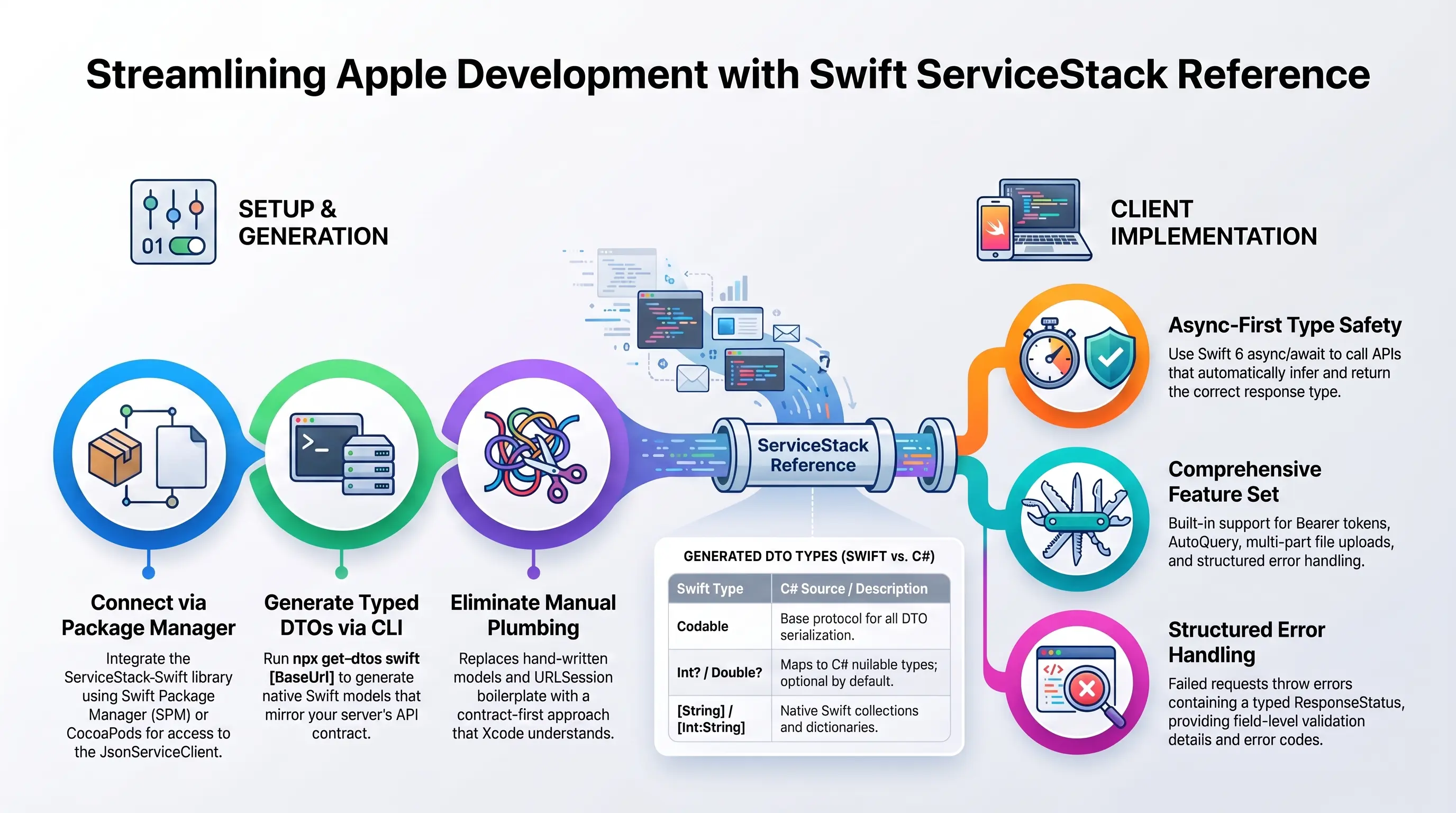
Swift - Native, async-first APIs for Apple platforms
ServiceStack's Add ServiceStack Reference feature generates a native, typed Swift API for your
ServiceStack Services using the npx get-dtos command-line script.
Add the dependency with Swift Package Manager, generate your DTOs, then call your APIs with
ServiceStack.Swift. Generated request DTOs are
Codable and declare the response they return, so JsonServiceClient infers the response type for the
entire async/await call:
let client = JsonServiceClient(baseUrl: baseUrl)

let request = Hello()
request.name = "World"

let response = try await client.getAsync(request)
print(response.result)
This replaces URLSession plumbing and hand-written response models with a contract Xcode understands,
so incompatible server changes become compile-time errors. The Swift 6 package is dependency-free and uses
Foundation, Swift Concurrency, and Codable.
What you can build
The client and its test suite exercise the same API surface used by production apps:
- Typed
GET,POST,PUT,DELETE, andPATCHrequests with sync andasync/awaitAPIs. - HTTP method inference from generated
IGet,IPost,IPut,IDelete, andIPatchmarkers. - Typed AutoQuery requests, including paging, ordering, projected fields, and dynamic query conventions.
- Structured
ResponseStatuserrors with field-level validation details and global or per-client handlers. - Bearer tokens, session IDs, API version propagation, and automatic access-token renewal with refresh tokens.
- Single and multi-file multipart uploads, including typed request fields alongside uploaded data.
- Typed custom-route calls, relative or absolute URLs, raw
Dataresponses, and request/response filters. IReturnVoidrequests plus high-fidelityCodablesupport for collections, enums, dates, durations, inheritance, and nested DTOs.
Simple command-line utils for ServiceStack
The cross-platform get-dtos script provides a simple command-line UX to easily Add and Update Swift ServiceStack References.
Prerequisites: Install Node.js.
$ npx get-dtos
As it's run with npx there's nothing to install, it can be run as-is from within a Terminal window at your Xcode project folder, where running it without any arguments displays the available options for adding and updating ServiceStack References.
Reference ServiceStack.Swift
To use the latest JsonServiceClient you'll need to add a reference to ServiceStack Swift library using your preferred package manager:
Xcode
From Xcode 12 the Swift Package Manager is built into Xcode.
Go to File > Swift Packages > Add Package Dependency:
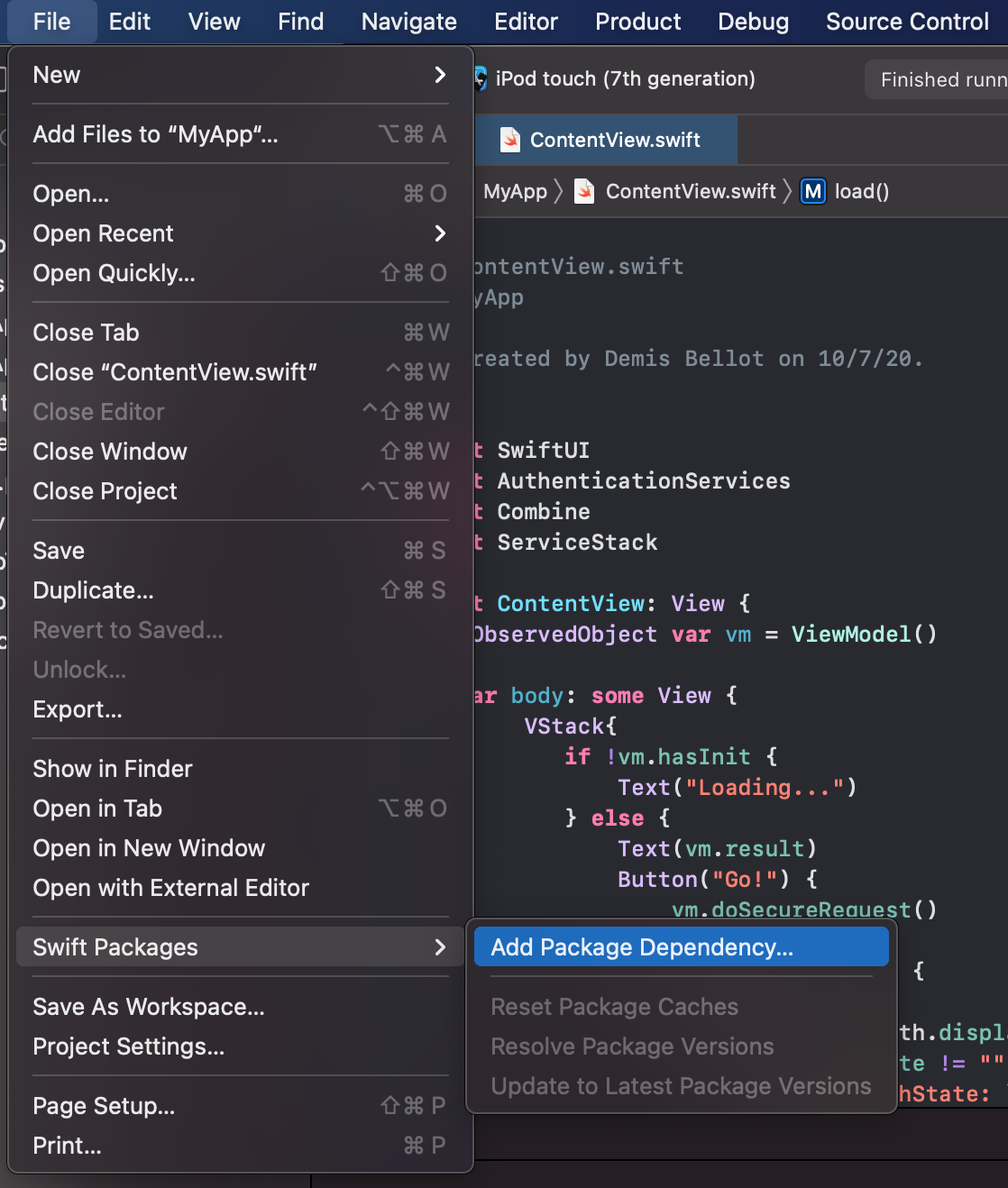
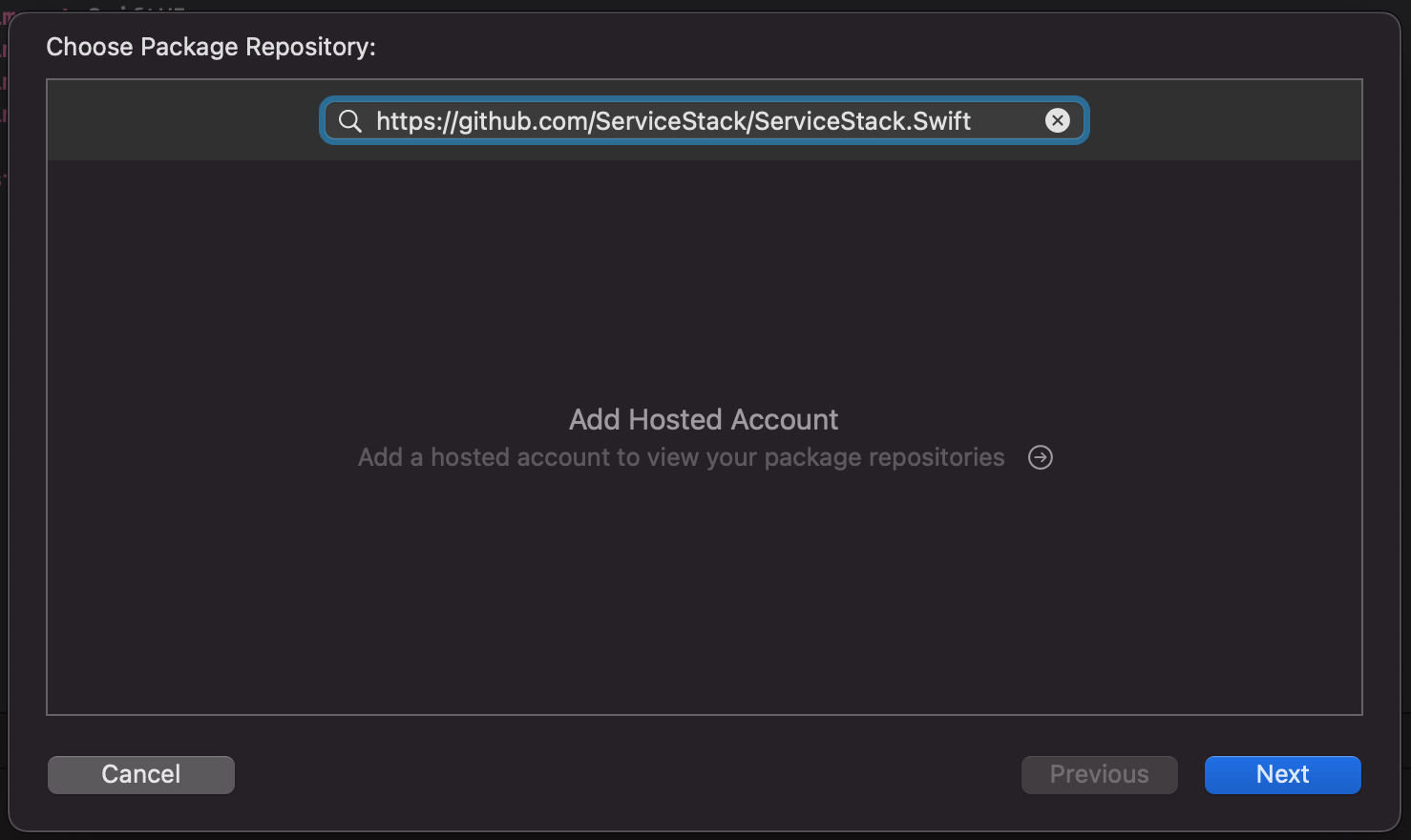
Add a reference to the ServiceStack.Swift GitHub repo:
https://github.com/ServiceStack/ServiceStack.Swift
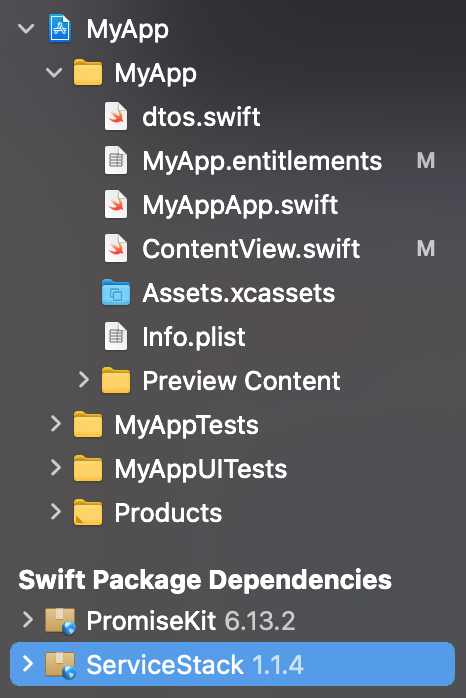
After adding the dependency ServiceStack.Swift will be added to your project:
CocoaPods
In your Podfile:
use_frameworks!

# Pods for Project
pod "ServiceStack", '~> 6.0.5'
SwiftPM
dependencies: [
    .package(url: "https://github.com/ServiceStack/ServiceStack.Swift.git", from: "6.0.5")
],
Quick start
From your Xcode project directory, generate DTOs for a ServiceStack API:
npx get-dtos swift https://test.servicestack.net
Add the generated dtos.swift file to your application target, import ServiceStack, then make a typed
request. Generated DTOs use an empty initializer with mutable properties:
import ServiceStack

let client = JsonServiceClient(baseUrl: "https://test.servicestack.net")
let request = Hello()
request.name = "World"

let response = try await client.getAsync(request)
print(response.result ?? "")
Hello implements IReturn and declares HelloResponse as its return type, which is why no response cast
or generic type argument is needed. Synchronous APIs are also available for background work and command-line
applications:
let response = try client.get(request)
Add a new ServiceStack Reference
To Add a new ServiceStack Reference, call npx get-dtos swift with the Base URL to a remote ServiceStack instance:
$ npx get-dtos swift {BaseUrl}
$ npx get-dtos swift {BaseUrl} {FileName.dtos.swift}
If no file name is provided, the first reference is saved to dtos.swift. If that file already exists,
the host name is used for the new reference, e.g. techstacks.dtos.swift:
$ npx get-dtos swift https://techstacks.io
Downloads the typed Swift DTOs for techstacks.io and saves them to dtos.swift.
Alternatively you can have it saved to a different FileName with:
$ npx get-dtos swift https://techstacks.io TechStacks.dtos.swift
Which instead saves the DTOs to TechStacks.dtos.swift.
The generated Server DTOs are used together with the JsonServiceClient in the
ServiceStack.Swift package added above, which contains
all the dependencies required to consume Typed Web Services in Swift.
Update an existing ServiceStack Reference
The easiest way to update all your Swift Server DTOs is to just call npx get-dtos swift without any arguments:
$ npx get-dtos swift
This updates the Swift Service References found in the current directory.
To Update a specific ServiceStack Reference, call npx get-dtos swift with the Filename:
$ npx get-dtos swift {FileName.dtos.swift}
As an example, you can Update the Server DTOs added in the previous command with:
$ npx get-dtos swift dtos.swift
Which also includes any Customization Options that were manually added.
Swift Server Configuration
The Swift defaults are overridable on the ServiceStack Server by modifying the default config on the
NativeTypesFeature Plugin, e.g:
var typesConfig = this.GetPlugin<NativeTypesFeature>().MetadataTypesConfig;
typesConfig.AddResponseStatus = true;
More Swift-specific configuration is available on the SwiftGenerator class itself, e.g:
SwiftGenerator.DefaultImports.Add("UIKit");
Swift Configuration
The header comment in each generated DTO file records its source URL and code-generation options. These
options are preserved when the reference is updated with npx get-dtos swift. Options prefixed with the
Swift single-line comment // show the server defaults and can be overridden, e.g:
/* Options:
Date: 2025-06-04 09:51:09
SwiftVersion: 6.0
Version: 8.80
Tip: To override a DTO option, remove "//" prefix before updating
BaseUrl: https://blazor-vue.web-templates.io

//BaseClass:
//AddModelExtensions: True
//AddServiceStackTypes: True
//MakePropertiesOptional: True
//IncludeTypes:
//ExcludeTypes:
//ExcludeGenericBaseTypes: False
//AddResponseStatus: False
//AddImplicitVersion:
//AddDescriptionAsComments: True
//InitializeCollections: False
//TreatTypesAsStrings:
//DefaultImports: Foundation,ServiceStack
*/
To override a value, remove the // and specify the value to the right of the :. Any value uncommented will be sent to the server to override any server defaults.
We'll go through and cover each of the above options to see how they affect the generated DTO's:
BaseClass
Specify a base class that's inherited by all Swift DTO's, e.g. to enable Key-Value Observing (KVO) in the generated DTO models have all types inherit from NSObject:
/* Options:
BaseClass: NSObject
Will change all DTO types to inherit from NSObject:
public class UserInfo : NSObject { ... }
AddModelExtensions
Remove the the code-generated type extensions required to support typed JSON serialization of the Swift types and leave only the clean Swift DTO Type definitions.
/* Options:
AddModelExtensions: False
AddServiceStackTypes
Don't generate the types for built-in ServiceStack classes and Services like ResponseStatus and Authenticate, etc.
/* Options:
AddServiceStackTypes: False
IncludeTypes
Is used as a Whitelist that can be used to specify only the types you would like to have code-generated:
/* Options:
IncludeTypes: GetTechnology,GetTechnologyResponse
Will only generate GetTechnology and GetTechnologyResponse DTO's:
public class GetTechnology { ... }
public class GetTechnologyResponse { ... }
Include Request DTO and its dependent types
You can include a Request DTO and all its dependent types with a .* suffix on the Request DTO, e.g:
/* Options:
IncludeTypes: GetTechnology.*
Which will include the GetTechnology Request DTO, the GetTechnologyResponse Response DTO and all Types that they both reference.
Include All Types within a C# namespace
If your DTOs are grouped into different namespaces they can be all included using the /* suffix, e.g:
/* Options:
IncludeTypes: MyApp.ServiceModel.Admin/*
This will include all DTOs within the MyApp.ServiceModel.Admin C# namespace.
Include All Services in a Tag Group
Services grouped by Tag can be used in the IncludeTypes where tags can be specified using braces in the format {tag} or {tag1,tag2,tag3}, e.g:
/* Options:
IncludeTypes: {web,mobile}
Or individually:
/* Options:
IncludeTypes: {web},{mobile}
ExcludeTypes
Is used as a Blacklist where you can specify which types you would like to exclude from being generated:
/* Options:
ExcludeTypes: GetTechnology,GetTechnologyResponse
Will exclude GetTechnology and GetTechnologyResponse DTO's from being generated.
ExcludeGenericBaseTypes
Work around a regression added in Swift 1.2 where the Swift compiler segfaults trying to compile Extensions to Types with a Generic Base Class. You can omit the problematic Generic Base Types from being generated with:
ExcludeGenericBaseTypes: True
Any types that were omitted from the generated DTO's will be emitted in comments, using the format:
//Excluded: {TypeName}
AddResponseStatus
Automatically add a ResponseStatus property on all Response DTO's, regardless if it wasn't already defined:
/* Options:
AddResponseStatus: True
Will add a ResponseStatus property to all Response DTO's:
public class GetAllTechnologiesResponse
{
    ...
    public var responseStatus:ResponseStatus
}
AddImplicitVersion
Lets you specify the Version number to be automatically populated in all Request DTO's sent from the client:
/* Options:
AddImplicitVersion: 1
Will add an initialized version property to all Request DTO's:
public class GetAllTechnologies : IReturn
{
    ...
    public var version:Int = 1
}
This lets you know what Version of the Service Contract that existing clients are using making it easy to implement ServiceStack's recommended versioning strategy.
InitializeCollections
Whether enumerables should be initialized with an empty collection (default) or changed to use an Optional type:
/* Options:
InitializeCollections: False
Changes Collection Definitions to be declared as Optional Types instead of being initialized with an empty collection:
public class ResponseStatus
{
    public var errors:[ResponseError]?
}
DefaultImports
Add additional import statements to the generated DTO's:
/* Options:
DefaultImports: UIKit,Foundation
Will import the UIKit and Foundation frameworks:
import UIKit;
import Foundation;
Swift style enums
You can override code-generation to emit Swift Style camelCase enums in your AppHost with:
SwiftGenerator.EnumNameStrategy = SwiftGenerator.SwiftStyleEnums;
Swift Client Usage
JsonServiceClient.swift
The same ideal, high-level API available in .NET's ServiceClients have been translated into idiomatic Swift as seen with its ServiceClient protocol definition below:
public protocol ServiceClient {
    func get<T: IReturn>(_ request: T) throws -> T.Return where T: Codable
    func get<T: IReturnVoid>(_ request: T) throws -> Void where T: Codable
    func get<T: IReturn>(_ request: T, query: [String: String]) throws -> T.Return where T: Codable
    func get<T: Codable>(_ relativeUrl: String) throws -> T
    func getAsync<T: IReturn>(_ request: T) async throws -> T.Return where T: Codable
    func getAsync<T: IReturnVoid>(_ request: T) async throws -> Void where T: Codable
    func getAsync<T: IReturn>(_ request: T, query: [String: String]) async throws -> T.Return where T: Codable
    func getAsync<T: Codable>(_ relativeUrl: String) async throws -> T

    func post<T: IReturn>(_ request: T) throws -> T.Return where T: Codable
    func post<T: IReturnVoid>(_ request: T) throws -> Void where T: Codable
    func post<Response: Codable, Request: Codable>(_ relativeUrl: String, request: Request?) throws -> Response
    func postAsync<T: IReturn>(_ request: T) async throws -> T.Return where T: Codable
    func postAsync<T: IReturnVoid>(_ request: T) async throws -> Void where T: Codable
    func postAsync<Response: Codable, Request: Codable>(_ relativeUrl: String, request: Request?) async throws -> Response

    func put<T: IReturn>(_ request: T) throws -> T.Return where T: Codable
    func put<T: IReturnVoid>(_ request: T) throws -> Void where T: Codable
    func put<Response: Codable, Request: Codable>(_ relativeUrl: String, request: Request?) throws -> Response
    func putAsync<T: IReturn>(_ request: T) async throws -> T.Return where T: Codable
    func putAsync<T: IReturnVoid>(_ request: T) async throws -> Void where T: Codable
    func putAsync<Response: Codable, Request: Codable>(_ relativeUrl: String, request: Request?) async throws -> Response

    func delete<T: IReturn>(_ request: T) throws -> T.Return where T: Codable
    func delete<T: IReturnVoid>(_ request: T) throws -> Void where T: Codable
    func delete<T: IReturn>(_ request: T, query: [String: String]) throws -> T.Return where T: Codable
    func delete<T: Codable>(_ relativeUrl: String) throws -> T
    func deleteAsync<T: IReturn>(_ request: T) async throws -> T.Return where T: Codable
    func deleteAsync<T: IReturnVoid>(_ request: T) async throws -> Void where T: Codable
    func deleteAsync<T: IReturn>(_ request: T, query: [String: String]) async throws -> T.Return where T: Codable
    func deleteAsync<T: Codable>(_ relativeUrl: String) async throws -> T

    func patch<T: IReturn>(_ request: T) throws -> T.Return where T: Codable
    func patch<T: IReturnVoid>(_ request: T) throws -> Void where T: Codable
    func patch<Response: Codable, Request: Codable>(_ relativeUrl: String, request: Request?) throws -> Response
    func patchAsync<T: IReturn>(_ request: T) async throws -> T.Return where T: Codable
    func patchAsync<T: IReturnVoid>(_ request: T) async throws -> Void where T: Codable
    func patchAsync<Response: Codable, Request: Codable>(_ relativeUrl: String, request: Request?) async throws -> Response

    func send<T: IReturn>(_ request: T) throws -> T.Return where T: Codable
    func send<T: IReturnVoid>(_ request: T) throws -> Void where T: Codable
    func send<T: Codable>(intoResponse: T, request: URLRequest) throws -> T
    func sendAsync<T: Codable>(intoResponse: T, request: URLRequest) async throws -> T

    func postFileWithRequest<T: IReturn & Codable>(request:T, file:UploadFile) throws -> T.Return
    func postFileWithRequestAsync<T: IReturn & Codable>(request:T, file:UploadFile) async throws -> T.Return
    func postFileWithRequest<T: IReturn>(_ relativeUrl: String, request:T, fileName:String, data:Data, mimeType:String?, fieldName:String?) throws -> T.Return
    func postFileWithRequestAsync<T: IReturn>(_ relativeUrl: String, request:T, fileName:String, data:Data, mimeType:String?, fieldName:String?) async throws -> T.Return
    func postFileWithRequest<T: IReturn>(url:URL, request:T, fileName:String, data:Data, mimeType:String?, fieldName:String?) throws -> T.Return
    func postFileWithRequestAsync<T: IReturn>(url:URL, request:T, fileName:String, data:Data, mimeType:String?, fieldName:String?) async throws -> T.Return
    func postFilesWithRequest<T: IReturn & Codable>(request:T, files:[UploadFile]) throws -> T.Return
    func postFilesWithRequestAsync<T: IReturn & Codable>(request:T, files:[UploadFile]) async throws -> T.Return
    func postFilesWithRequest<T: IReturn>(url:URL, request:T, files:[UploadFile]) throws -> T.Return
    func postFilesWithRequestAsync<T: IReturn>(url:URL, request:T, files:[UploadFile]) async throws -> T.Return

    func putFileWithRequest<T: IReturn & Codable>(request:T, file:UploadFile) throws -> T.Return
    func putFileWithRequestAsync<T: IReturn & Codable>(request:T, file:UploadFile) async throws -> T.Return
    func putFileWithRequest<T: IReturn>(_ relativeUrl: String, request:T, fileName:String, data:Data, mimeType:String?, fieldName:String?) throws -> T.Return
    func putFileWithRequestAsync<T: IReturn>(_ relativeUrl: String, request:T, fileName:String, data:Data, mimeType:String?, fieldName:String?) async throws -> T.Return
    func putFileWithRequest<T: IReturn>(url:URL, request:T, fileName:String, data:Data, mimeType:String?, fieldName:String?) throws -> T.Return
    func putFileWithRequestAsync<T: IReturn>(url:URL, request:T, fileName:String, data:Data, mimeType:String?, fieldName:String?) async throws -> T.Return
    func putFilesWithRequest<T: IReturn & Codable>(request:T, files:[UploadFile]) throws -> T.Return
    func putFilesWithRequestAsync<T: IReturn & Codable>(request:T, files:[UploadFile]) async throws -> T.Return
    func putFilesWithRequest<T: IReturn>(url:URL, request:T, files:[UploadFile]) throws -> T.Return
    func putFilesWithRequestAsync<T: IReturn>(url:URL, request:T, files:[UploadFile]) async throws -> T.Return

    func sendFileWithRequest<T: IReturn>(_ req:inout URLRequest, request:T, fileName:String, data:Data, mimeType:String?, fieldName:String?) throws -> T.Return
    func sendFileWithRequestAsync<T: IReturn>(_ req:inout URLRequest, request:T, fileName:String, data:Data, mimeType:String?, fieldName:String?) async throws -> T.Return
    func sendFilesWithRequest<T: IReturn>(_ req:inout URLRequest, request:T, files:[UploadFile]) throws -> T.Return
    func sendFilesWithRequestAsync<T: IReturn>(_ req:inout URLRequest, request:T, files:[UploadFile]) async throws -> T.Return

    func getData(url: String) throws -> (Data, HTTPURLResponse)?
    func getDataAsync(url: String) async throws -> (Data, HTTPURLResponse)?
    func getData(request: URLRequest, retryIf:((HTTPURLResponse) -> Bool)?) throws -> (Data, HTTPURLResponse)?
    func getDataAsync(request: URLRequest, retryIf:((HTTPURLResponse) async throws -> Bool)?) async throws -> (Data, HTTPURLResponse)?

    func getCookies() -> [String:String]
    func getTokenCookie() -> String?
    func getRefreshTokenCookie() -> String?
}
Generic type constraints omitted for readability
The package has no third-party runtime dependencies. Its asynchronous APIs use Swift Concurrency and
return the generated response type directly with async throws; synchronous equivalents are available for
background threads and command-line applications.
JsonServiceClient Usage
If you've ever had to make HTTP requests using Objective-C's NSURLConnection or NSURLSession static classes in iOS or macOS, you'll appreciate the typing benefits and productivity offered by the higher-level API's in JsonServiceClient - which enable the same ideal client API's we've enjoyed in ServiceStack's .NET Clients, in Swift Apps!
Tip
A nice benefit of using JsonServiceClient over static classes is that Service calls can be easily substituted and mocked with the above ServiceClient protocol, making it easy to test or stub out the external Gateway calls whilst the back-end is under development.
To illustrate its usage we'll consume TechStacks Services
after adding a ServiceStack Reference to https://techstacks.io:
let client = JsonServiceClient(baseUrl: "https://techstacks.io")
let response = try client.get(Overview())
Essentially usage is the same as it is in .NET ServiceClients - where it just needs the baseUrl of the remote ServiceStack instance, which can then be used to consume remote Services by sending typed Request DTO's that respond in kind with the expected Response DTO.
Async API Usage
Use the non-blocking APIs from application code so network activity doesn't block the UI. The same typed request with Swift Concurrency is:
let response = try await client.getAsync(Overview())
Inspect.printDump(response)
Swift also lets you continue marking it up with explicit Type Information and optional syntax as preferred, e.g:
let response:OverviewResponse = try await client.getAsync(Overview())
Inspect.printDump(response)
The explicit response annotation is optional when the request implements IReturn, but is useful when
calling a relative or absolute URL where Swift needs the generic response type from context.
INFO
async methods don't promise a particular actor for the continuation. Keep UI mutations isolated to
@MainActor or use await MainActor.run { ... } after the request completes.
Typed Error Handling
JsonServiceClient throws NSError for failed HTTP responses. ServiceStack's structured error payload is
available as a typed ResponseStatus, including its error code, message, stack trace, metadata, and any
field-level validation errors.
To illustrate exception handling we'll connect to ServiceStack's Test Services and call the ThrowType Service to intentionally throw the error specified, e.g:
Sync Error Handling
Handling a Single C# Exception:
var client = JsonServiceClient(baseUrl: "https://test.servicestack.net")

var request = ThrowType()
request.type = "NotFound"
request.message = "custom message"

do {
    _ = try client.post(request)
} catch let error as NSError {
    print(error.code) // 404
    let status = error.responseStatus
    print(status.errorCode ?? "") // NotFound
    print(status.message ?? "")   // custom message
}
Handling a Validation Exception with multiple field validation errors:
let client = JsonServiceClient(baseUrl: "https://test.servicestack.net")

let request = ThrowValidation()
request.email = "invalidemail"

do {
    let response = try client.post(request)
} catch let responseError as NSError {
    let status = responseError.responseStatus
    status.errors.count //= 3
    let field1 = status.errors[0]

    field1.errorCode! //= InclusiveBetween
    field1.fieldName! //= Age
    field1.message!   //= 'Age' must be between 1 and 120. You entered 0.
}
Async Error Handling
Async APIs use the same structured errors with normal do/catch handling:
let request = ThrowValidation()
request.email = "invalidemail"

do {
    _ = try await client.postAsync(request)
} catch let responseError as NSError {
    let status = responseError.responseStatus
    status.errors.count //= 3
    let field1 = status.errors[0]

    field1.errorCode! //= InclusiveBetween
    field1.fieldName! //= Age
    field1.message!   //= 'Age' must be between 1 and 120. You entered 0.
}
JsonServiceClient Error Handlers
Just like in .NET, we can also attach Global or instance error handlers to be able to generically handle all Service Client errors with a custom handler, e.g:
client.onError = {(e:NSError) in ... }
JsonServiceClient.Global.onError = {(e:NSError) in ... }
Authentication and automatic token renewal
Set a bearer token once on the client and it is sent in the Authorization header of every request:
let client = JsonServiceClient(baseUrl: "https://api.example.com")
client.bearerToken = accessToken

let request = Secured()
request.name = "test"
let response = try await client.sendAsync(request)
The client can also propagate sessionId and version to generated request DTOs that implement
IHasSessionId and IHasVersion:
client.sessionId = sessionId
client.version = 2
When refreshToken is set, or the server has issued an ss-reftok cookie, a 401 Unauthorized response
causes JsonServiceClient to request a new access token and retry the original request. Both sync and async
reauthentication paths are supported:
client.refreshToken = refreshToken
let response = try await client.sendAsync(request)

let tokenCookie = client.getTokenCookie()
let refreshCookie = client.getRefreshTokenCookie()
Typed AutoQuery
Generated AutoQuery request DTOs inherit the standard paging, ordering, field-selection, and metadata properties. Add strongly typed filters directly to the request:
let request = FindTechnologies()
request.vendorName = "Google"
request.take = 3
request.orderByDesc = "ViewCount"
request.fields = "Id,Name,VendorName,Tier,ProductUrl"

let response = try await client.getAsync(request)
for technology in response.results {
    print(technology.name ?? "")
}
You can also add any implicit AutoQuery convention at call time without regenerating DTOs:
let response = try client.get(
    FindTechnologies(),
    query: ["DescriptionContains": "framework"])
Requests without response DTOs
Request DTOs that implement IReturnVoid use the same typed HTTP APIs without manufacturing an empty
response model:
try await client.postAsync(HelloReturnVoid())
Swift HTTP Marker Interfaces
The new send* API's take advantage of the HTTP Verb Interface Markers described below to send the Request DTO using the
annotated HTTP Method, e.g:
public class HelloByGet : IReturn, IGet, Codable
{
    public typealias Return = HelloResponse
    public var name:String?
    required public init(){}
}
public class HelloByPut : IReturn, IPut, Codable
{
    public typealias Return = HelloResponse
    public var name:String?
    required public init(){}
}

let getResponse = try client.send(HelloByGet())       // GET
let putResponse = try await client.sendAsync(HelloByPut()) // PUT
Custom Routes
As Swift doesn't support Attributes any exported .NET Attributes are emitted in comments on the Request DTO they apply to, e.g:
// @Route("/technology/{Slug}")
public class GetTechnology : IReturn { ... }
This also means that the Custom Routes aren't used when making Service Requests and instead just uses ServiceStack's built-in pre-defined routes.
But when preferred JsonServiceClient can also be used to call Services using Custom Routes, e.g:
let response:GetTechnologyResponse = try client.get("/technology/servicestack")
INFO
the explicit type definition on the return type is required here as Swift uses it as part of the generic method invocation.
Uploading Files
The postFileWithRequestAsync method can be used to upload a file with an API Request.
For example you can request a Speech to Text
transcription by sending an audio file to the SpeechToText API using postFileWithRequest:
Calling AI Server to transcribe an Audio Recording
let client = JsonServiceClient(baseUrl: "https://openai.servicestack.net")
client.bearerToken = apiKey

let request = SpeechToText()
request.refId = "uniqueUserIdForRequest"

let response = try client.postFileWithRequest(request:request,
    file:UploadFile(fileName:"audio.mp3", data:mp3Data, fieldName:"audio"))

Inspect.printDump(response)
Async Upload Files with API Example
Alternatively use the new postFileWithRequestAsync method to call the API asynchronously
using Swift 6 Concurrency
new async/await feature:
let response = try await client.postFileWithRequestAsync(request:request,
    file:UploadFile(fileName:"audio.mp3", data:mp3Data, fieldName:"audio"))

Inspect.printDump(response)
Multiple file upload with API Request examples
Whilst the postFilesWithRequest methods can be used to upload multiple files with an API Request. e.g:
let request = WatermarkVideo()
request.position = .BottomRight

let response = try client.postFilesWithRequest(request: request,
    files: [
        UploadFile(fileName: "video.mp4", data:videoData, fieldName:"video"),
        UploadFile(fileName: "watermark.jpg", data:watermarkData, fieldName:"watermark")
    ])
Async Example:
let response = try await client.postFilesWithRequestAsync(request: request,
    files: [
        UploadFile(fileName: "video.mp4", data:videoData, fieldName:"video"),
        UploadFile(fileName: "watermark.jpg", data:watermarkData, fieldName:"watermark")
    ])
JsonServiceClient Options
Other options that can be configured on JsonServiceClient include:
client.onError = {(e:NSError) in ... }
client.timeout = ...
client.cachePolicy = .reloadIgnoringLocalCacheData
client.bearerToken = ...
client.refreshToken = ...
client.sessionId = ...
client.version = ...
client.basePath = "api"
client.requestFilter = {(req:URLRequest) in ... }
client.responseFilter = {(res:URLResponse) in ... }

//static Global configuration
JsonServiceClient.Global.onError = {(e:NSError) in ... }
JsonServiceClient.Global.requestFilter = {(req:URLRequest) in ... }
JsonServiceClient.Global.responseFilter = {(res:URLResponse) in ... }
TechStacks iOS App
The TechStacks native iOS app for techstacks.io illustrates how to structure a
services-heavy UIKit application around JsonServiceClient:
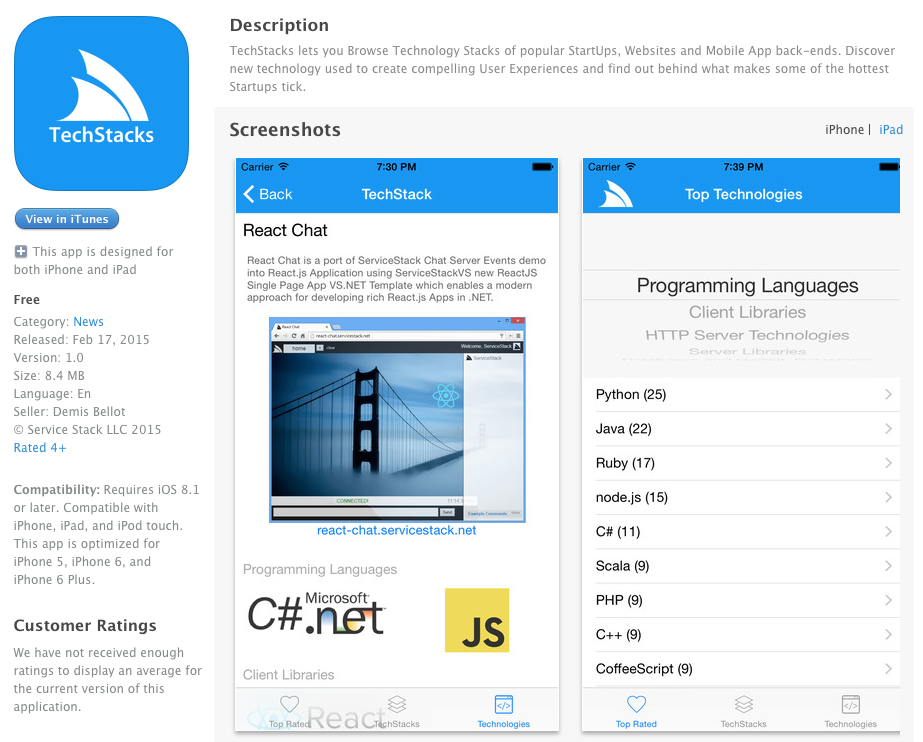
The complete TechStacks App source is available on GitHub.
All remote Service Calls used by the App are encapsulated into a single AppData.swift class and only uses JsonServiceClient's non-blocking Async API's to ensure a Responsive UI is maintained throughout the App.
MVC and Key-Value Observables (KVO)
If you've ever had to implement INotifyPropertyChanged in .NET, you'll find the built-in model binding capabilities in iOS/macOS a refreshing alternative thanks to Objective-C's underlying NSObject which automatically generates change notifications for its KV-compliant properties. UIKit and Cocoa frameworks both leverage this feature to enable its Model-View-Controller Pattern.
As keeping UI state updated after asynchronous calls can get unwieldy, this section shows how the sample
app uses NSObject and KVO in its response models. In new SwiftUI apps, the same client can be called from
an @Observable or ObservableObject model instead.
Enable Key-Value Observing in Swift DTO's
To enable KVO in your Swift DTOs, have each DTO inherit from NSObject by overriding the BaseClass
option in the header comment:
/* Options:
Date: 2015-02-19 22:43:04
Version: 1
BaseUrl: https://techstacks.io

BaseClass: NSObject
...
*/
Then run npx get-dtos swift to update the reference with the customized option.
Then to enable Key-Value Observing just mark the response DTO variables with the dynamic modifier, e.g:
public dynamic var allTiers:[Option] = []
public dynamic var overview:AppOverviewResponse = AppOverviewResponse()
public dynamic var topTechnologies:[TechnologyInfo] = []
public dynamic var allTechnologies:[Technology] = []
public dynamic var allTechnologyStacks:[TechnologyStack] = []
This allows the properties to issue change notifications when they're populated after an async request:
@MainActor
func loadOverview() async throws -> AppOverviewResponse {
    let response = try await client.getAsync(AppOverview())
    overview = response
    allTiers = response.allTiers
    topTechnologies = response.topTechnologies
    return response
}

@MainActor
func loadAllTechnologies() async throws -> GetAllTechnologiesResponse {
    let response = try await client.getAsync(GetAllTechnologies())
    allTechnologies = response.results
    return response
}

@MainActor
func loadAllTechStacks() async throws -> GetAllTechnologyStacksResponse {
    let response = try await client.getAsync(GetAllTechnologyStacks())
    allTechnologyStacks = response.results
    return response
}
Observing Data Changes
In your ViewController have the datasources for your custom views binded to the desired data (which will initially be empty):
func pickerView(pickerView: UIPickerView, numberOfRowsInComponent component: Int) -> Int {
    return appData.allTiers.count
}
...
func tableView(tableView: UITableView, numberOfRowsInSection section: Int) -> Int {
    return appData.topTechnologies.count
}
Then in viewDidLoad() start observing the properties your UI Controls are bound to, e.g:
override func viewDidLoad() {
    ...
    self.appData.observe(self, properties: ["topTechnologies", "allTiers"])
    Task { try await self.appData.loadOverview() }
}
deinit { self.appData.unobserve(self) }
In the example code above we're using some custom KVO helpers to keep the code required to a minimum.
With the observable bindings in place, the change notifications of your observed properties can be handled by overriding observeValueForKeyPath() which passes the name of the property that's changed in the keyPath argument that can be used to determine the UI Controls to refresh, e.g:
override func observeValueForKeyPath(keyPath:String, ofObject object:AnyObject, change:[NSObject:AnyObject],
  context: UnsafeMutablePointer<Void>) {
    switch keyPath {
    case "allTiers":
        self.technologyPicker.reloadAllComponents()
    case "topTechnologies":
        self.tblView.reloadData()
    default: break
    }
}
With the bindings configured, start the async request from a task and let the observed properties update the relevant UI controls:
Task {
    try await self.appData.loadOverview()
}
Images and Custom Binary Requests
In addition to typed Service requests, JsonServiceClient can fetch images and other binary responses with
the getData() and getDataAsync() APIs. They return both Data and the HTTPURLResponse, so callers can
inspect status and headers. This can be used to maintain an in-memory image cache:
var imageCache:[String:UIImage] = [:]

public func loadImageAsync(url:String) async throws -> UIImage? {
    if let image = imageCache[url] {
        return image
    }

    guard let (data, _) = try await client.getDataAsync(url: url),
          let image = UIImage(data: data) else {
        return nil
    }

    imageCache[url] = image
    return image
}
TechStacks macOS Desktop App
As JsonServiceClient.swift has no external dependencies and only relies on core Foundation classes it
can be used anywhere Swift can including macOS Cocoa Desktop and Command Line Apps and Frameworks.
Most of the API's used in TechStacks iOS App are standard typed Web Services calls. There is also a TechStacks macOS Desktop available which showcases how easy it is to call ServiceStack's dynamic AutoQuery Services and how much auto-querying functionality they can provide for free.
E.g. The TechStacks Desktop app is essentially powered with these 2 AutoQuery Services:
[Query(QueryTerm.Or)] //change from filtering (default) to combinatory semantics
public class FindTechStacks : QueryBase<TechnologyStack> {}

[Query(QueryTerm.Or)]
public class FindTechnologies : QueryBase<Technology> {}
Basically just a Request DTO telling AutoQuery what Table we want to Query and that we want to change the default Search behavior to have OR semantics. We don't need to specify which properties we can query as the implicit conventions automatically infer it from the table being queried.
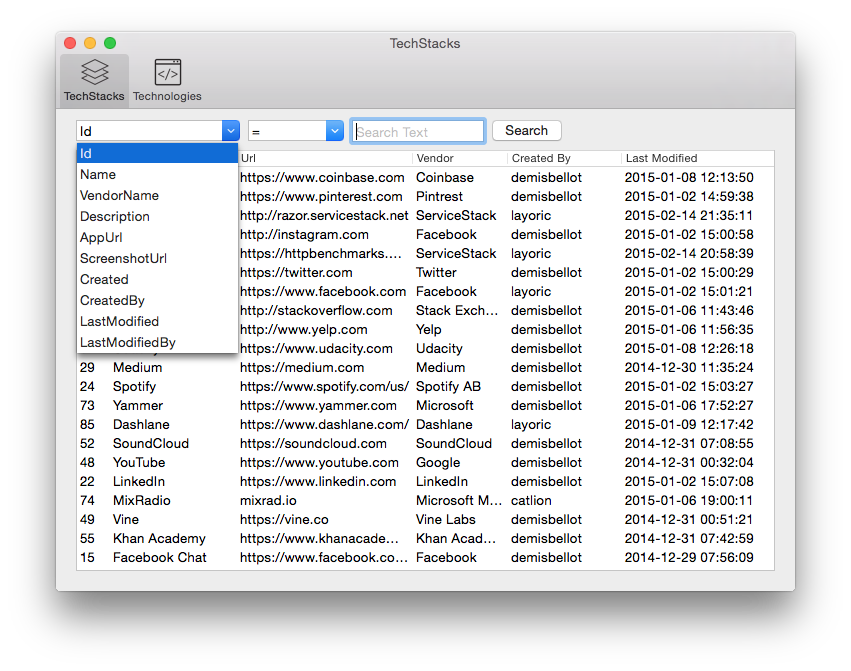
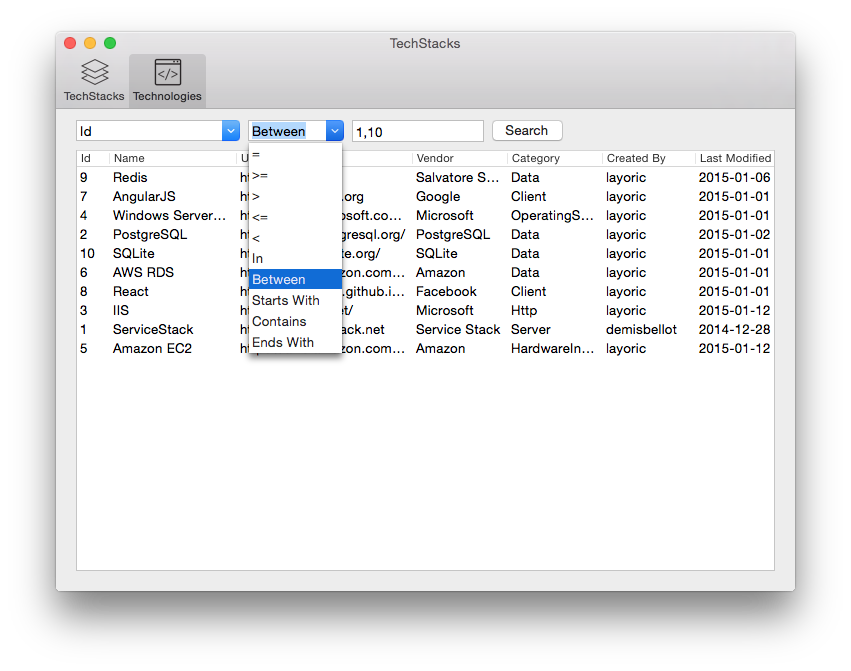
The TechStacks Desktop UI is then built around these 2 AutoQuery Services allowing querying against each field and utilizing a subset of the implicit conventions supported:
Querying Technology Stacks
Querying Technologies
Like the TechStacks iOS App, its Service calls can be kept in one data model. The model builds additional AutoQuery conventions at runtime, calls the typed request, and updates UI-bound results on the main actor:
@MainActor
func searchTechStacks(query:String, field:String? = nil, operand:String? = nil)
  async throws -> QueryResponse<TechnologyStackView> {
    self.search = query

    let queryString = query.count > 0 && field != nil && operand != nil
        ? [createAutoQueryParam(field!, operand!): query]
        : ["NameContains":query, "DescriptionContains":query]

    let request = FindTechStacks()
    let response = try await client.getAsync(request, query:queryString)
    filteredTechStacks = response.results
    return response
}

@MainActor
func searchTechnologies(query:String, field:String? = nil, operand:String? = nil)
  async throws -> QueryResponse<TechnologyView> {
    self.search = query

    let queryString = query.count > 0 && field != nil && operand != nil
        ? [createAutoQueryParam(field!, operand!): query]
        : ["NameContains":query, "DescriptionContains":query]

    let request = FindTechnologies()
    let response = try await client.getAsync(request, query:queryString)
    filteredTechnologies = response.results
    return response
}

func createAutoQueryParam(field:String, _ operand:String) -> String {
    let template = autoQueryOperandsMap[operand]!
    let mergedField = template.replace("%", withString:field)
    return mergedField
}
Essentially employing the same strategy for both AutoQuery Services where it builds a query String parameter to send with the request. For incomplete queries, the default search queries both NameContains and DescriptionContains field conventions returning results where the Search Text is either in Name OR Description fields.
TechStacks Console App
Swift Package Manager works in Xcode and from the command line, so the same ServiceStack package and
generated DTOs can be used by Apple-platform apps, libraries, tests, and command-line executables. The
package conditionally imports FoundationNetworking, enabling the client to build on platforms where
networking APIs aren't part of Foundation itself.
Together with Swift Add ServiceStack Reference we now have a productive development workflow for building statically-linked native executables that consume Typed ServiceStack Services as seen in the new step-by-step guide below showing how to create a simple Swift TechStacks Console App.
Swift Generated DTO Types
ServiceStack translates .NET service contracts into clean Swift classes and enums using the closest
built-in Swift types. Request DTOs implement IReturn and declare their response with a typealias, while
all generated models use Codable for serialization.
To see what this ended up looking like, we'll peel back behind the covers and look at a couple of the Generated Swift Test Models to see how they're translated in Swift:
public class AllTypes : IReturn, Codable
{
    public typealias Return = AllTypes

    public var id:Int?
    public var nullableId:Int?
    public var byte:UInt8?
    public var short:Int16?
    public var int:Int?
    public var long:Int?
    public var uShort:UInt16?
    public var uInt:UInt32?
    public var uLong:UInt64?
    public var float:Float?
    public var double:Double?
    public var decimal:Double?
    public var string:String?
    public var dateTime:Date?
    @TimeSpan public var timeSpan:TimeInterval?
    public var dateTimeOffset:Date?
    public var guid:String?
    public var char:String?
    public var nullableDateTime:Date?
    @TimeSpan public var nullableTimeSpan:TimeInterval?
    public var stringList:[String] = []
    public var stringArray:[String] = []
    public var stringMap:[String:String] = [:]
    public var intStringMap:[Int:String] = [:]
    public var subType:SubType?

    required public init(){}
}

public class AllCollectionTypes : IReturn, Codable
{
    public typealias Return = AllCollectionTypes

    public var intArray:[Int] = []
    public var intList:[Int] = []
    public var stringArray:[String] = []
    public var stringList:[String] = []
    public var pocoArray:[Poco] = []
    public var pocoList:[Poco] = []
    public var pocoLookup:[String:[Poco]] = [:]
    public var pocoLookupMap:[String:[[String:Poco]]] = [:]

    required public init(){}
}

public enum EnumType : String, Codable
{
    case Value1
    case Value2
    case Value3
}
Properties are mapped to their Swift equivalents. DTOs can be partially populated, so scalar and nested properties are optional by default, while collections are initialized empty. Configuration options let you change collection initialization and property optionality. Tests also cover JSON round trips for inherited and nested DTOs, ISO-8601 and WCF JSON dates, XSD durations, dictionaries, arrays, and typed enums.
Swift Code Generation
Simple DTOs rely on synthesized Codable conformance. For inherited DTOs, the generator emits explicit
CodingKeys, decoder, and encoder implementations so base and derived properties round-trip correctly:
public class HelloWithInheritance : HelloBase, IReturn
{
    public typealias Return = HelloWithInheritanceResponse
    public var name:String?

    required public init(){ super.init() }

    private enum CodingKeys : String, CodingKey { case name }

    required public init(from decoder: Decoder) throws {
        try super.init(from: decoder)
        let container = try decoder.container(keyedBy: CodingKeys.self)
        name = try container.decodeIfPresent(String.self, forKey: .name)
    }

    public override func encode(to encoder: Encoder) throws {
        try super.encode(to: encoder)
        var container = encoder.container(keyedBy: CodingKeys.self)
        if name != nil { try container.encode(name, forKey: .name) }
    }
}
Swift Native Types Limitations
Due to the semantic differences and limitations in Swift there are some limitations of what's not supported. Luckily these limitations are mostly highly-discouraged bad practices which is another reason not to use them. Specifically what's not supported:
No object or Interface properties
When emitting code we'll generate a comment when ignoring these properties, e.g:
//emptyInterface:IEmptyInterface ignored. Swift doesn't support interface properties
Base types must be marked abstract
As Swift doesn't support extension inheritance, when using inheritance in DTO's any Base types must be marked abstract.
All DTO Type Names must be unique
Required as there are no namespaces in Swift (Also required for F# and TypeScript). ServiceStack only requires Request DTO's to be unique, but our recommendation is for all DTO names to be unique.