AI Server can transcribe audio files to text using the Speech-to-Text provider. This is powered by the Whisper model and is hosted on your own ComfyUI Agent.
Speech to Text UI
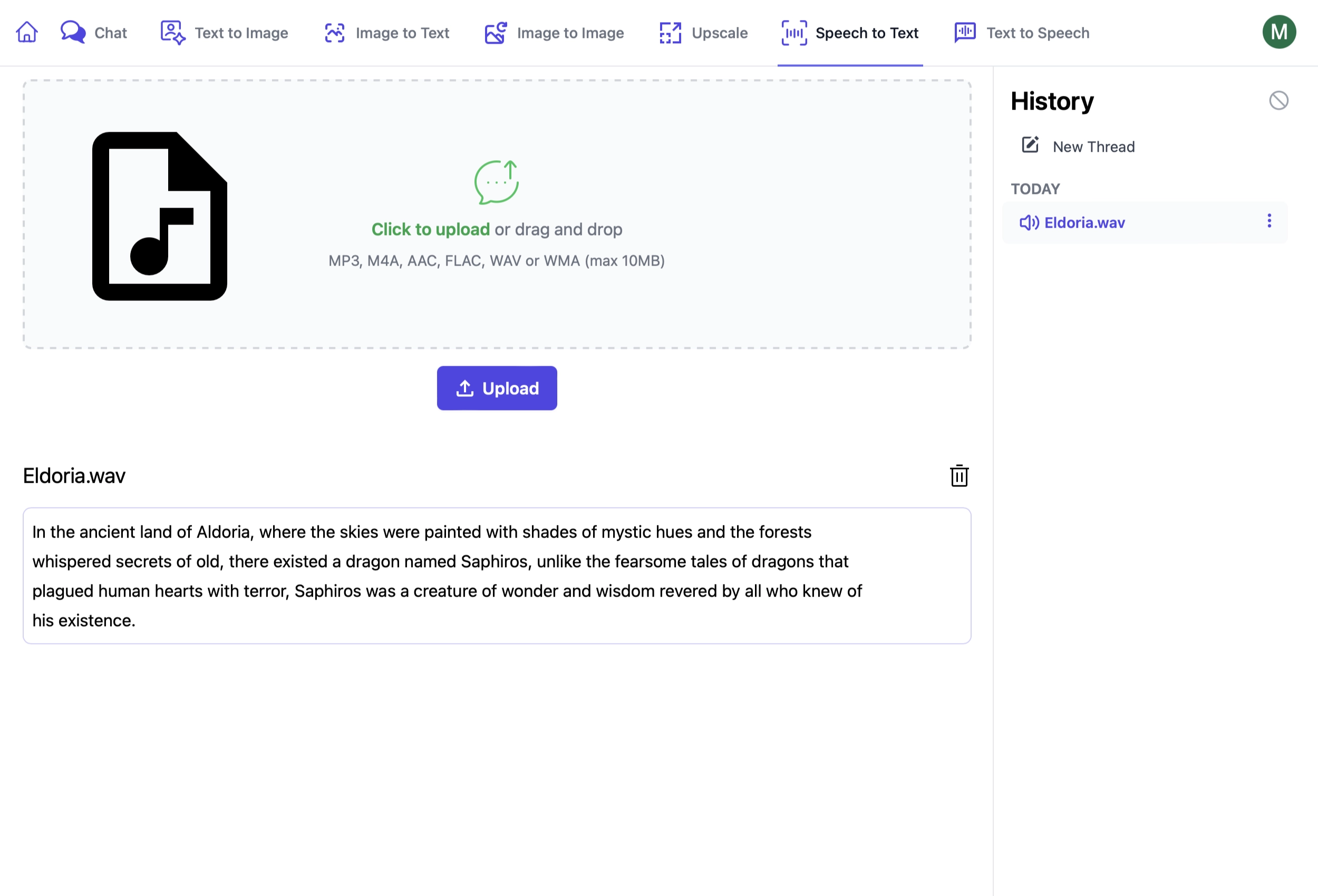
AI Server's Speech to Text UI lets you transcribe audio files from its active Comfy UI Agents:
https://localhost:5006/SpeechToText
Using Speech to Text Endpoints
These endpoints are used in a similar way to other AI Server endpoints where you can provide:
RefId- provide a unique identifier to track requestsTag- categorize like requests under a common group
In addition Queue requests can provide:
ReplyTo- URL to send a POST request to when the request is complete
Speech to Text
The Speech to Text endpoint converts audio input into text. It provides two types of output:
- Text with timestamps: JSON format with
startandendtimestamps for each segment. - Plain text: The full transcription without timestamps.
These outputs are returned in the TextOutputs array, where the JSON will need to be parsed to extract the text and timestamps.
using var fsAudio = File.OpenRead("files/test_audio.wav");
var response = client.PostFileWithRequest(new SpeechToText(),
    new UploadFile("test_audio.wav", fsAudio, "audio"));

// Two texts are returned
// The first is the timestamped text json with `start` and `end` timestamps
var textWithTimestamps = response.Results[0].Text;
// The second is the plain text
var textOnly = response.Results[1].Text;
Queue Speech to Text
For longer audio files or when you want to process the request asynchronously, you can use the Queue Speech to Text endpoint.
using var fsAudio = File.OpenRead("files/test_audio.wav");
var response = client.PostFileWithRequest(new QueueSpeechToText(),
    new UploadFile("test_audio.wav", fsAudio, "audio"));

// Poll for Job Completion Status
GetTextGenerationStatusResponse status = new();
while (status.JobState is BackgroundJobState.Started or BackgroundJobState.Queued)
{
    status = client.Get(new GetTextGenerationStatus { RefId = response.RefId });
    Thread.Sleep(1000);
}

var answer = status.Results[0].Text;