
Background Jobs, ready for your important work
ServiceStack v10.3 is a major upgrade to Background Jobs, turning it from a simple way to run work off the request thread into a complete, durable job platform for the work your business depends on: charging payments, sending emails, importing data, generating reports, syncing tenants and calling third-party APIs.
It's the same IBackgroundJobs API you already use, on the same database you already run. There's no
broker to deploy, no new infrastructure to operate and nothing to learn before you benefit - existing Jobs
get safer retries, bounded resource usage and graceful shutdown on upgrade, while the new features are there
the moment you need them.
See how v10.3 keeps your Jobs running through server crashes, deploys, failing dependencies and duplicate requests:
This release also adds two new React templates: Next SaaS for multi-tenant SaaS products and Next License for selling licenses for desktop apps, as well as MCP connections for AI Chat, project-organized AI Chat conversations, API Rate Limiting for ASP.NET Core endpoints and OpenTelemetry tracing across APIs and the work they start:
Upgrading requires a schema change
Background Jobs updates its database schema automatically on startup, and clears Jobs that were still queued or running when you upgrade. Please read Upgrading to v10.3 before deploying.
Scale out across App Servers
The RDBMS provider now safely runs on any number of App Servers sharing the same PostgreSQL, SQL Server or MySQL database. Every Job is claimed with a lease that's renewed while it runs, and every write a server makes to a Job is fenced by that lease - so a Job is only ever owned by one server at a time, and a slow or partitioned server can't overwrite the result of the server that took over from it.
When a server crashes, is killed or loses its network, its leases simply expire and another server
recovers its Jobs automatically. A Job that repeatedly takes its server down with it is counted as a
failed attempt each time, and is failed with the LeaseExpired error code once it exceeds its RetryLimit,
instead of being retried forever.
On PostgreSQL and MySQL 8+, servers claim Jobs with SKIP LOCKED, so adding more servers adds more
throughput rather than more contention.
Deploy without losing work
Background Jobs now shuts down gracefully. Running Jobs are given ShutdownTimeoutSecs (default 30s)
to finish and have their progress saved, and on the RDBMS provider any Job that was claimed but never
started is handed straight back so another server picks it up immediately - rather than waiting for its
lease to expire on every deploy. This is registered for you by the plugin, so existing Apps get it without
changing their own hosted service.
Know which servers are doing what
Each App Server records a heartbeat, so jobs.GetJobNodes() and the AdminGetJobNodes API report which
servers are alive, what version they're running, how many Jobs each is running, and which stopped
reporting. You can also:
- Drain a server before taking it out of service, so it finishes the Jobs it has without taking any more:
jobs.SetJobNodeDraining(serverId, true) - Dedicate servers to queues, e.g. only run GPU work on the servers that have one:
services.AddPlugin(new DatabaseJobFeature {
    Queues = ["gpu"], // this server only processes Jobs on the gpu queue
});
Control your workloads
Different work has different needs: a password reset can't wait behind a bulk import, and a third-party API can't be called faster than its quota allows. Queues let you run each class of work in its own lane, and control each lane while your App is running:
Queues and priorities
Jobs can now be routed to named queues, each with its own concurrency, so different classes of work
don't compete for the same capacity. Within a queue, Jobs with a higher Priority run first:
jobs.EnqueueCommand<SendPasswordResetCommand>(request, new() {
    Queue = "emails",
    Priority = 10, // ahead of the newsletter
});
services.AddPlugin(new BackgroundsJobFeature {
    MaxConcurrentJobs = 8,                   // default for every queue
    QueueConcurrency = { ["imports"] = 2 },  // bulk imports can't take over the server
});
Pause, resume and throttle at runtime
When a downstream system is down, pause its queue - its Jobs stay safely queued and resume where they left off, instead of burning through their retries. Queue concurrency can also be raised to clear a backlog or lowered to protect a struggling dependency. Both take effect on every server, from the API or the Admin UI:
jobs.PauseJobQueue("payments");
jobs.ResumeJobQueue("payments");
jobs.SetJobQueueConcurrency("imports", 4);
Rate limit third-party APIs
Concurrency limits how many Jobs run at once, but a quota like "10 calls per second" limits how often they start. Queue rate limits handle exactly that, and on the RDBMS provider the limit is counted across every server, so adding servers doesn't multiply your API bill:
jobs.SetJobQueueRateLimit("stripe-api", rateLimit: 10, window: TimeSpan.FromSeconds(1));
Fair distribution across servers
Each server only claims its queue's concurrency plus MaxPrefetchJobs (default 100) Jobs ahead of its
Workers, so one server can't hoard a backlog that the others could be running.
Never do the same work twice
Networks time out, users double-click and messages get replayed - the same request arriving twice is normal, but charging a customer twice isn't. Background Jobs gives you three ways to make sure work happens once:
- Idempotent enqueue - give a Job a meaningful
RefIdand submitting it again returns the Job that's already queued, instead of queueing a duplicate. - Singleton Jobs - a
SingletonKeyallows only one Job with that key to be queued or running at a time, enforced by a unique database index so it holds even when several servers submit at once. - Transactional outbox - with the RDBMS provider, queue Jobs on your own connection so they're saved in the same transaction as your data: if the transaction rolls back, so do its Jobs.
Resilient failure handling
- Smarter retries. Retries back off with
Fixed,Linear,Exponentialor the new defaultExponentialJitter, which spreads retries out after an outage so your servers don't all hammer a recovering dependency at once. Configure the delays per Job withRetryDelayandMaxRetryDelay. - Every failure is kept. Each failed attempt is recorded with its error, server and duration, so an
intermittent failure shows its full history rather than only the last error - see
jobs.GetJobAttempts(jobId)or theAdminGetJobAttemptsAPI. - Jobs that shouldn't run late won't. Give a Job an
ExpiresInorExpiresAtand if it can't start in time it's cancelled with theJobExpirederror code - no more reminders for meetings that already happened. - Timeouts are enforced. A Job that exceeds its
TimeoutSecsis cancelled, and even a Job that ignores its cancellation token releases its Worker so the Jobs queued behind it keep moving. - Cancellation reaches the running Job, on whichever server is executing it.
- Typed errors you can branch on, like
DuplicateRefIdException,JobErrorCodes.JobExpiredandJobErrorCodes.LeaseExpired.
jobs.EnqueueCommand<SyncCrmContactCommand>(contact, new() {
    RetryLimit = 5,
    RetryBackoff = RetryBackoff.ExponentialJitter,
    RetryDelay = TimeSpan.FromSeconds(5),
    MaxRetryDelay = TimeSpan.FromMinutes(5),
    ExpiresIn = TimeSpan.FromHours(1),
    TimeoutSecs = 120,
});
Workflows and batches
Multi-step workflows
Steps can depend on each other, with each step reading the result of the step before it. If a step fails,
the steps after it are cancelled - while steps queued with DependsOnPolicy.OnFinished still run however the
previous step ended, perfect for notifications and clean-up:
var charge  = jobs.EnqueueCommand<ChargePaymentCommand>(order);
var reserve = jobs.EnqueueCommand<ReserveInventoryCommand>(order, new() { DependsOn = charge.Id });
var ship    = jobs.EnqueueCommand<ShipOrderCommand>(order, new() {
    DependsOn = reserve.Id,
    Callback = nameof(OrderShippedCommand),
});
// Tell the customer what happened, whether shipping succeeded or not
jobs.EnqueueCommand<NotifyCustomerCommand>(order, new() {
    DependsOn = ship.Id,
    DependsOnPolicy = JobDependencyPolicy.OnFinished,
});
Batches with live progress
Fan out thousands of Jobs as a Batch and watch its progress in the Admin UI. When every Job has
finished, the batch's callback runs, and onSuccess runs only if every Job succeeded - so "email the
report when the import completes" no longer needs a polling loop. A Job with DependsOnBatch fans back in,
only running once the whole batch is done:
jobs.CreateJobBatch(batchId, total: images.Count,
    callback: nameof(ImportFinishedCommand),   // runs once every Job has finished
    onSuccess: nameof(PublishGalleryCommand)); // only when every Job succeeded

foreach (var image in images)
    jobs.EnqueueCommand<ResizeImageCommand>(image, new() { BatchId = batchId });

jobs.EnqueueCommand<CreateZipArchiveCommand>(new() { DependsOnBatch = batchId });
A whole batch can be cancelled or requeued in one call, and cancelling a batch prevents any more Jobs being added to it.
Keep each customer's Jobs in order
Jobs that share a ConcurrencyKey run one at a time, while Jobs with different keys still run in parallel.
Each tenant's syncs, each account's ledger updates or each document's edits are applied in order - without
serialising everyone else behind them:
jobs.EnqueueCommand<SyncTenantDataCommand>(sync, new() {
    ConcurrencyKey = $"tenant:{sync.TenantId}",
    TenantId = sync.TenantId, // also filter and report by tenant
});
Get results back
Background work doesn't have to mean fire-and-forget. Await a Job's result in the same request to keep a
synchronous API while the heavy lifting runs on whichever server has capacity, or give it a ReplyTo and
have its result delivered the moment it completes - POSTed to a webhook URL, or published to an MQ.
When a ReplyTo can come from your users, restrict where results can be sent so your servers can't be used
to reach internal addresses:
services.AddPlugin(new DatabaseJobFeature {
    ValidateReplyTo = JobReplyTo.AllowUrlPrefixes(["https://hooks.example.org/"]),
});
Production-grade schedules
Recurring tasks are now durable and safe to run on every server - each occurrence is only ever queued once, however many servers evaluate the schedule:
var schedule = Schedule.Cron("0 9 * * MON-FRI");
schedule.TimeZoneId = "America/New_York";
schedule.OverlapPolicy = ScheduleOverlapPolicy.Skip;
schedule.EndDate = new DateTime(2026, 12, 31);

jobs.RecurringCommand<SendDailyDigestCommand>("Daily Digest", schedule);
See what your Jobs are doing
Job executions also appear in the Admin UI's Profiling page alongside APIs, OrmLite and Redis, and continue the trace of the request that queued them with OpenTelemetry.
The Background Jobs Admin UI has been updated with pause, resume, concurrency and rate limit controls for each queue, a Nodes view to see and drain App Servers, per-queue statistics and wait times on the dashboard, each Job's failed attempts, batch progress, pause and run-now controls for Scheduled Tasks, replaying a completed Job, and bulk actions to cancel or requeue Jobs by queue, tag or batch. Running Jobs stream their progress and logs live:
Protecting your database
Your jobs database is a work queue, so v10.3 keeps it lean:
- Requests larger than
MaxRequestBodyChars(1M chars) are rejected when they're queued - pass a reference to large payloads instead. - Responses larger than
MaxResponseBodyChars(1M chars) aren't stored, and the Job records why. - Job logs are bounded by
MaxJobLogChars(100K chars), with truncation shown in the Admin UI. - Opt in to
JobSummaryRetentionandArchiveRetentionto delete old history automatically.
Upgrading to v10.3
v10.3 changes the Background Jobs schema and clears in-flight Jobs, so a few minutes of preparation makes for a smooth upgrade. Tick these off as you go - the details for each are below:
The schema is upgraded on startup
When your App starts, Background Jobs upgrades its database schema automatically (unless you've disabled
AutoInitSchema):
- New columns are added to the
BackgroundJob,JobSummaryandScheduledTasktables, and to theCompletedJobandFailedJobarchives. - New tables are created:
JobBatch,JobQueue,JobConcurrencyLock,JobNodeandJobAttempt. - New indexes are created.
New columns
BackgroundJob, along with its CompletedJob and FailedJob archives, and JobSummary gain:
| Columns | Used for |
|---|---|
Queue, Priority |
Routing Jobs to named queues, and running higher priority Jobs first |
RetryBackoff, RetryDelayMs, MaxRetryDelayMs |
Each Job's retry policy |
ExpiresAt |
Cancelling a Job with JobExpired if it can't start in time |
CancelRequestedDate |
Telling a cancelled queued Job apart from a running Job that's asked to stop |
LeaseOwner |
The server that ran the Job - on BackgroundJob, the server that owns it |
DependsOnBatch, DependsOnPolicy |
Fan-in after a batch, and running a dependent Job however its parent ended |
ConcurrencyKey |
Running Jobs that share a key one at a time |
TenantId |
Filtering and reporting by tenant |
TraceId |
Continuing the trace of the request that queued the Job |
LogsTruncated |
Showing when a Job's logs reached MaxJobLogChars |
BackgroundJob also gains SingletonKey, which is backed by a unique index that allows only one queued or running Job
per key, and LeaseToken and LeaseExpiresAt, the lease that lets only one server own a Job and lets another server
recover it when it expires.
JobSummary also gains RunAfter and SingletonKey to show and filter them in the Admin UI, and Meta, the
metadata recorded against the Job.
ScheduledTask gains the columns behind production-grade schedules:
| Columns | Used for |
|---|---|
Enabled, NextRun |
Pausing and resuming a schedule, and the persisted next occurrence every server agrees on |
TimeZoneId |
Running at the intended local time |
MisfirePolicy, OverlapPolicy |
Whether a missed occurrence runs after a restart, and whether an occurrence can overlap the previous one |
StartDate, EndDate, MaxRuns, RunCount |
Limiting when and how many times a schedule runs |
LastRunState, LastRunDurationMs, LastErrorCode, LastErrorMessage |
The outcome of the last run, and any error scheduling it |
CreatedDate, ModifiedDate, Meta |
Auditing when a schedule was created and last changed |
New tables
| Table | Used for |
|---|---|
JobBatch |
Batches: progress counters, the callback and onSuccess commands, and cancellation |
JobQueue |
Queue controls: pausing a queue, runtime concurrency overrides and rate limits, shared by every server |
JobConcurrencyLock |
Concurrency keys: holding each key so only one Job with that key runs at a time |
JobNode |
Server heartbeats: which servers are alive, what they're running, and draining them |
JobAttempt |
Failed attempt history: each failed attempt's error, server and duration |
These changes are additive, so your history and Scheduled Tasks are preserved. The database user your App connects with needs permission to alter tables and create indexes. If you manage schema changes separately, apply them before deploying.
Jobs still queued when you upgrade are cleared
To start the new release from a consistent state, any Job that's still queued, scheduled to run later,
retrying or running when the upgrade is applied is removed from the queue. It's kept in your history as
Cancelled with the QueueClearedOnUpgrade error code, so you can see exactly what was cleared.
Before upgrading:
- Let your queue drain, or pause new work and wait for running Jobs to finish.
- Check for delayed Jobs - Jobs queued with
RunAfterorScheduleCommandfor a future date will be cleared too, and need to be queued again after the upgrade.
Recurring Scheduled Tasks aren't affected; they'll continue queueing their next occurrences as normal.
Upgrade every server at once
If you run the RDBMS provider on multiple servers, stop all of them before starting the new version, rather than doing a rolling deploy. Servers running v10.2 and v10.3 must not process the same database at the same time.
Behaviour changes to review
| Change | What to check |
|---|---|
| Bounded concurrency | Jobs without a named Worker previously each started immediately with unlimited parallelism. They now run on their queue's Workers, at most MaxConcurrentJobs at a time (default: the number of CPU cores). Raise MaxConcurrentJobs or set QueueConcurrency if you relied on running more at once. |
| ReplyTo is delivered | ReplyTo was previously only stored against the Job. It's now used to deliver the result: URLs receive a POST, and anything else is published to an MQ. If you used ReplyTo to store your own data, move it to Args or Meta. |
| Retry defaults | Retries now use ExponentialJitter backoff from a 5s base delay, capped at 5 minutes. Use DefaultRetryBackoff, DefaultRetryDelayMs and DefaultMaxRetryDelayMs to change them. |
| Cancellation isn't retried | Jobs that throw any OperationCanceledException (not just TaskCanceledException) are no longer retried. |
| Payload limits | Queueing a Job whose serialized request exceeds MaxRequestBodyChars (1M chars) now throws an ArgumentException. |
| Duplicate RefIds | Queueing a Job with a RefId already used by a different Job throws a DuplicateRefIdException instead of a database error. |
Schedule.Yearly |
Now runs once a year on 1 January. It previously ran on the first of every month. |
| Scheduled times | Schedule times are stored to the whole second. |
| Profiling | Job executions are now included in ProfileSource.All. |
For custom implementations
IBackgroundJobshas a newStopAsync()method, which custom implementations need to implement.DbJobsWorker.Queuehas been removed. UseQueuedCountorGetQueuedJobs()instead.
Get Started
Background Jobs is available in every ServiceStack App on .NET 8+. Existing Apps get the reliability improvements with the upgrade, and new features are opt-in per Job or per queue:
| To use | Do this |
|---|---|
| Background Jobs | Upgrade to v10.3 - your existing Jobs and schedules keep working. |
| Scale out across servers | Use DatabaseJobFeature on PostgreSQL, SQL Server or MySQL. |
| Queues, priorities, retries, expiry | Set them in BackgroundJobOptions when queueing a Job. |
| Batches, rate limits and queue controls | Use the new IBackgroundJobs extension methods. Queues can also be paused, resumed and re-throttled from the Admin UI. |
| Transactional outbox | Pass your IDbConnection to EnqueueCommand with the RDBMS provider. |
Open Background Jobs in the Admin UI to see your queues, batches and schedules.
New Next.js SaaS and Licensing Templates
This release also adds two new production-ready templates to the React Templates. Both are built with .NET 10, ServiceStack and Next.js 16. They take care of the parts every commercial product needs, like taking payments, managing customers and running the business, so you can spend your time on your product.
Next SaaS
Next SaaS is a starting point for multi-tenant B2C and B2B SaaS products. It includes the public site, the customer app and the back office from day one:
- Public Site - a product landing page, pricing rendered from published plan versions, ASP.NET Core Identity sign up and hosted Stripe Checkout with trials, coupons and promotion codes
- Customer App - organization dashboards, organization-scoped file storage, real-time usage meters and quotas, plan and billing management through the Stripe Customer Portal, team roles, API keys, audit logs and data export, ownership transfer and delayed deletion
- Operations Center - platform-wide commercial health, a Customer 360 view, an immutable plan editor, Stripe-synced coupons, platform usage analytics and recovery of failed webhooks, jobs and integrations
See it in action in this tour of Next SaaS:
Create a new Next SaaS project with:
npx create-net next-saas ProjectName
Next License
Next License lets you sell perpetual, offline-verified licenses for your .NET and Electron desktop apps, with no activation server to run:
- Purchase - customers choose an offer and pay with Stripe Checkout
- Fulfill - a Stripe webhook confirms the payment and signs an ES256 JWT license key
- Deliver - customers copy their key from My licenses
- Unlock - your app verifies the key offline against its embedded public key and enables Pro features
Licenses cover every build released up to their update cutoff, and keep working with those builds forever. Lifetime licenses cover every future build. Your app checks the key against its own release date, not today's date, so there's no expiry to enforce and no network call to make. The storefront also includes downloads from your published GitHub releases, account license transfers and an Operations Center where you can manage products and pricing, licenses, orders, refunds and license terms.
See it in action in this tour of Next License:
Create a new Next License project with:
npx create-net next-license ProjectName
Connect AI Chat to your tools with MCP
Your AI assistant can now work with tools hosted by other services. Add a remote Model Context Protocol (MCP) server from AI Chat's Tools → MCP Connections page, choose the tools you want in a conversation, and review each new tool call before it runs. Connections to GitHub, internal knowledge services and other Streamable HTTP MCP servers sit alongside your existing API Tools.
The connection form starts with a name and server URL. When a service needs credentials, choose a Bearer
token or OAuth. For GitHub's hosted MCP server, paste a personal access token without the Bearer prefix;
AI Chat stores it encrypted and sends it as an Authorization header when connecting.
Prefer sign-in? Register an OAuth App with your provider, enter its client details and the callback URL shown in the form, then authorize in the provider's browser window. The Tools page loads the connection's catalog after sign-in, so you can start selecting tools for a conversation.
Search the discovered tools, select all matching results in one click, or pick individual tools. You can disable a connection without deleting its credentials and later use Connect all to reconnect every enabled service. Tool calls show the server, input schema and proposed arguments; approvals can be granted for one call or remembered for an individual tool. If a remote result is uncertain after a connection failure, AI Chat asks you to verify it before continuing, without replaying the call.
Hosts enable the outbound McpClientExtension separately from the existing MCP Server, which
publishes your App's tools to external assistants. Connections can be managed by users in the UI or supplied
as shared, host-controlled configuration. See MCP Clients for setup, authentication and
configuration details.
AI Chat, organized by project
AI Chat's chat thread UI and prompt have been completely redesigned, so anyone who has used ChatGPT will feel at home straight away.
Its sidebar now groups conversations into project folders, so the chats for each piece of work stay together and the ones you need are a click away. Each folder shows its five most recent chats, Show more loads more on demand, and chats that don't belong to a project are kept under Recents. Hover a folder to start a new chat in it, or use its menu to edit the project or hide the folder from the sidebar.
Every chat runs in its own project
The prompt shows which project a conversation belongs to. Click it to search your projects, move the chat to another one, create a New project, or choose Don't work in a project. A chat's project decides which folder its file and code tools work in, and each running chat keeps the workspace it started with, so you can run chats in several projects at once without their work getting mixed up.
Titles that describe the conversation
New chats get a short, descriptive title generated alongside the first answer, instead of the first line of
your prompt. It never slows down or interrupts the response, and a chat you've renamed yourself keeps your
title. The model is configurable with defaults.summarize in llms.json, including a local model, or set it
to null to turn automatic titles off.
A prompt that keeps your work
Each conversation now has its own draft. Switch between chats and your unsent text, attachments and edits are exactly where you left them, even after reloading the page. Unsent drafts show in the sidebar with a Draft badge, so nothing you started gets lost.
The redesigned prompt floats above the conversation and grows as you type. Drop images, audio or documents anywhere on the chat to attach them, see image thumbnails before you send, and remove any attachment with one click.
AI Chat adds its new columns to your existing tables on startup, and your existing conversations keep their titles and appear under Recents until you move them into a project.
API Rate Limiting
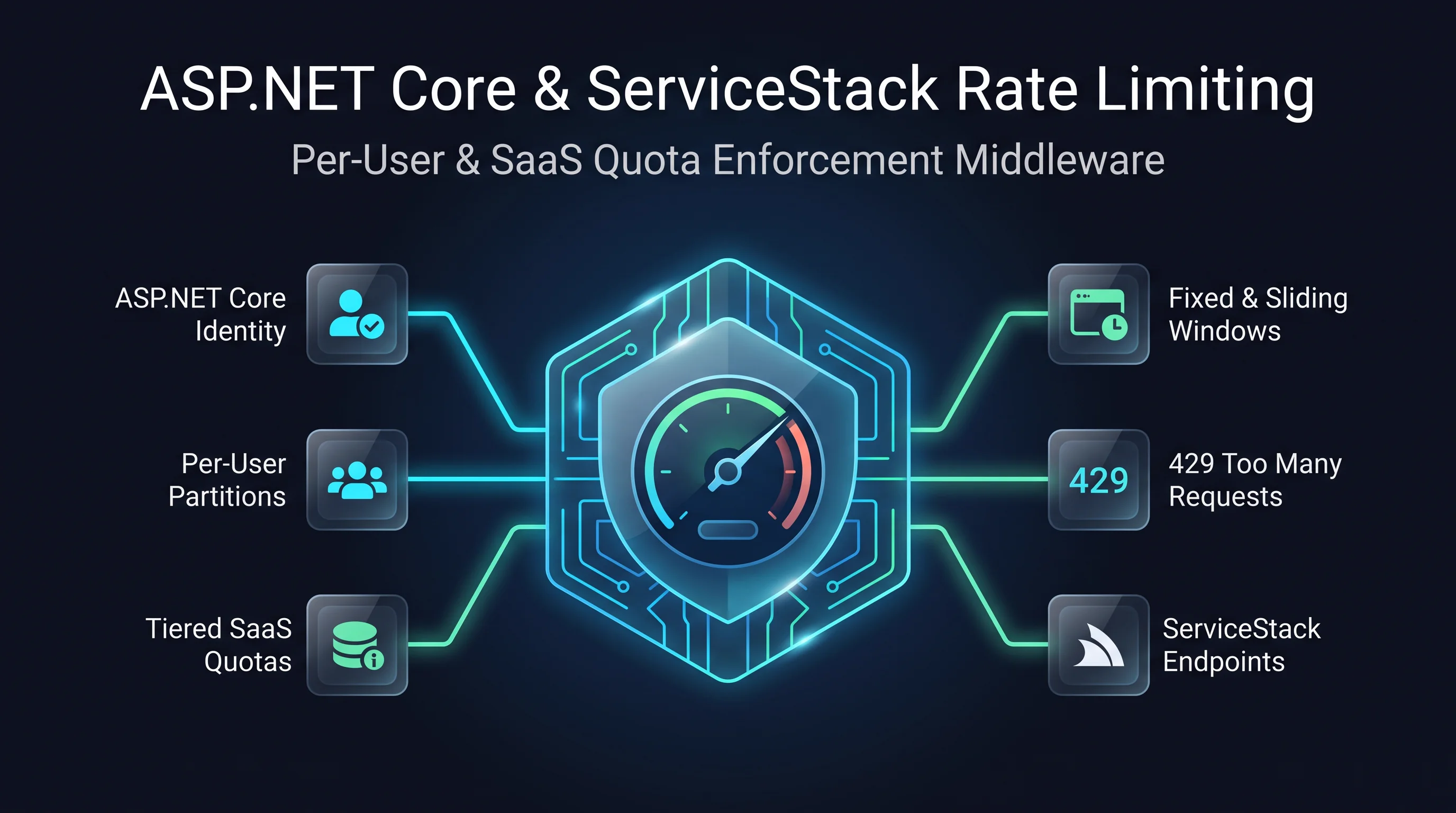
Protect your ServiceStack APIs from traffic spikes with opt-in ASP.NET Core rate limiting. Attach a
named policy to a request DTO with ServiceStack's [RateLimiting] attribute or Microsoft's
[EnableRateLimiting], or bind one policy to a [Tag] shared by several operations. Tagged operations
consume the same policy budget, so you can limit an entire workflow, such as orders, without giving
each endpoint a separate allowance.
Define the policy with AddRateLimiter and choose the limiter that fits your workload: fixed or sliding
windows, token buckets, concurrency limits, or your own policy. ASP.NET Core handles permits, queueing,
rejections and metrics. ServiceStack applies the policy consistently to explicit routes, /api URLs,
format URLs and autobatch endpoints, allowing an over-limit request to receive HTTP 429 before the
service runs. Shared DTO libraries can use [RateLimiting] without referencing ASP.NET Core.
For example, give every API tagged orders one fixed-window budget:
builder.Services.AddRateLimiter(options =>
{
    options.RejectionStatusCode = StatusCodes.Status429TooManyRequests;
    options.AddFixedWindowLimiter("orders", limiter =>
    {
        limiter.PermitLimit = 60;
        limiter.Window = TimeSpan.FromMinutes(1);
        limiter.QueueLimit = 0;
    });
});

var app = builder.Build();
app.UseRouting();
app.UseRateLimiter();
app.UseServiceStack(new AppHost(), options =>
{
    options.MapEndpoints();
    options.RateLimitTag("orders", "orders");
});
[Tag("orders")]
public class ListOrders : IGet, IReturn<ListOrdersResponse> { }

[RateLimiting("orders")]
public class PlaceOrder : IPost, IReturn<PlaceOrderResponse> { }
Both operations now draw from the orders policy. For per-user budgets, partition a named policy by an
authenticated ASP.NET Core principal and put UseAuthentication() before UseRateLimiter(). Keep
MapEndpoints() at its default force: true so legacy routes cannot bypass a limit. Built-in ASP.NET Core
limiter counters are local to each App Server; use a distributed policy or gateway for a quota shared across
servers. This API feature is separate from the Background Jobs queue rate limits
introduced in this release.
Follow a request with OpenTelemetry
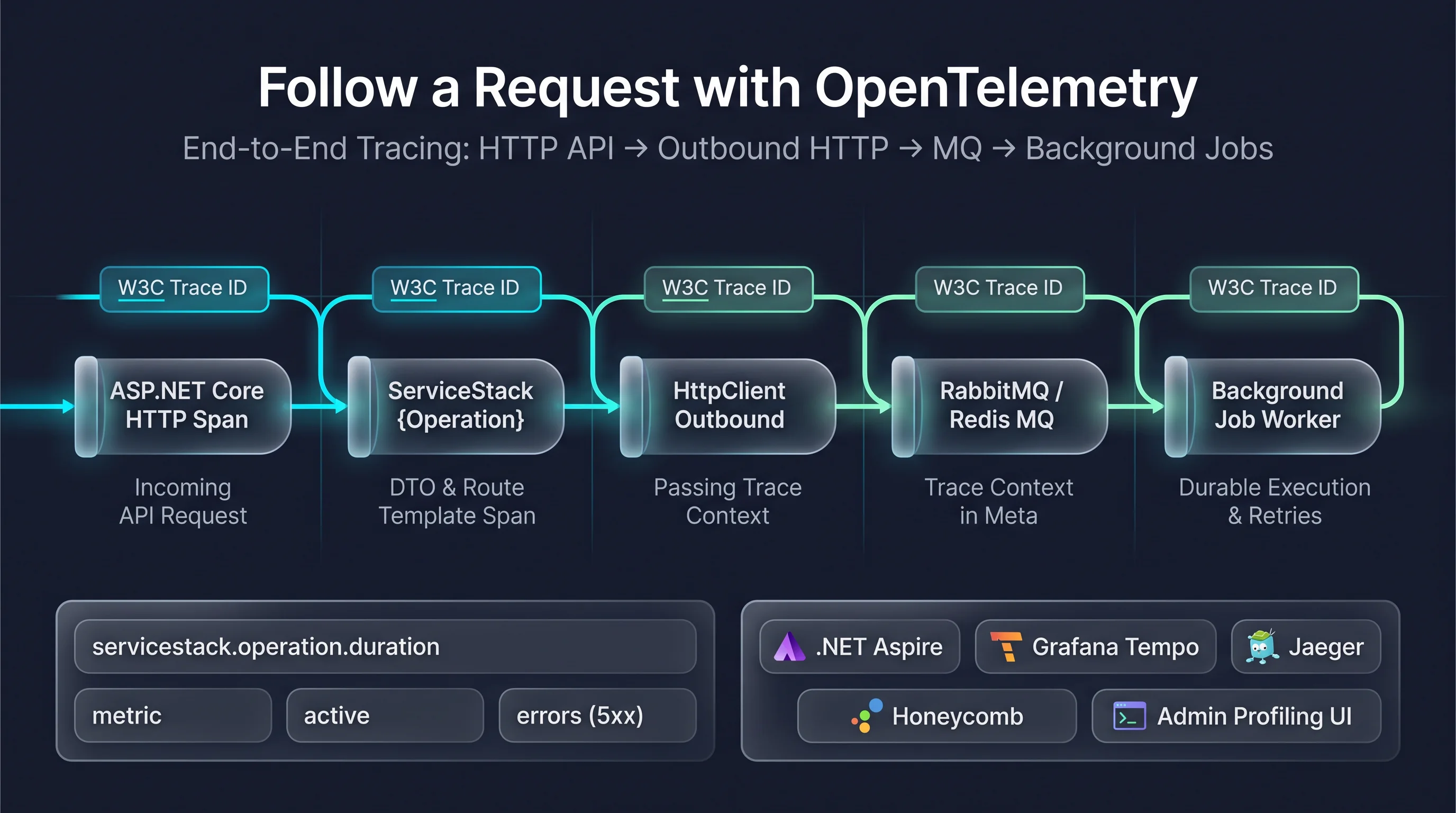
A single API call can charge a card, publish a message and queue a Job that runs on a different server. When something goes wrong, the evidence is spread across servers and log files. ServiceStack now emits standard OpenTelemetry traces and metrics that connect all of that work into one distributed trace, so you can follow a request from its HTTP call through its ServiceStack operation, outbound HTTP calls, MQ messages and Background Jobs in the tracing backend you already use, like Jaeger, Grafana Tempo, Honeycomb, Datadog or the .NET Aspire Dashboard.
Add it to an existing .NET 8+ App with:
npx add-in opentelemetry
This adds the OpenTelemetry packages and a Configure.Profiling.cs that registers ASP.NET Core and
HttpClient instrumentation alongside ServiceStack's own sources, exporting over OTLP to the collector in
OTEL_EXPORTER_OTLP_ENDPOINT:
services.AddOpenTelemetry()
    .WithTracing(tracing => tracing
        .AddAspNetCoreInstrumentation()
        .AddHttpClientInstrumentation()
        .AddSource(OperationDiagnostics.Name, MessagingDiagnostics.Name, JobsDiagnostics.Name)
        .AddOtlpExporter())
    .WithMetrics(metrics => metrics
        .AddAspNetCoreInstrumentation()
        .AddMeter(OperationDiagnostics.Name, MessagingDiagnostics.Name, JobsDiagnostics.Name)
        .AddOtlpExporter());
ServiceStack doesn't depend on the OpenTelemetry SDK or include an exporter, so your App keeps control of sampling, retention and where its data goes.
One trace, from the API to the work it starts
- API operations get a
ServiceStack {Operation}span inside ASP.NET Core's HTTP span, tagged with the Request DTO, route template, status code and outcome. No duplicate HTTP spans. - Messages published to Background MQ, Redis MQ or RabbitMQ carry the W3C trace context in their
Meta, so the consumer continues the trace, even on another server. - Background Jobs store the trace of the request that queued them, and continue it when they run, including after a retry or when another server recovers them.
- Outbound HTTP calls are traced by .NET's own HttpClient instrumentation, which passes the trace on to the services you call.
Metrics you can alert on
| Metric | Description |
|---|---|
servicestack.operation.duration |
How long each API operation took, in seconds |
servicestack.operation.active |
API operations currently executing |
servicestack.operation.errors |
API operations that failed with a server error |
Only 5xx responses and unhandled exceptions count as errors. Validation and authorization failures are
recorded as client_error, so they don't set off your error alerts. Metrics are tagged by operation, HTTP
method, route template and outcome, never by raw URLs, users or request bodies. They're joined by the existing
Background Jobs metrics for queue wait times, retries and failures.
Traces in the Profiling UI
You don't need to leave the Admin UI to follow a trace. With OpenTelemetry registered, the Profiling UI records each event with its W3C Trace Id and Span Id, so API, OrmLite, Redis, HttpClient, MQ and Job events from the same request come up together. Click a Trace Id to see them in order, switch to Trace view to see each event under its parent span, or use Open in trace backend to jump to the full trace in your tracing backend:
services.AddPlugin(new ProfilingFeature {
    ExternalTraceUrlTemplate = "https://traces.example.org/trace/{traceId}",
});
Profiling durations and times are now also measured correctly on Linux and macOS, where they were previously overstated. Profiling continues to work without OpenTelemetry, so you can adopt tracing when you're ready.
See OpenTelemetry Tracing for the full list of spans, attributes and configuration.
Async Bulk Inserts
OrmLite now has BulkInsertAsync for inserting large sets of rows without blocking an async workflow:
await db.BulkInsertAsync(rows, token: cancellationToken);
It accepts the same BulkInsertConfig options as BulkInsert, including Mode, BatchSize and
InsertFields. The async implementation uses the provider's bulk insert path for PostgreSQL, SQL Server,
MySQL and Firebird; BulkInsertMode.Sql sends batched multi-row INSERT statements asynchronously.
Thanks to ServiceStack community contributor @DeonHeyns for contributing this feature. See Bulk Inserts for usage and configuration.