Put the content you already have to work
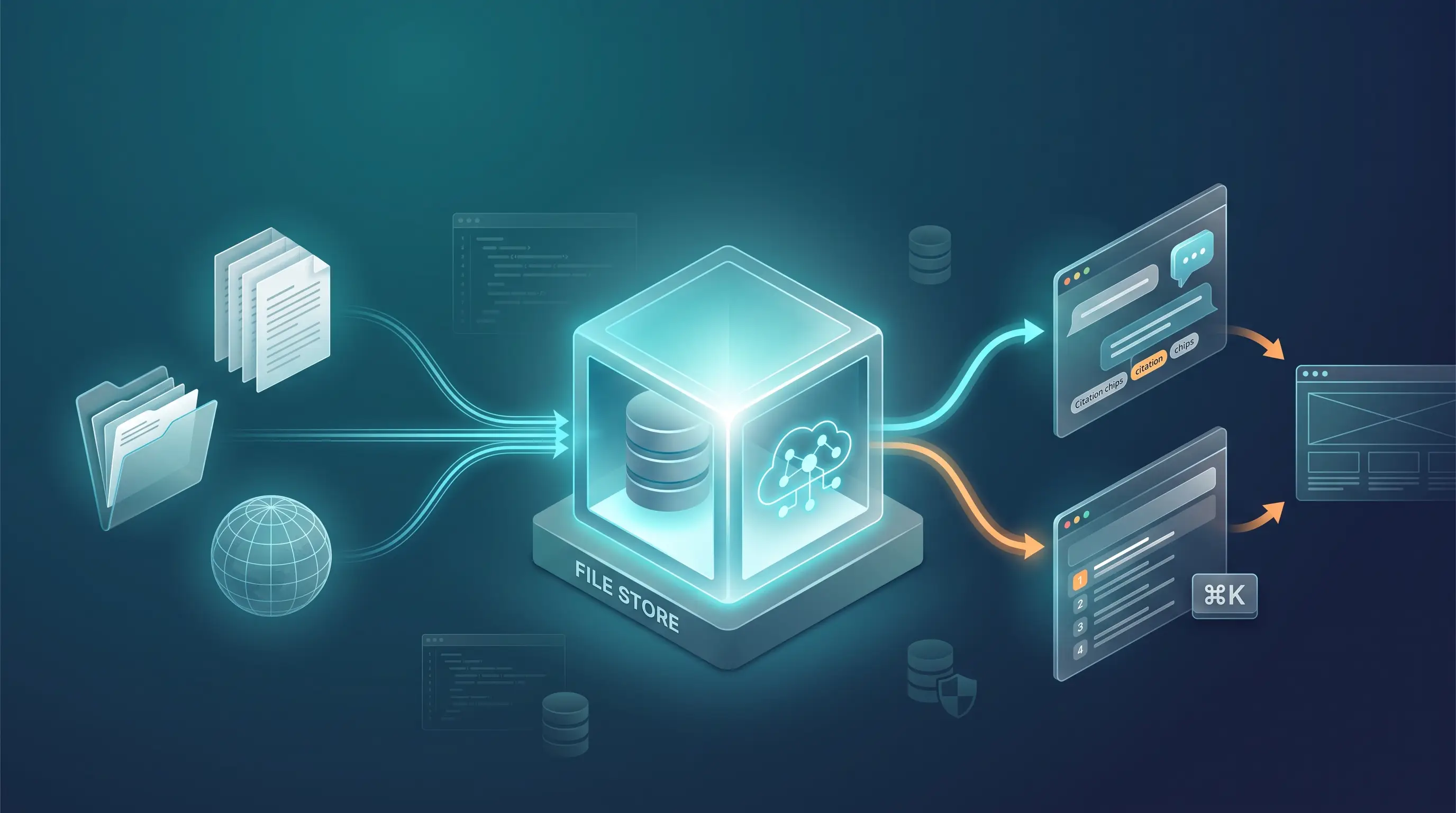
ServiceStack v10.2 is headlined by Gemini RAG - a complete, managed knowledge platform that turns the files, documentation and websites you already maintain into two public customer experiences: a citation-backed AI Assistant and an instant, model-free Website Search. Both are published to any site with a single script tag, from one import pipeline and one curated set of documents.
The rest of the release removes friction from everyday .NET development - portable typed JSON queries and native Upsert APIs in OrmLite, Startup Tasks that keep generated client DTOs and PDF models in sync on every restart, ServiceStack Auth support in AI Chat, and the results of a codebase-wide security and reliability audit.
Gemini RAG Knowledge Bases, Website Search and Assistants
Gemini RAG combines Google Gemini's File Search retrieval with ServiceStack's local data ownership, content ingestion, metadata management and AI Chat UI. It provides the full workflow needed to build and operate reliable Retrieval-Augmented Generation without first assembling your own crawler, document catalogue, synchronization jobs, administration UI and embeddable chat client.
Import a documentation repository, upload business documents or crawl a website into isolated File Stores, then query the entire knowledge base - or precisely the category, product, locale, version and document status relevant to the question. Answers can remain grounded in approved content with inline citations that let readers inspect the supporting source.
One import then feeds two independent public experiences from the same curated content: a citation-backed Website Assistant grounded in Gemini's semantic index, and a fast, model-free Website Search answered entirely by your own database.
Everything needed to operate a trusted knowledge system
| Capability | Customer benefit |
|---|---|
| Managed File Stores | Separate knowledge by product, team, customer, access boundary or lifecycle. |
| Multiple ingestion paths | Upload files and ZIPs, synchronize maintained folders, or crawl complete documentation websites. |
| Previewable synchronization | See new, changed, removed and unchanged documents before committing an import or embedding work. |
| Metadata-scoped retrieval | Search only the category, document type, status, locale, product, version and tags relevant to each experience. |
| Grounded answers and citations | Keep responses anchored to indexed content and let users open the evidence behind supported claims. |
| Embeddable Website Assistants | Publish a branded, responsive AI support experience on any site with one script tag. |
| Model-free Website Search | Publish instant ⌘K documentation search from the same documents, answered by your own database at no cost per query. |
| Search and traffic analytics | See what visitors search for, what returns nothing, and optionally chart first-party page traffic without a third-party tracker. |
| Conversation intelligence | Review what customers ask, find documentation gaps and improve the source material that powers future answers. |
| Operational visibility | Monitor uploads, audit metadata coverage and reconcile the local catalogue with Gemini's indexed state. |
Bring files, folders and websites into one knowledge pipeline
Gemini RAG supports the ingestion workflow that best matches each source:
- Upload files for PDFs, Markdown, HTML, CSV, JSON, YAML and other supported documents. ZIP directory structures are retained as browsable categories.
- Synchronize folders for documentation repositories and maintained server content. Imports can be saved and rerun, with normalized content and metadata compared independently so unchanged documents aren't embedded again.
- Crawl websites into a private Markdown workspace where extracted pages can be inspected, cleaned and transformed before anything is sent to Gemini.
Folder and website imports can be previewed before they change the knowledge base. The preview identifies new, changed, metadata-only, unchanged and removed documents, making embedding work and destructive changes visible before they're applied. Pending uploads survive application restarts and continue from the local catalogue.
This creates a repeatable content supply chain instead of a one-off upload: source material can evolve, imports can be rerun, and only the documents that actually changed need to be indexed again.
One Assistant can know every site you maintain
A File Store is not limited to one website or repository. The File Store shown below combines five saved imports from four independently maintained sites - docs.servicestack.net, servicestack.net, react-templates.net and sharpscript.net - into one searchable knowledge base.
Customers can ask one AI Assistant or use one Search widget without needing to know which site owns the answer. Metadata scopes keep each published experience focused, while custom Search ranking can promote the most authoritative titles, headings, document types and fresher content across the combined corpus.
Retrieve the right knowledge, not merely more knowledge
Large corpora become useful when retrieval can exclude stale, irrelevant or unapproved content. Gemini RAG attaches structured metadata to each document, including category, document type, status, locale, product, versions, tags and a canonical Source URL.
The Explorer UI turns that metadata into navigable categories, filters and coverage reports. Start a chat
over the entire File Store, a single document, or the exact filtered view currently being explored. The
same server-generated filter is passed to Gemini File Search, so a public product assistant can be limited
to status = published and the visitor's product/version while an internal research chat can search a
broader corpus.
Grounded responses retain their citations as the conversation continues. Readers can expand each source to inspect the retrieved excerpt or follow its canonical URL, making answers verifiable instead of asking customers to trust an opaque generated response.
Publish a Website Assistant with one script tag
Any File Store - or a server-enforced filtered slice of it - can be published as a branded Website Assistant:
<script
  src="https://app.example.com/chat/ext/gemini/public/assistants/widget.js?g=abc123"
  async>
</script>
The self-contained widget streams Markdown responses, preserves visitor sessions, displays citations and supports suggested questions, welcome messages, maximized reading and keyboard launch. It renders inside a Shadow DOM, isolating its styles and keyboard handling from the host website.
Each Assistant can have its own:
- visitor-facing name, welcome message and suggested questions;
- server-enforced category and metadata scope;
- behavior template, private system prompt, response detail and Gemini model;
- branded theme, typography, panel and launcher appearance;
- automatic launch behavior and Ctrl/⌘+K shortcut;
- exact or wildcard allowed website origins and per-client request limit; and
- publish state, stable deployment ID and retained customer conversations.
Retrieval rules, private prompts, model selection, origin restrictions and rate limits remain on the server - they aren't exposed in the embed code and can't be weakened by the host page. The host can still override safe presentation choices like theme, accent color, launcher icon and position.
Seven editable behavior templates provide useful starting points for documentation, troubleshooting, customer support, developer/API guidance, product advice, onboarding and policy assistants. Combined with custom prompts and document filters, the same knowledge base can power several purpose-built experiences without duplicating its source content.
Publish site search that costs nothing per query
The same imported documents also build a local search index inside your own database, so one content pipeline powers two public experiences. Website Search is completely independent of Gemini: queries never reach a model, never incur usage costs and never leave your App.
<script
  src="https://app.example.com/chat/ext/gemini/public/searches/widget.js?g=abc123"
  async>
</script>
Documents are split into heading-aware sections and queried through whichever RDBMS the App already uses:
Results are ranked by one consistent model across every database, with tunable weights for titles, headings, body text, exact phrases, exact titles, content freshness and preferred document types. Each adjustment re-queries immediately against the same term, so relevance is tuned against real results instead of guessed at.
The Shadow DOM widget gives visitors the interaction they already expect from a documentation site: Ctrl/⌘+K and / shortcuts, keyboard result navigation, grouped results with match highlighting, infinite scrolling and recently-opened links. Results open the document's canonical Source URL, or a rendered in-place preview when it has none. Either launcher can be mounted inside your own nav bar instead of floating in a corner.
Understand what visitors are looking for
Every published Search reports its own demand and quality signals, without adding any model usage. Related queries are grouped by normalized wording so near-identical phrasings count as one intent, and no-result searches point directly at the documentation you haven't written yet.
Because the Search script is already on every page, it can optionally double as a lightweight, first-party website analytics system - page views, visitors, sessions, bounce rate, load times, referrers, campaigns, devices and platforms - charted over 24 hours, 7, 30 or 90 days.
This is off by default and privacy-respecting by design: it sets no cookies, requests no precise
location, anonymizes IP addresses to an IPv4 /24 or IPv6 /48, honors Do Not Track, excludes known
bots, and enforces your own denied user-agent, IP-range and page-path rules on the server before
anything is stored. Retention is configurable and expired data is removed automatically. An optional
consent callback can gate collection entirely, and IP geography is only ever resolved when you
explicitly register a resolver. The data stays in your database rather than a third party's.
Learn from every customer conversation
Website Assistant conversations, messages and citations are retained server-side for authorized teams to review. Conversation lists surface user-message counts and originating pages, while message navigation makes it easy to move between a customer's question, the generated answer and its supporting sources.
This closes the knowledge loop: teams can discover what visitors actually need, identify weak or missing coverage, improve the underlying documentation and let the next synchronized import improve every Assistant grounded in that content.
Assistants support complete draft, publish, unpublish, archive, restore and permanent-deletion workflows. Regenerating a deployment ID invalidates old embeds immediately, while destructive operations summarize affected Assistants, imports and conversations and require typed-name confirmation.
Know what is indexed and keep it healthy
AI Chat retains the authoritative document catalogue, source files, imports, metadata, Assistants and conversation history in your App and OrmLite database, while Gemini File Stores contain the indexed copies used for semantic retrieval.
This operational visibility is what makes a knowledge base maintainable long after its first successful demo: administrators can find the documents nobody categorized, reconcile what Gemini actually holds, and correct both in bulk rather than one document at a time.
Enable Gemini RAG
Gemini RAG is a built-in AI Chat extension and is enabled automatically when the App has a Gemini API key
and an IDbConnectionFactory for its local catalogue:
GOOGLE_API_KEY=your_api_key
# or GEMINI_API_KEY=your_api_key
Create a File Store, import a few documents and open New Chat to ask the first grounded question. When the corpus is ready for customers, publish a Search widget for instant navigation and an Assistant for grounded answers - both from the same script tag pipeline and the same imported content.
See Gemini RAG, Search & Analytics for the complete reference, or jump to Imports & Synchronization, Website Search, AI Assistants, Analytics & Privacy and Operations & Diagnostics.
Portable, Type-Safe JSON Queries
Semi-structured JSON columns normally force a trade: either give up typed queries and hand-write provider-specific JSON SQL, or flatten the document into columns it doesn't naturally fit.
OrmLite can now query JSON with the same typed SqlExpression<T> API used for relational columns across
SQLite, PostgreSQL, SQL Server and MySQL - so the same C# query compiles once, refactors with your Data
Models and runs unchanged on every supported database.
Query known JSON Data Models
Sql.Json<T>() translates ordinary C# member access, collection membership and array indexes into each
database's native JSON functions:
var q = db.From<OrderEvent>()
    .Where(x =>
        Sql.Json<OrderDocument>(x.Data).Customer.Address.State == "WA" &&
        Sql.Json<OrderDocument>(x.Data).Tags.Contains("priority") &&
        Sql.Json<OrderDocument>(x.Data).Lines[0].Quantity > 1);

var priorityOrders = db.Select(q);
Applications can keep the flexibility of document-shaped data without giving up typed, refactor-safe queries or committing their data access layer to provider-specific JSON SQL. Nested scalar values, objects and collections can all be filtered or projected, with typed JSON fragments automatically deserialized back into C# Data Models.
When the column is already a complex property serialized by OrmLite, its document type is inferred:
var q = db.From<OrderEvent>()
    .Where(x =>
        Sql.Json(x.Document).Customer.Address.State == "WA" &&
        Sql.Json(x.Document).Lines.Count > 0);
Typed members can also be projected as scalar values or complete C# objects:
var q = db.From<OrderEvent>()
    .Select(x => new {
        x.Id,
        State = Sql.Json<OrderDocument>(x.Data).Customer.Address.State,
        Total = Sql.Json<OrderDocument>(x.Data).Total,
        Address = Sql.Json<OrderDocument>(x.Data).Customer.Address,
    });

var summaries = db.Select<OrderSummary>(q);
Complete JSON API
Typed expressions are preferred when a C# Data Model is available, while explicit JSON paths support dynamic documents and paths selected at runtime:
| Capability | Typed expression | Explicit JSON function |
|---|---|---|
| Read a scalar | Sql.Json<T>(json).Member |
Sql.JsonValue<TValue>(json, path) |
| Read an object or array | Sql.Json<T>(json).Member |
Sql.JsonQuery<TValue>(json, path) |
| Read the root object or array | - | Sql.JsonQuery<TValue>(json) |
| Array indexing | Sql.Json<T>(json).Items[index] |
Include [index] in the path |
| Array length | Sql.Json<T>(json).Items.Count |
Sql.JsonArrayLength(json, path) |
| Scalar array membership | Sql.Json<T>(json).Items.Contains(value) |
Sql.JsonArrayContains(json, path, value) |
| Validate JSON | - | Sql.IsJson(json) |
| Test whether a path exists | - | Sql.JsonExists(json, path) |
| Read a JSON value's type | - | Sql.JsonType(json, path) |
| Test document containment | - | Sql.JsonContains(json, candidate, path) |
Sql.JsonValue<T>() extracts a scalar and can be used anywhere a normal value can be used, including
filters, projections and ordering:
var totalPath = "$.Total";

var q = db.From<OrderEvent>()
    .Where(x =>
        Sql.JsonValue<string>(x.Data,
            "$.Customer.Address.shipping_state") == "WA" &&
        Sql.JsonValue<decimal?>(x.Data, totalPath) >= 100m)
    .OrderByDescending(x =>
        Sql.JsonValue<decimal?>(x.Data, totalPath));
Sql.JsonQuery<T>() extracts an object, array or complete root document and deserializes it into the
requested C# type:
var address = db.Scalar<Address>(db.From<OrderEvent>()
    .Where(x => x.Id == id)
    .Select(x => Sql.JsonQuery<Address>(x.Data,
        "$.Customer.Address")));

var document = db.Scalar<OrderDocument>(db.From<OrderEvent>()
    .Where(x => x.Id == id)
    .Select(x => Sql.JsonQuery<OrderDocument>(x.Data)));
Sql.IsJson(), Sql.JsonExists() and Sql.JsonType() provide validation and document introspection:
var validRows = db.Count<OrderEvent>(x =>
    Sql.IsJson(x.Data) == true);

var rowsWithTags = db.Select(db.From<OrderEvent>()
    .Where(x => Sql.JsonExists(x.Data, "$.Tags")));

var addressType = db.Scalar<JsonValueType?>(db.From<OrderEvent>()
    .Where(x => x.Id == id)
    .Select(x => Sql.JsonType(x.Data,
        "$.Customer.Address")));
// JsonValueType.Object
Sql.JsonArrayLength() and Sql.JsonArrayContains() query arrays without requiring a typed document:
var priorityOrders = db.Select(db.From<OrderEvent>()
    .Where(x =>
        Sql.JsonArrayLength(x.Data, "$.Lines") > 0 &&
        Sql.JsonArrayContains(x.Data, "$.Tags", "priority") &&
        Sql.JsonArrayContains(x.Data, "$.Numbers", 1)));

var withNull = db.Select(db.From<OrderEvent>()
    .Where(x => Sql.JsonArrayContains<string>(
        x.Data, "$.NullableTags", null)));
PostgreSQL and MySQL can additionally use Sql.JsonContains() to test whether a JSON document or nested
array contains another document:
var candidate = new {
    Customer = new {
        Address = new { shipping_state = "WA" }
    }
};

var matchingOrders = db.Select(db.From<OrderEvent>()
    .Where(x => Sql.JsonContains(x.Data, candidate)));

var requiredTags = new[] { "priority" };
var taggedOrders = db.Select(db.From<OrderEvent>()
    .Where(x => Sql.JsonContains(
        x.Data, requiredTags, "$.Tags")));
All of these remain ordinary SqlExpression<T> queries and work with OrmLite's async query APIs:
var priorityOrders = await db.SelectAsync(q);
See OrmLite JSON Support for supported operations, typed projections, dynamic paths and database-specific capabilities.
Native Upsert APIs
OrmLite's new Upsert APIs express one of the most common data workflows directly: insert a row when its
Primary Key is new, otherwise bring the existing row up to date.
var customer = new Customer {
    Id = 1,
    Name = "Initial Name",
    Email = "initial@example.org",
};

db.Upsert(customer); // Insert Id=1

customer.Name = "Updated Name";
db.Upsert(customer); // Update Id=1
On SQLite, PostgreSQL, SQL Server and MySQL/MariaDB this uses each database's native single-statement
conflict handling. It avoids the extra existence query used by Save() and closes the race window between
checking for a row and subsequently inserting or updating it.
This makes Upsert a natural fit for imports, synchronization, event consumers and retryable jobs that
should converge on the same persisted state whether a row is new or already exists.
Update selected fields
A typed updateOnly expression restricts which fields change when the row already exists, while still
inserting every insertable field for a new row:
db.Upsert(customer,
    updateOnly: x => new { x.Name, x.Email });
This makes it safe to preserve fields owned by another part of the application. Primary Key and RowVersion
fields can't be updated, and [IgnoreOnUpdate] properties remain excluded.
When the field set is selected at runtime, use the equivalent string field-name overload:
var fields = includeEmail
    ? new[] { nameof(Customer.Name), nameof(Customer.Email) }
    : new[] { nameof(Customer.Name) };

db.Upsert(customer, updateOnly: fields);
Upsert multiple rows
UpsertAll inserts new rows and updates existing rows together in a transaction:
var customers = new[] {
    new Customer {
        Id = 1,
        Name = "Updated",
        Email = "one@example.org",
    },
    new Customer {
        Id = 2,
        Name = "Inserted",
        Email = "two@example.org",
    },
};

db.UpsertAll(customers);

db.UpsertAll(customers,
    updateOnly: x => new { x.Name, x.Email });

db.UpsertAll(customers, updateOnly: fields);
As with Upsert, updateOnly restricts updates to existing rows without restricting the fields inserted
for new rows.
Async Upsert APIs
Every single-row, batch, typed-field and runtime-field API has an async equivalent with optional
CancellationToken support:
await db.UpsertAsync(customer,
    token: cancellationToken);

await db.UpsertAsync(customer,
    updateOnly: x => new { x.Name, x.Email },
    token: cancellationToken);

await db.UpsertAsync(customer,
    updateOnly: fields,
    token: cancellationToken);

await db.UpsertAllAsync(customers,
    token: cancellationToken);

await db.UpsertAllAsync(customers,
    updateOnly: x => new { x.Name, x.Email },
    token: cancellationToken);

await db.UpsertAllAsync(customers,
    updateOnly: fields,
    token: cancellationToken);
Auto-increment models are also supported. A default [AutoIncrement] Primary Key inserts a new row and
populates its generated ID; subsequent calls use that ID as the Upsert conflict key.
See OrmLite Upsert for batch and async APIs, auto-increment keys, selective updates and
guidance on choosing between Upsert, Save, Insert and Update.
Development Startup Tasks
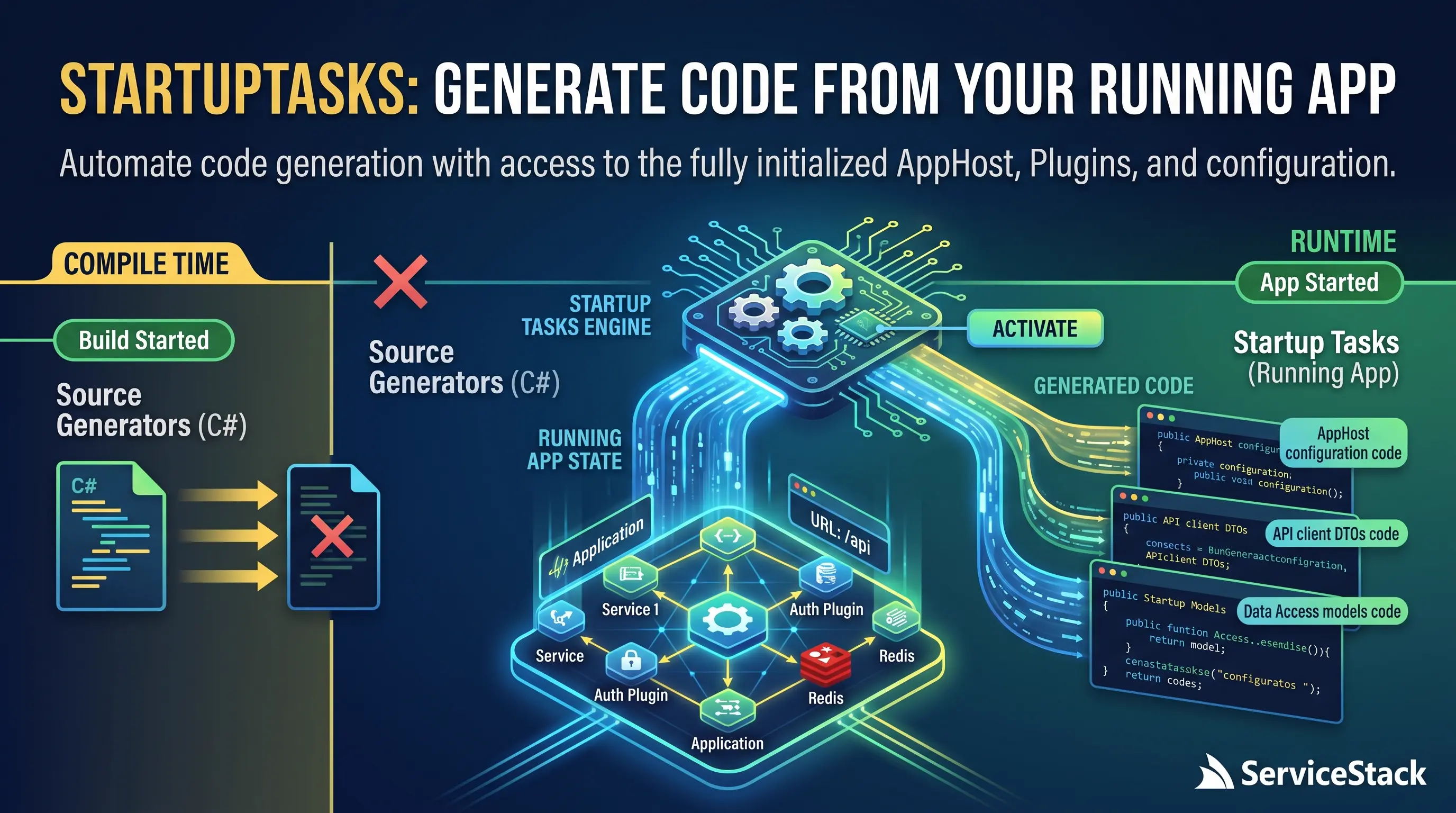
ServiceStack v10.2 introduces Startup Tasks, a new way to automate development-time
work as soon as your App is ready. They run after ASP.NET Core and ServiceStack have fully started, giving
them access to the configured AppHost, plugins and server addresses:
StartupTasks.Register("search-index", () =>
    appHost.Resolve<SearchIndexer>().Update());
Startup Tasks turn recurring setup commands into part of the normal development loop. Restart the App and the work happens automatically - without another CLI command to remember, a separate toolchain to install, or stale generated artifacts making their way into source control.
They're development-only and don't run in Production, whilst failures are isolated and logged so a convenience task can't prevent the App from starting.
Client DTOs That Stay in Sync
The first built-in use of Startup Tasks removes one of the most common interruptions in full-stack
ServiceStack development: manually running npx get-dtos after changing a server API.
StartupTasks.Register("dtos", () =>
    appHost.GetPlugin<NativeTypesFeature>().GenerateDtos());
The easiest way to add it to existing projects is to run:
npx add-in startup-dtos
On every development restart, ServiceStack finds the existing dtos.* references belonging to the App
and regenerates them directly from its Native Types metadata. There's no longer a separate manual DTO
update step after changing or updating server APIs - restarting the App keeps its clients synchronized.
This also improves agent-driven development workflows: an agent can add or change server APIs, restart the App, and immediately use the regenerated contracts from the client App without needing to discover and run a separate DTO generation command.
Safe Automatic PDF Model Generation
Apps using PdfFeature can use the same workflow to regenerate typed C# models from published PDF
template schemas whenever the App restarts:
StartupTasks.Register("pdf", () =>
    appHost.GetPlugin<PdfFeature>().GeneratePdfs());
Unchanged runs are inexpensive: models are generated in memory and compared with existing source without invoking Typst or rewriting files.
Generated PDF models now use a simple ownership marker:
// <auto-generated>
//     Remove this <auto-generated> line to preserve this file on future runs.
// </auto-generated>
While the opening marker remains, ServiceStack keeps the model synchronized with its .ui.json schema.
Remove it when you want to take ownership of a generated model and future runs will preserve it. This makes
automatic regeneration safe and predictable without content hashes or heuristics trying to determine
whether a file was edited.
See the Startup Tasks reference for complete DTO discovery, URL matching and generation options, or Rendering PDFs for PDF model generation and customization.
AI Chat now supports ServiceStack Auth
AI Chat is installed inside your ServiceStack App, so it never needs a separate user directory, a second login experience or a new identity silo - existing users sign in with the account they already have. Until now that integration assumed ASP.NET Core Identity Auth.
In v10.2 AI Chat also supports ServiceStack's own built-in Auth - AuthFeature with CredentialsAuth()
and your existing IAuthRepository - so both identity models are now first-class:
services.AddPlugin(new ChatFeature {
    RequireAuth = true,
    AuthType = ChatAuthType.Credentials,
});
The credentials sign-in component authenticates through ServiceStack's Authenticate API and shares the
App's auth cookie, which is what lets it work against either provider - the Chat UI asks the App who the
user is instead of maintaining its own answer.
Everything AI Chat scopes to an identity behaves identically on both: conversation threads, history and
generated media; Projects, personal Skills, Agent Profiles and provider preferences; Gemini File Stores,
document catalogues and PDF Studio workspaces; RequireAuth and RequiredRole gating; and API Tools calls,
which execute as the signed-in user through your App's normal authorization.
The practical consequence is that adopting AI Chat no longer implies an Identity Auth migration. Apps still running ServiceStack Auth can add AI Chat and have their existing users, roles and permissions apply immediately, whilst account lifecycle - password policy, lockouts, roles, deactivation - remains owned by the App in either case.
API Keys remain a valid way in whichever AuthType is configured, and RequireAuth = false still runs
everything as the shared default user for single-user or trusted-network deployments.
See Integrated Auth for sign-in types, per-user isolation and request validation.
Get Started
Everything in v10.2 works on .NET 8+ ServiceStack Apps, and the OrmLite, Startup Tasks and hardening improvements arrive with the upgrade - there's nothing new to install or configure:
| To use | Do this |
|---|---|
| JSON Queries and Upsert | Upgrade ServiceStack.OrmLite.* - both are available on SQLite, PostgreSQL, SQL Server and MySQL/MariaDB. |
| Startup Tasks | Register a task in development, or start from a project template where the dtos task is already included. |
| Gemini RAG | Add AI Chat with npx add-in chat, set GOOGLE_API_KEY and open Gemini RAG in /chat. |
| AI Chat with ServiceStack Auth | Keep your existing AuthFeature - set AuthType = ChatAuthType.Credentials and your users, roles and permissions apply to /chat immediately. |
The quickest way to see the headline feature is to point a folder import at the documentation folder of a repo you already have, import it, and ask the first grounded question in New Chat. From there the same documents publish a Search widget and an Assistant with two script tags.
Hardened ServiceStack
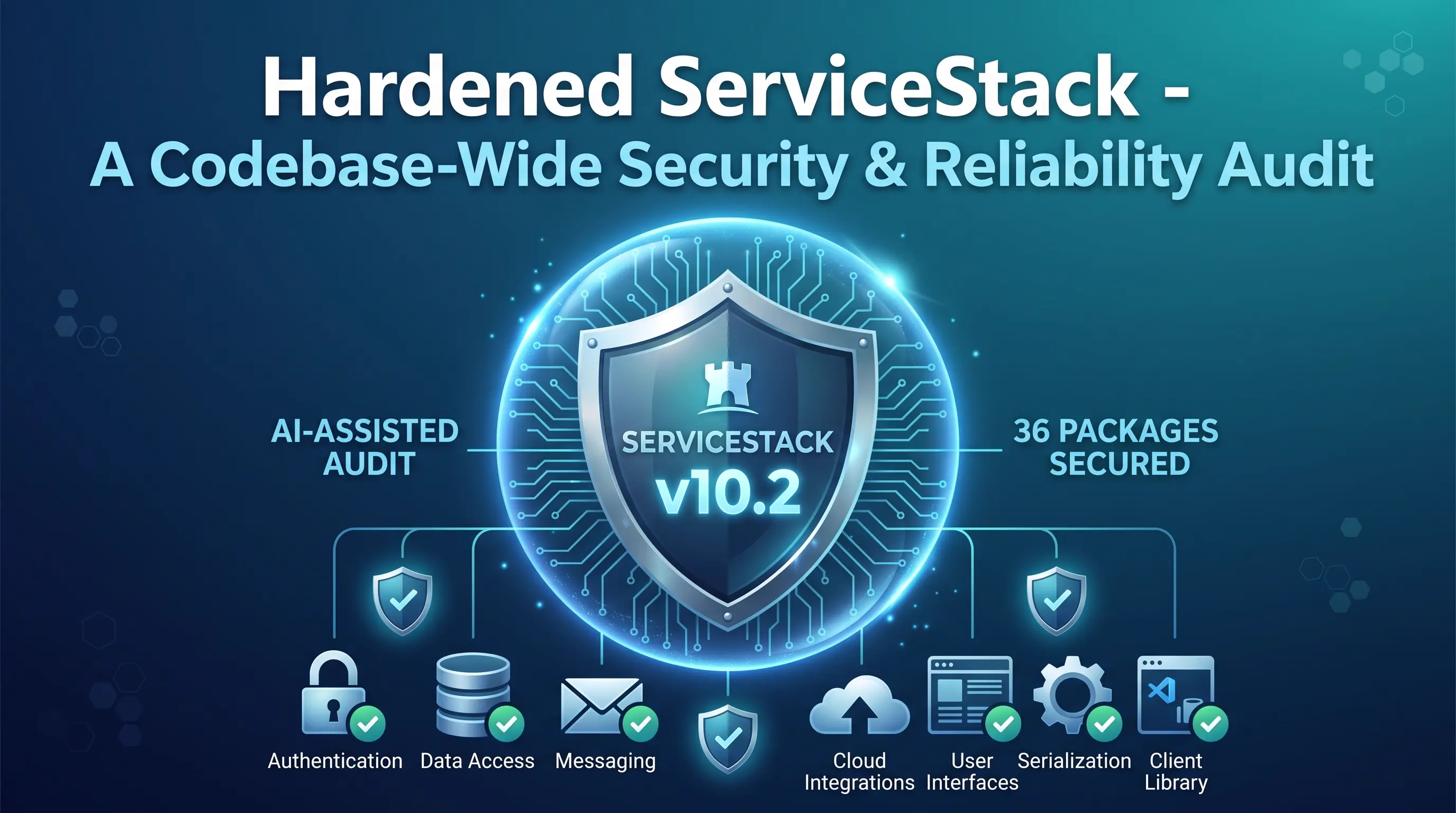
This release also includes the results of a codebase-wide AI-assisted security and reliability audit. The review identified and resolved issues across ServiceStack's core runtime, authentication, data access, messaging, cloud integrations, UI, serialization, image processing and client libraries.
The value for existing Apps is that this work happens beneath your code: the same trust boundaries, parsers and background workers your App already relies on now handle malformed input, hostile input and concurrent load more defensively - and every change is published for review in the per-package audit reports below, so security teams can see exactly what was fixed rather than take an upgrade on faith.
Reliability and correctness
The audit also fixed race conditions in distributed locks, caches, serializers, background workers and type registries; made disposal and shutdown deterministic; removed sync-over-async and retry defects; and added defensive null, range and format validation throughout public APIs. Further corrections address master/replica routing, cache key and update semantics, OpenAPI schema generation, route parameters, multipart requests, configuration parsing, image resizing, database metadata and query generation, message acknowledgement and recovery, and cross-platform behavior.
Together these changes make failures explicit instead of silently losing data, prevent malformed external input from escalating into process-wide failures, and improve predictable behavior under concurrency, cancellation and partial infrastructure outages.