
First-Class React + Tailwind for AI-First Development
We're witnessing a fundamental shift in how applications are built. AI code generation has evolved from a novelty to a productivity multiplier that's become too significant to ignore. While AI models still require oversight for production backend systems, they excel at generating frontend UIs-compressing development timelines that once took months into days.
The Rise of Vibe Coding
AI can now generate complete, production-ready UI code. This enables an entirely new development workflow that Andrej Karpathy has termed "Vibe Coding"-where developers iteratively guide AI agents to implement features through natural language instructions, where features can be iteratively prototyped, refined and improved within seconds instead of hours.
This AI-first approach is rapidly maturing, with tools like Cursor, Claude Code, and Codex becoming the preferred platforms for this new paradigm with new tools designed to get maximum effectiveness of AI models with sophisticated planning tools, focused models optimized for code generation and edits and agentic workflows that's able to solidifying each new feature iteration with tests, along with detailed documentation, planning, migrations and usage guides.
React & Tailwind: The AI Development Standard
React and Tailwind have emerged as the de facto standards for AI-generated UIs. Every major platform for generating applications from prompts has converged on this stack including Replit, Lovable, Google's AI Studio, Vercel's v0 and Claude Code Web.
TypeScript
Whilst TypeScript is often excluded in one-prompt solutions catering to non-developers, it's still a critical part of the AI development workflow. It provides a type system that helps AI models generate more accurate and maintainable code and TypeScript's static analysis also helps identify errors in the generated code which AI Models have have become really good at correcting-as such it's an integral part in all our React templates.
How ServiceStack Excels in AI-First Development
Context is king when developing with AI models. The better the context, the higher the quality of generated code and ServiceStack's architecture is uniquely suited for AI-assisted development:
Declarative Typed APIs
All ServiceStack APIs follow a flat, declarative structure-The contract is explicit and consistent and LLMs don't need to guess what APIs accept or return.
End-to-End Type Safety
Context quality directly impacts generated code quality. ServiceStack's TypeScript integration provides complete static analysis of what APIs accept, return, and how to bind responses-giving AI models the full context they need. The static analysis feedback also directs models to identify and correct any errors in the generated code.
Zero-Ambiguity Integration
AI models thrive on consistency. ServiceStack removes guesswork with a single pattern for all API calls:
- One generic
JsonServiceClientfor all APIs - Consistent methods used to send all requests
- Consistent Typed Request DTO → Response DTO flow
- Uniform error handling
Intuitive Project Structure
ServiceStack's physical project structure provides clear separation of concerns, with the entire API surface area contained in the ServiceModel project-making codebases easy for AI models to navigate and understand.
Minimal Code Surface
Less code means fewer opportunities for errors. ServiceStack's high-productivity features minimize the code AI needs to generate:
- AutoQuery APIs - Flexible, queryable APIs defined with just a Request DTO
- AutoQueryGrid Component - Complete CRUD UIs in 1 line of code
- Auto Form Components - Beautiful, validation-bound forms in 1 line of code
These components are ideal for rapidly building backend management interfaces, freeing developers to focus on differentiating customer-facing features.
Modern React Project Templates
We're introducing three production-ready React templates, each optimized for different use cases:
Comprehensive React Component Library
All three templates leverage our new React Component Gallery-a high-fidelity port of our proven Vue Component Library and Blazor Component Library. This comprehensive collection provides everything needed to build highly productive, modern and responsive web applications.
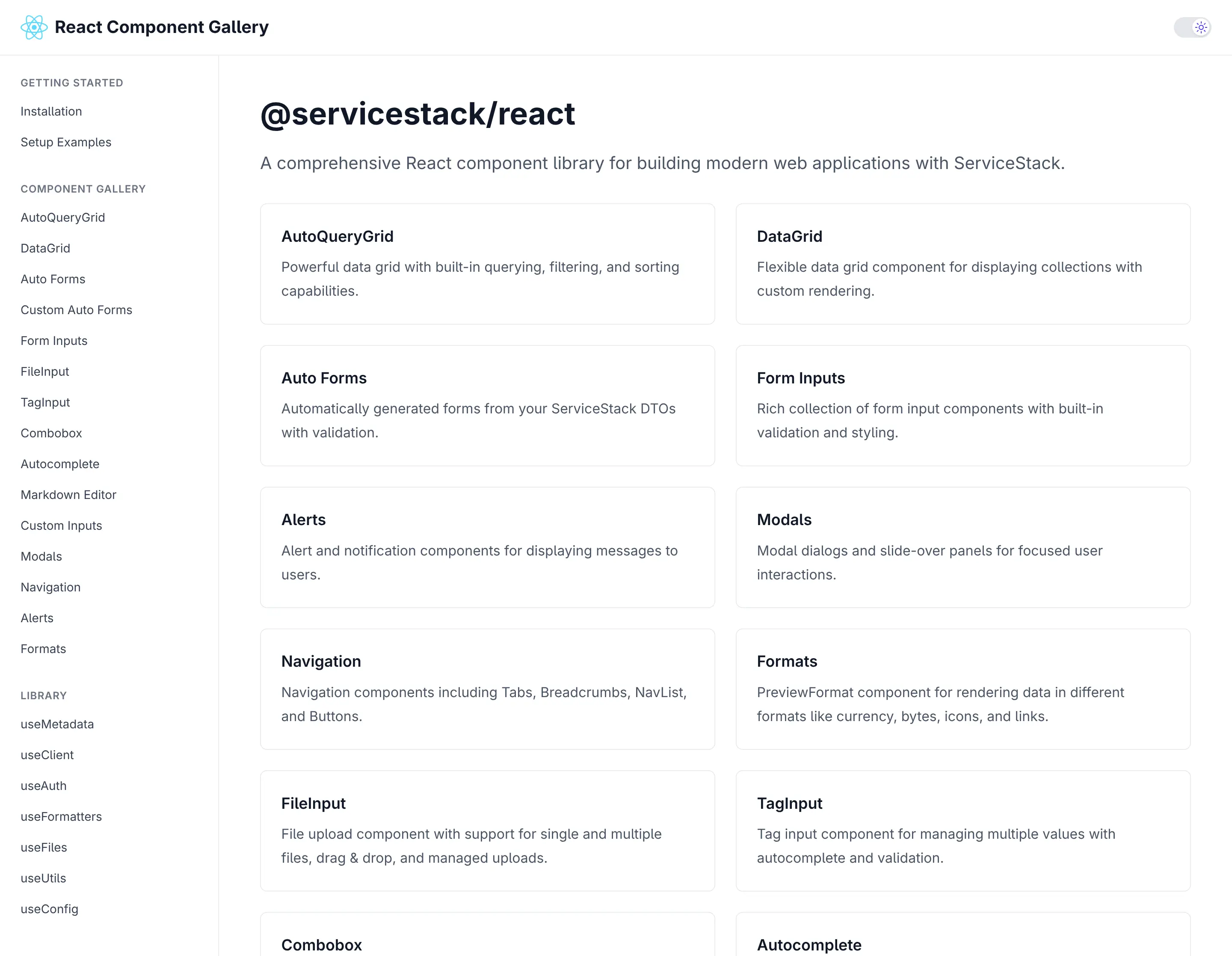
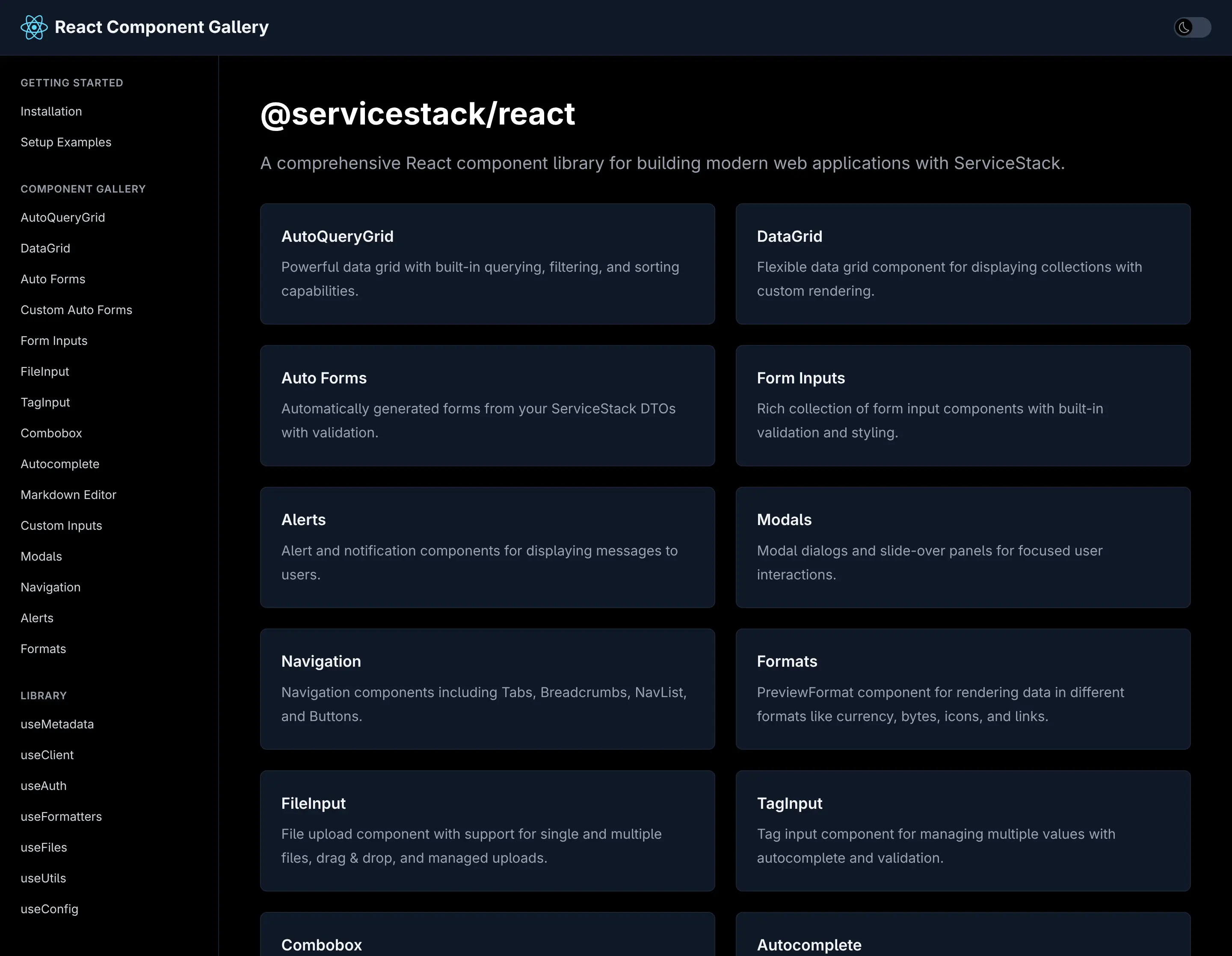
Switch to Dark Mode to see how all components looks in Dark Mode:
ServiceStack's first-class React support positions your applications at the forefront of AI-assisted development. With declarative APIs, complete type safety, and minimal boilerplate, you can leverage AI code generation with confidence while maintaining the quality and maintainability your production systems demand.
TypeScript Data Models
As AI Models are not as adept at generating C# APIs or Migrations yet, they excel at generating TypeScript code, which our TypeScript Data Models feature can take advantage of by generating all the C# AutoQuery CRUD APIs and DB Migrations needing to support it.
With just a TypeScript Definition:
We can generate all the AutoQuery CRUD APIs and DB Migrations needed to enable a CRUD UI with:
npx okai Bookings.d.ts
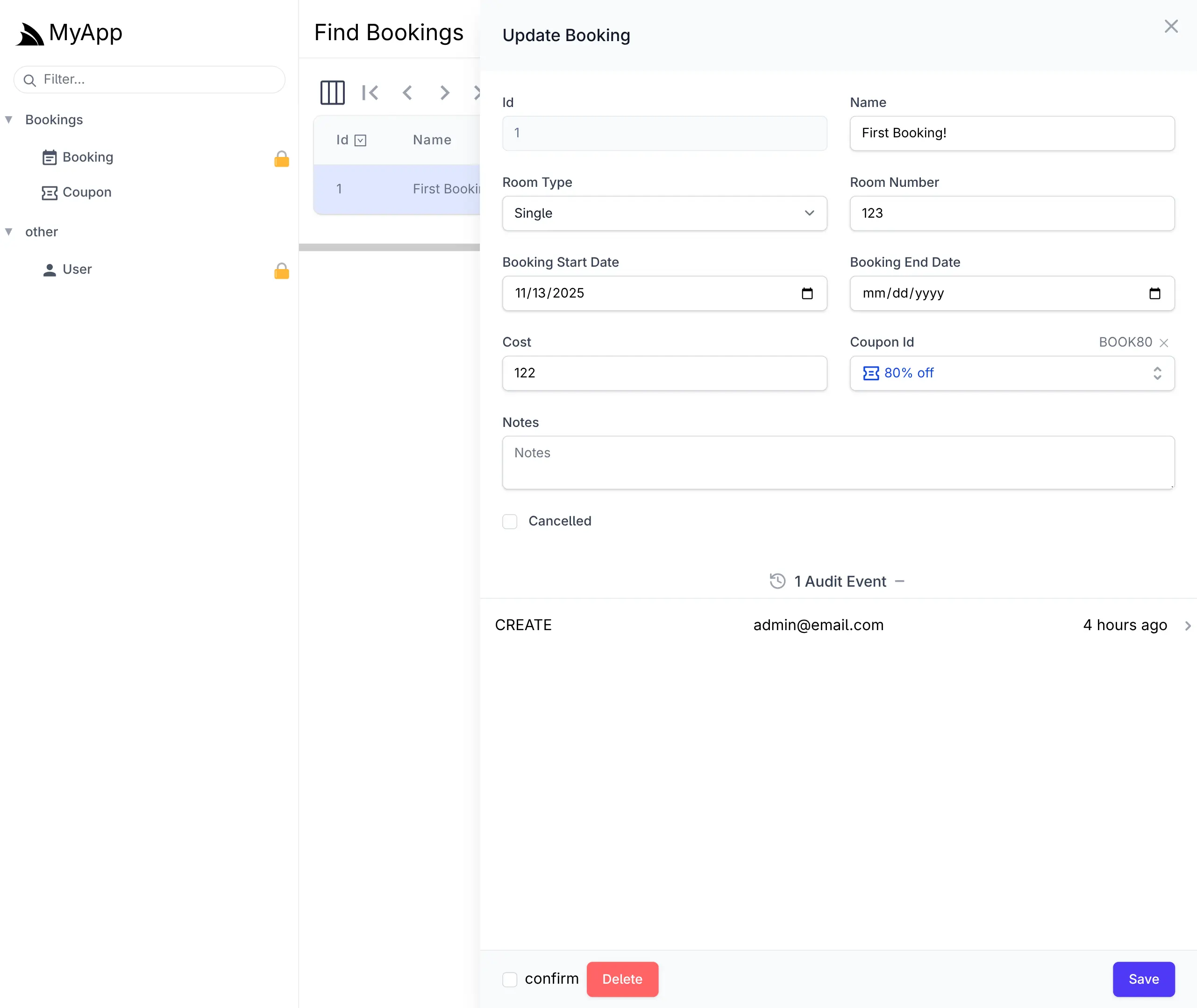
This is enough to generate a complete CRUD UI to manage Bookings in your React App with the React AutoQueryGrid Component. or with ServiceStack's built-in Locode UI:
Cheat Sheet
We'll quickly cover the common dev workflow for this feature.
To create a new Table use init <Table>, e.g:
npx okai init Transaction
This will generate an empty MyApp.ServiceModel/<Table>.d.ts file along with stub AutoQuery APIs and DB Migration implementations.
Regenerate AutoQuery APIs and DB Migrations
After modifying the TypeScript Data Model to include the desired fields, you can re-run the okai tool to generate the AutoQuery APIs and DB Migrations
(which can be run anywhere within your Solution):
npx okai Transaction.d.ts
After you're happy with your Data Model you can run DB Migrations to run the DB Migration and create your RDBMS Table:
npm run migrate
Making changes after first migration
If you want to make further changes to your Data Model, you can re-run the okai tool to update the AutoQuery APIs and DB Migrations, then run the rerun:last npm script to drop and re-run the last migration:
npm run rerun:last
Removing a Data Model and all generated code
If you changed your mind and want to get rid of the RDBMS Table you can revert the last migration:
npm run revert:last
Which will drop the table and then you can get rid of the AutoQuery APIs, DB Migrations and TypeScript Data model with:
npx okai rm Transaction.d.ts
AI-First Example
There are a number of options for starting with an AI generated Application, with all the Instant AI App Generators like Google's App Studio able to provide a great starting point. Although currently Professional Developers tend to use Cursor, Claude Code or Codex as their day-to-day tools of choice.
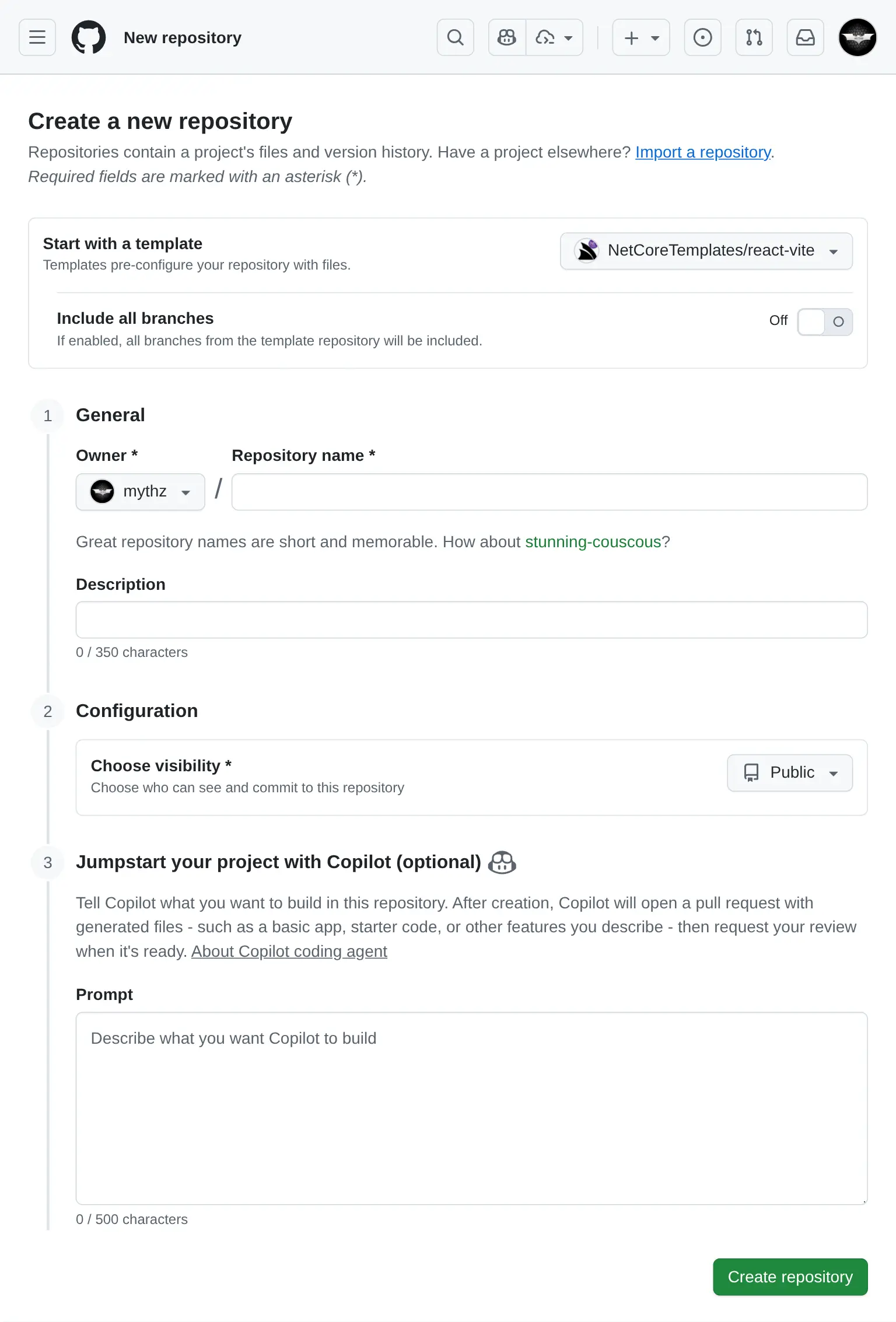
Use GitHub Copilot when creating a new Repository
If you're using GitHub Copilot you can also use it to generate a new App from the Vite React template :
For the example, I've started with a useful App that I've never created before, a Budget Planner App, using the prompt:
Budget Planner Prompt
- React 19, TypeScript, TailwindCSS v4
- Persistence in IndexedDB/localStorage
- Recharts
- Vitest with React Testing Library

## Features
Dashboard
- Overview of total income, expenses, and remaining budget
- Monthly summary chart (line graph)
- Expense categories (pie chart)

Transactions
- Add/Edit/Delete income or expenses
- Date filtering/sorting

Budgets
- Set monthly budget goals per category
- Progress bars for spending vs. budget

Reports
- View past months
- Export
The generated source code for the App was uploaded to: github.com/mythz/budgets.apps.cafe
Budgent Planner App
After a few minutes Copilot creates a PR with what we asked for, even things that we didn't specify in the prompt but could be inferred from the Project Template like Dark Mode support where it made use of the existing <DarkModeToggle />.
Prompt AI to add new Features
AI Assistance doesn't end after the initial implementation as AI Models and tools are more than capable to create 100% of the React UI now, including new features, fixes and other improvements. For this example I used Claude Code to Implement Category Auto-Tagging with this prompt:
Implement Category Auto-Tagging

Allow specifying tags when creating a new transaction.
When users add a transaction, try to predict the tag from the Description, e.g:

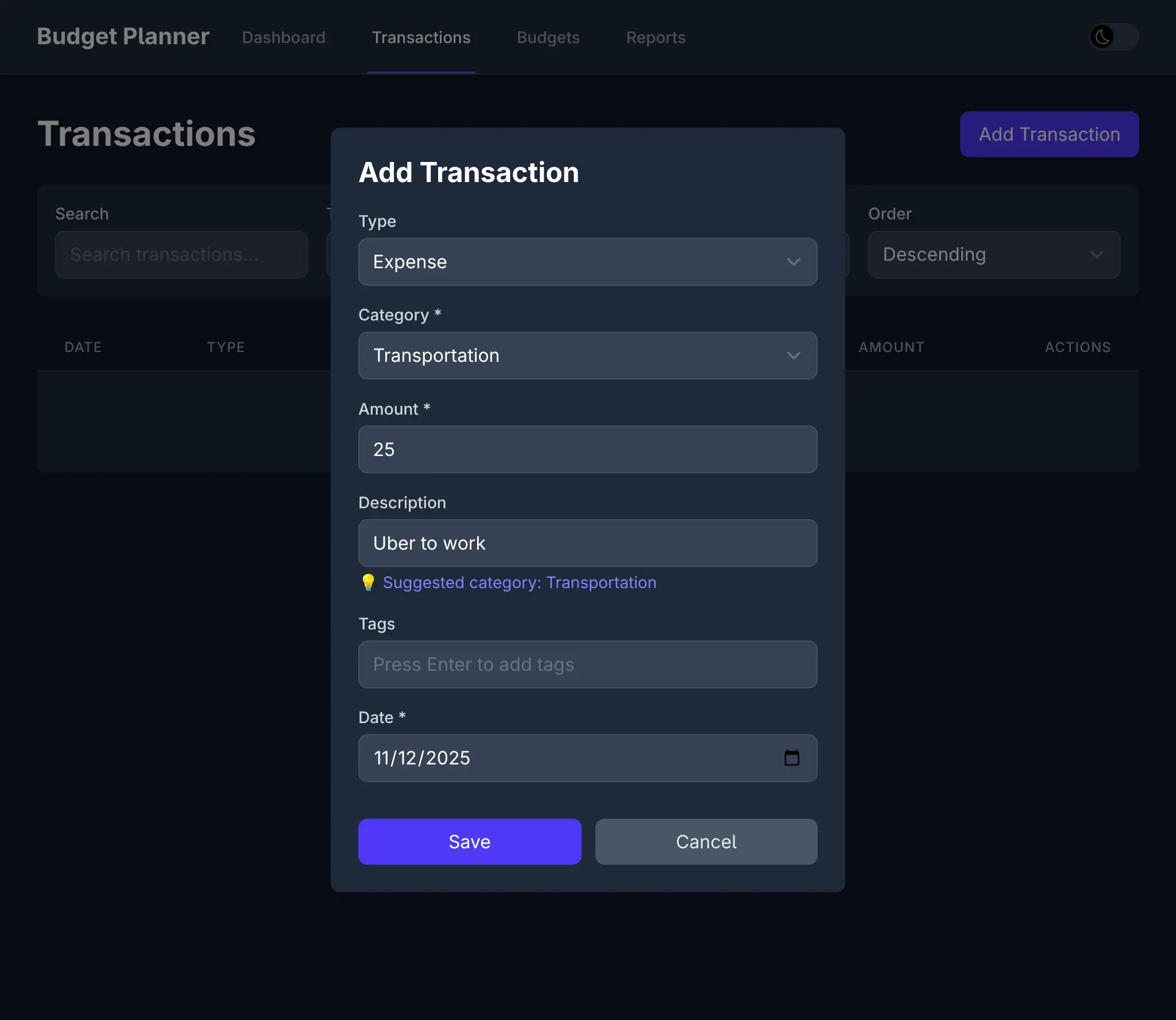
Input: “Starbucks latte” → Suggests category: Food & Drinks
Input: “Uber to work” → Suggests category: Transport

Implementation:

Maintain a small local list of common keywords + categories.
Pre-fill category in the transaction form as the user types in the Description.
Which resulted in this commit which sees the feature available in the UI:
Along with different seed data, tailored for Income and Expenses:
And 19 passing tests to verify a working implementation:
Combined with Vite's instant hot-reload, this creates a remarkably fluid development experience where we get to watch our prompts materialize into working features in real-time.
All this to say that this new development model exists today, and given its significant productivity gains, it's very likely to become the future of software development, especially for UIs. Since developers are no longer the primary authors of code, our UI choices swing from Developer preferences to UI technologies that AI models excel at.
So whilst we have a preference for Vue given it's more readable syntax and progressive enhancement capabalities, and despite the .NET ecosystem having a strong bias towards Blazor, we're even more excited for the future of React and are committed to providing the best possible support for it.
AI Chat upgraded to latest llms.py
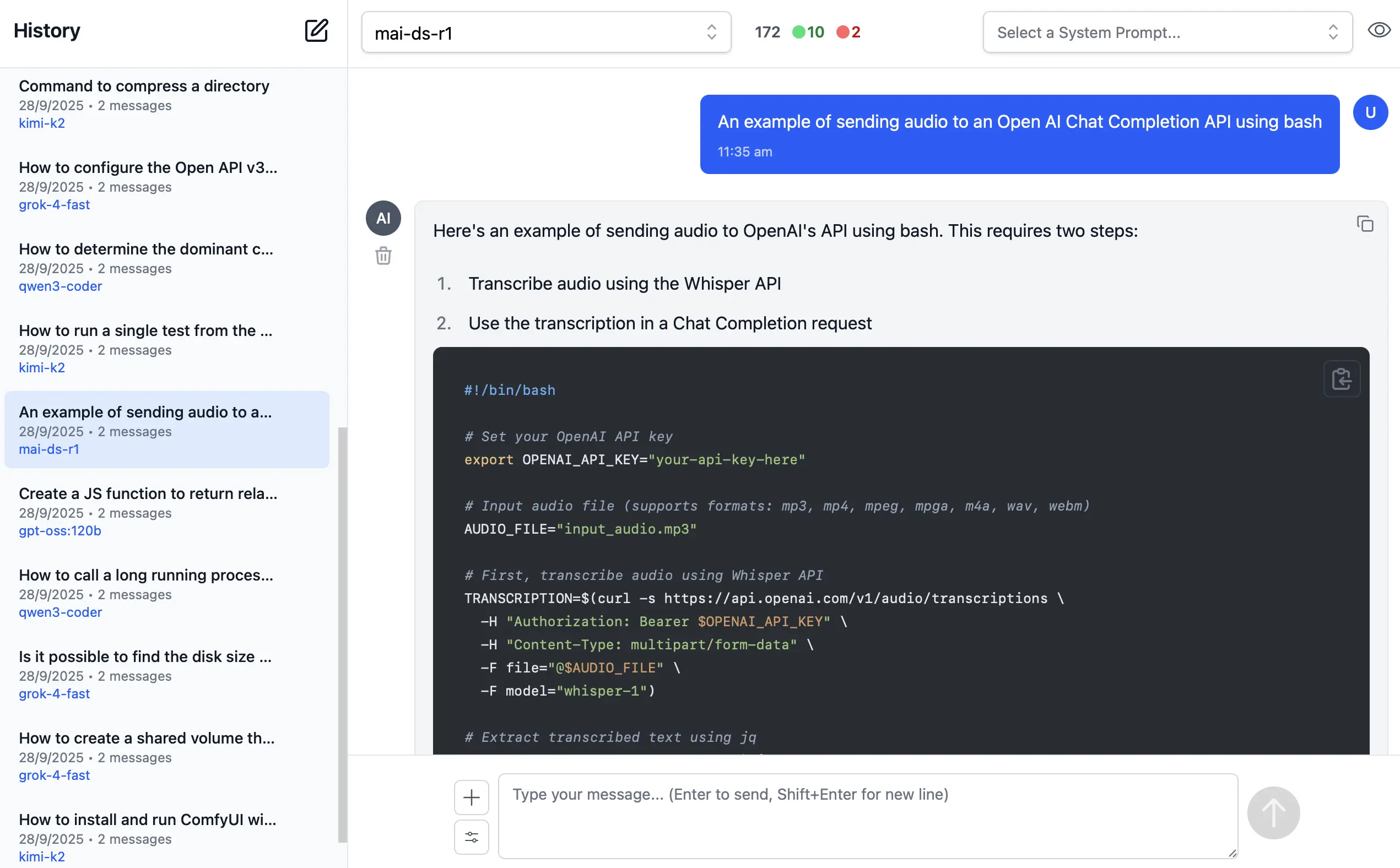
ServiceStack's AI Chat has been upgraded to use the latest version of llms.py UI and configuration.
llms.py is a popular open-source Python package (380+ stars) we're developing that provides:
- A lightweight CLI and API
- A ChatGPT-like alternative to Open WebUI for accessing multiple LLMs
- Entirely offline operation with all data kept private in browser storage
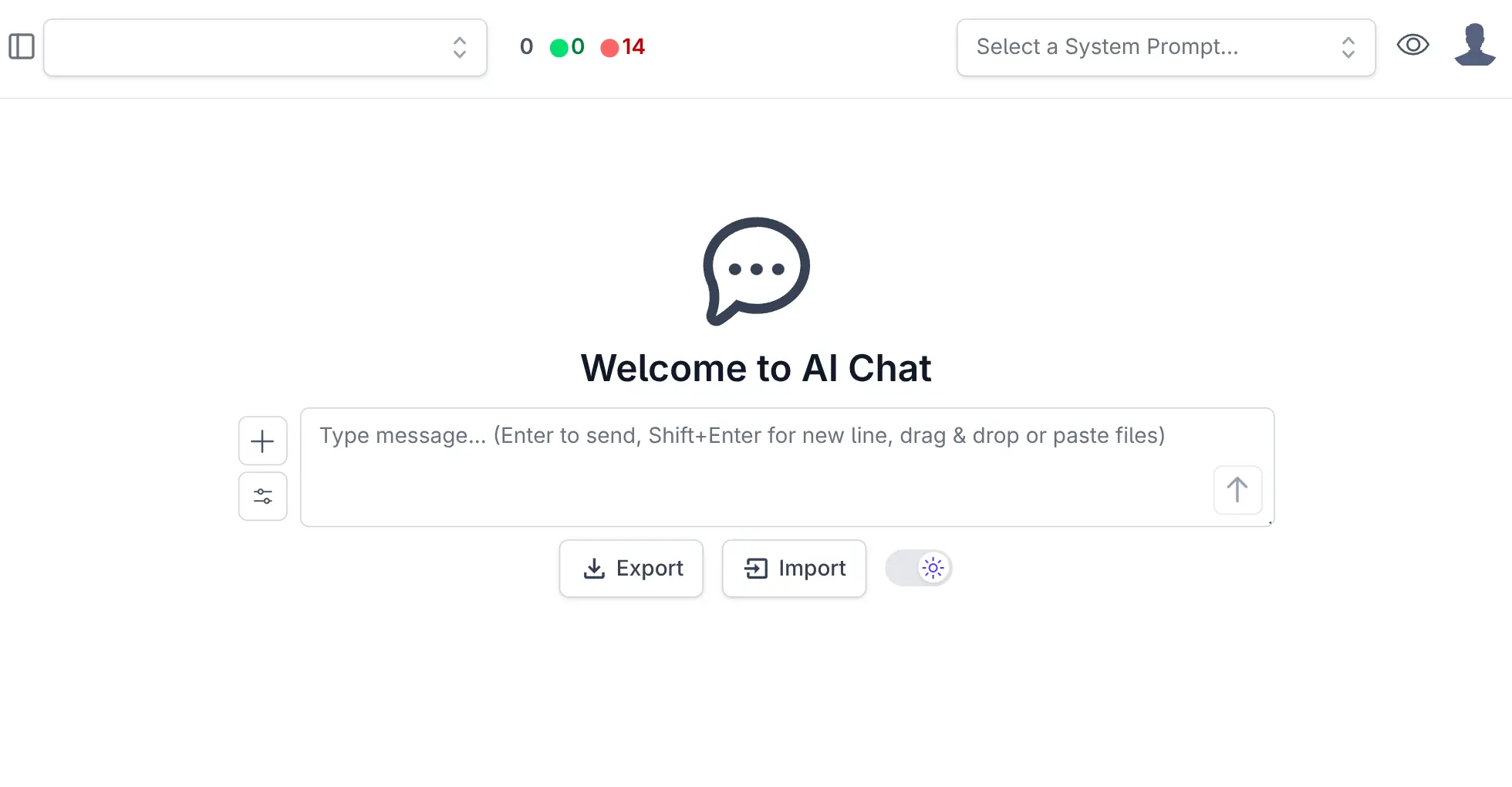
We use Python for rapid feature development, then sync the latest improvements to ServiceStack's AI Chat implementation via an automated script.
Beyond llms.py's core features, ServiceStack's AI Chat adds integrated authentication, allowing you to offer ChatGPT-like capabilities to your users while maintaining complete control over API keys, billing, and approved prioritized providers-ensuring Fast, Local, and Private AI access within your organization.
AI Chat Admin Analytics
ServiceStack's AI Chat feature provides a unified API for integrating multiple AI providers into your applications. To gain visibility into usage patterns, costs, and performance across your AI infrastructure, the platform includes comprehensive chat history persistence and analytics capabilities.
x mix chat
Or by referencing the ServiceStack.AI.Chat NuGet package and adding the ChatFeature plugin:
services.AddPlugin(new ChatFeature {
    EnableProviders = [
        "servicestack",
    ]
});
AI Chat History Persistence
Enabling chat history persistence allows you to maintain a complete audit trail of all AI interactions, track token consumption, monitor costs across providers and models, and analyze usage patterns over time that captures every
request and response flowing through AI Chat's UI, external OpenAI endpoints and internal IChatStore requests.
Database Storage Options
ServiceStack provides two storage implementations to suit different deployment scenarios:
DbChatStore - A universal solution that stores chat history in a single table compatible with any RDBMS
supported by OrmLite:
services.AddSingleton<IChatStore,DbChatStore>();
PostgresChatStore - An optimized implementation for PostgreSQL that leverages monthly table partitioning for improved query performance and data management:
services.AddSingleton<IChatStore, PostgresChatStore>();
Both implementations utilize indexed queries with result limits to ensure consistent performance even as your chat history grows. The partitioned approach in PostgreSQL offers additional benefits for long-term data retention and archival strategies.
Admin UI Analytics
Once chat history persistence is enabled, the Admin UI provides comprehensive analytics dashboards that deliver actionable insights into your AI infrastructure. The analytics interface offers multiple views to help you understand costs, optimize token usage, and monitor activity patterns across all configured AI providers and models.
The analytics dashboard includes three primary tabs:
- Cost Analysis - Track spending across providers and models with daily and monthly breakdowns
- Token Usage - Monitor input and output token consumption to identify optimization opportunities
- Activity - Review detailed request logs with full conversation history and metadata
These visualizations enable data-driven decisions about provider selection, model usage, and cost optimization strategies.
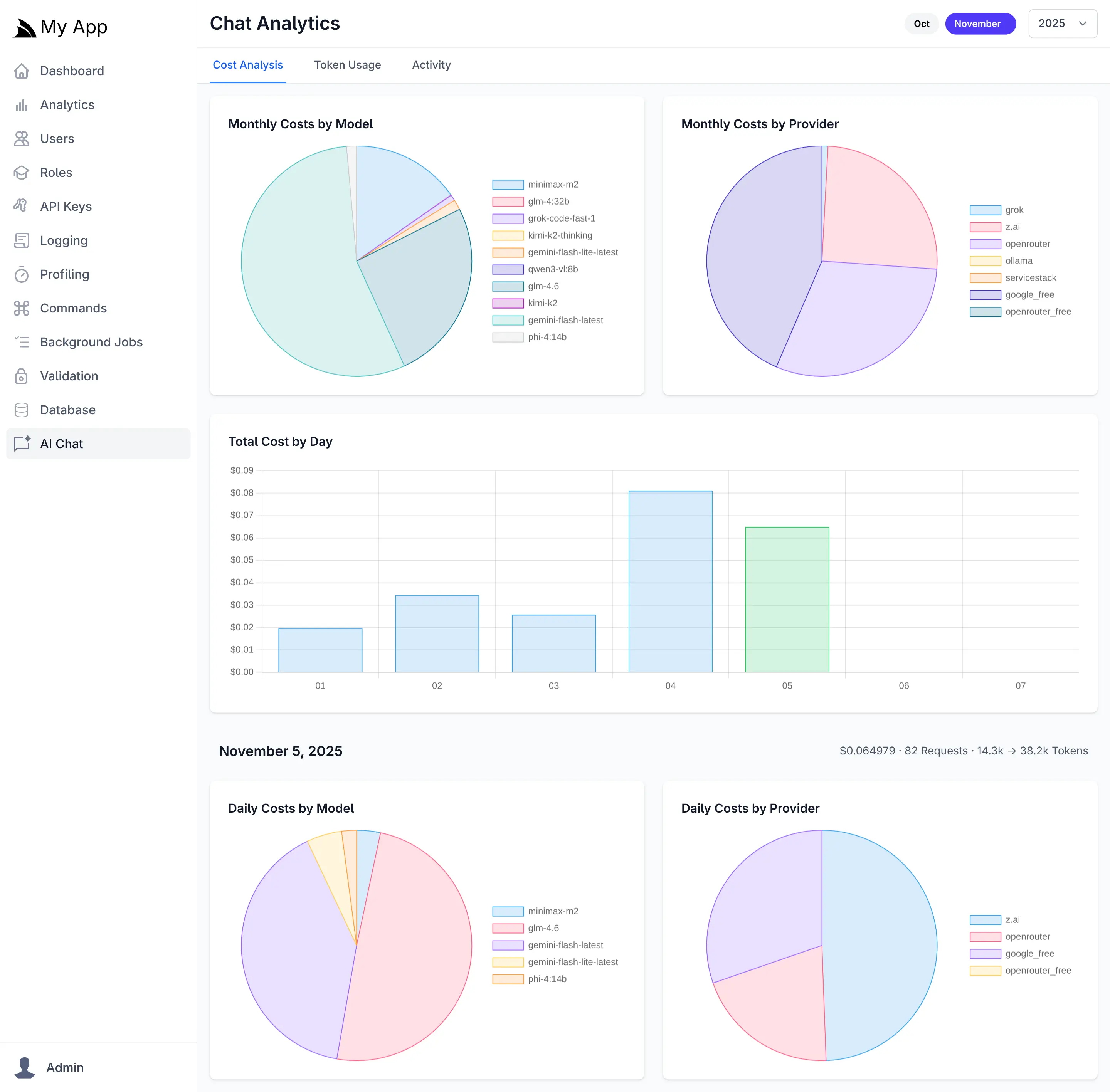
Cost Analysis
The Cost Analysis tab provides financial visibility into your AI operations with interactive visualizations showing spending distribution across providers and models. Daily cost trends help identify usage spikes, while monthly aggregations reveal long-term patterns. Pie charts break down costs by individual models and providers, making it easy to identify your most expensive AI resources and opportunities for cost optimization.
Token Usage
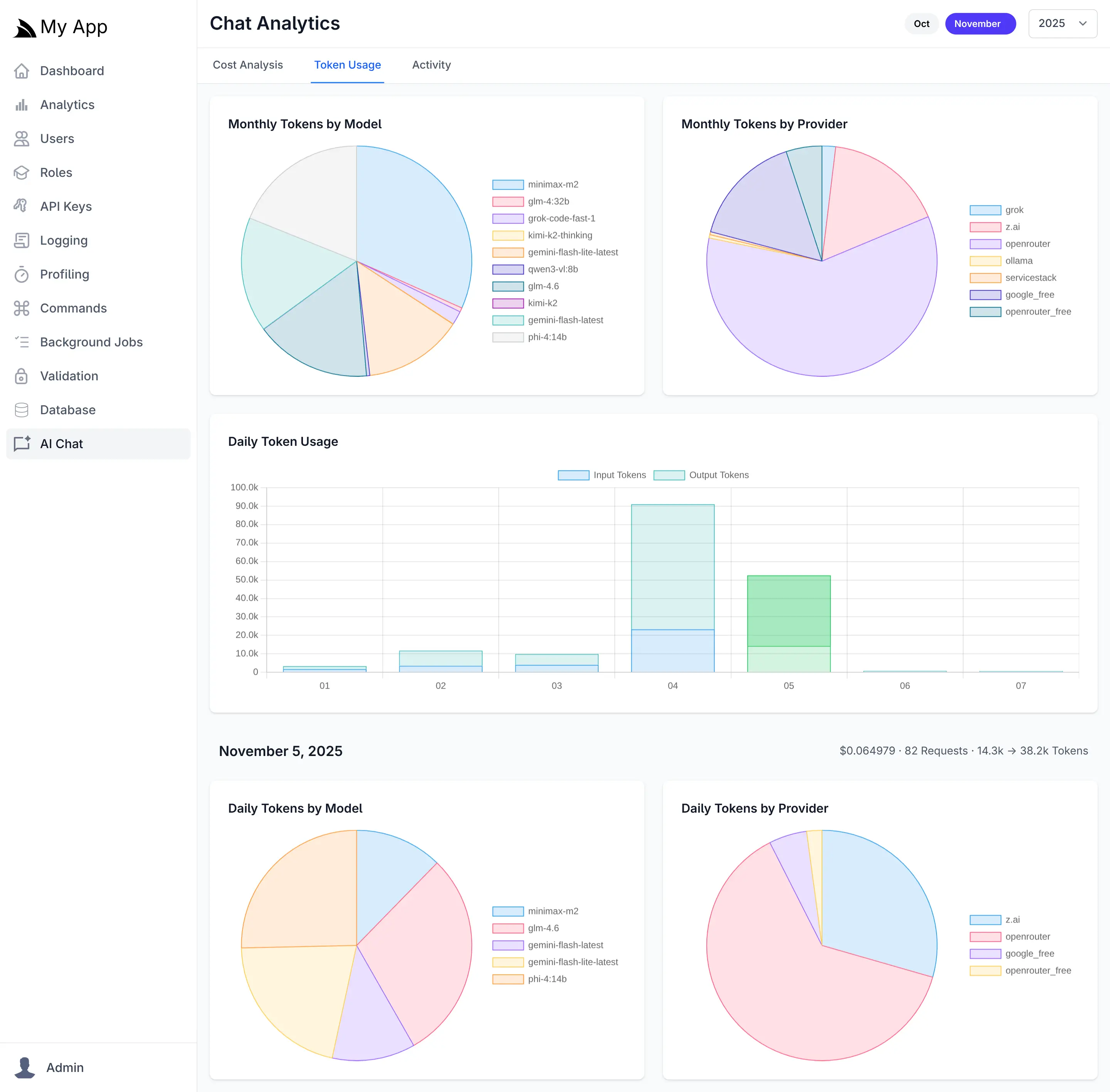
The Token Usage tab tracks both input (prompt) and output (completion) tokens across all requests. Daily usage charts display token consumption trends over time, while model and provider breakdowns show which AI resources consume the most tokens. This granular visibility helps optimize prompt engineering, identify inefficient usage patterns, and forecast capacity requirements.
Activity Log
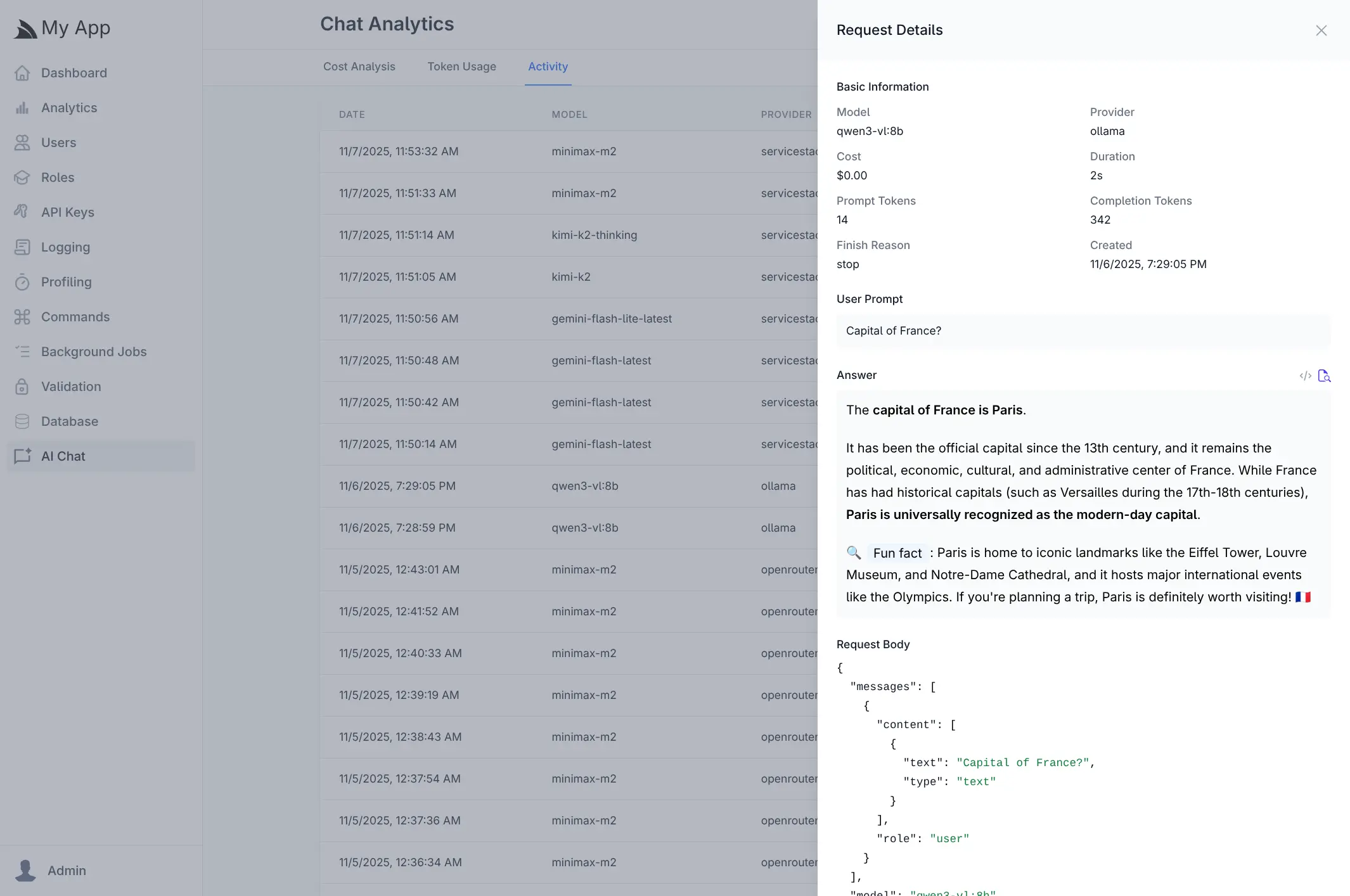
The Activity tab maintains a searchable log of all AI chat requests, displaying timestamps, models, providers, and associated costs. Clicking any request opens a detailed view showing the complete conversation including user prompts, AI responses, token counts, duration, and the full request payload. This audit trail is invaluable for debugging, quality assurance, and understanding how your AI features are being used in production.
FREE Gemini, Minimax M2, GLM 4.6, Kimi K2 in AI Chat
To give AI Chat instant utility, we're making available a free servicestack OpenAI Chat provider that can be enabled with:
services.AddPlugin(new ChatFeature {
    EnableProviders = [
        "servicestack",
        // "groq",
        // "google_free",
        // "openrouter_free",
        // "ollama",
        // "google",
        // "anthropic",
        // "openai",
        // "grok",
        // "qwen",
        // "z.ai",
        // "mistral",
        // "openrouter",
    ]
});
The servicestack provider is configured with a default llms.json which enables access to Gemini and the
best value OSS models for FREE:
{
  "providers": {
    "servicestack": {
      "enabled": false,
      "type": "OpenAiProvider",
      "base_url": "http://okai.servicestack.com",
      "api_key": "$SERVICESTACK_LICENSE",
      "models": {
        "gemini-flash-latest": "gemini-flash-latest",
        "gemini-flash-lite-latest": "gemini-flash-lite-latest",
        "kimi-k2": "kimi-k2",
        "kimi-k2-thinking": "kimi-k2-thinking",
        "minimax-m2": "minimax-m2",
        "glm-4.6": "glm-4.6",
        "gpt-oss:20b": "gpt-oss:20b",
        "gpt-oss:120b": "gpt-oss:120b",
        "llama4:400b": "llama4:400b",
        "mistral-small3.2:24b": "mistral-small3.2:24b"
      }
    }
  }
}
Clean, Lightweight & Flexible AI Integration
ServiceStack's AI Chat delivers a production-ready solution for integrating AI capabilities into your applications with minimal overhead and maximum flexibility. The llms.json configuration approach provides several key advantages:
Unified Provider Abstraction
Define the exact models you want your application to use through a single, declarative configuration file. This thin abstraction layer eliminates vendor lock-in and allows seamless switching between providers without code changes, enabling you to:
- Optimize for cost - Route requests to the most economical provider for each use case
- Maximize performance - Leverage faster models for latency-sensitive operations while using more capable models for complex tasks
- Ensure reliability - Configure automatic failover between providers to maintain service availability
- Control access - Specify which models are available to users in your preferred priority order
Hybrid Deployment Flexibility
Mix and match local and cloud providers to meet your specific requirements. Deploy privacy-sensitive workloads on local models while leveraging cloud providers for scale, or combine premium models for critical features with cost-effective alternatives for routine tasks.
Zero-Dependency Architecture
The lightweight implementation adds minimal footprint to your application while providing enterprise-grade AI capabilities. No heavy SDKs or framework dependencies required-just clean, direct performant integrations.
The servicestack provider requires the SERVICESTACK_LICENSE Environment Variable, although any ServiceStack License Key can be used, including expired and Free ones.
Learn more about AI Chat's UI:
FREE for Personal Usage
To be able to maintain this as a free service we're limiting usage for development or personal assistance and research by limiting usage to 60 requests /hour which should be more than enough for most personal usage and research whilst deterring usage in automated tools or usage in production.
info
Rate limiting is implemented with a sliding Token Bucket algorithm that replenishes 1 additional request every 60s
Effortless AI Integration
In addition of providing UI and ChatGPT-like features, it also makes it trivially simple to access AI Features from within your own App that's as simple as sending a populated ChatCompletion Request DTO with the IChatClient dependency:
class MyService(IChatClient client)
{
    public async Task<object> Any(DefaultChat request)
    {
        return await client.ChatAsync(new ChatCompletion {
            Model = "glm-4.6",
            Messages = [
                Message.Text(request.UserPrompt)
            ],
        });
    }
}
It's also makes it easy to send Image, Audio & Document inputs to AI Models that support it, e.g:
var image = new ChatCompletion
{
    Model = "qwen2.5vl",
    Messages = [
        Message.Image(imageUrl:"https://example.org/image.webp",
            text:"Describe the key features of the input image"),
    ]
}

var audio = new ChatCompletion
{
    Model = "gpt-4o-audio-preview",
    Messages = [
        Message.Audio(data:"https://example.org/speaker.mp3",
            text:"Please transcribe and summarize this audio file"),
    ]
};

var file = new ChatCompletion
{
    Model = "gemini-flash-latest",
    Messages = [
        Message.File(
            fileData:"https://example.org/order.pdf",
            text:"Please summarize this document"),
    ]
};
Ask ServiceStack Docs - Introducing AI Search
We're excited to announce the new Typesense-powered AI Search, a powerful new feature bringing conversational AI capabilities to ServiceStack Docs.

Comprehensive Docs
As ServiceStack has grown over the years, so have our docs - now spanning hundreds of pages covering everything from core features to advanced integrations. While comprehensive documentation is invaluable, finding the right information quickly can be challenging. Traditional search works well when you know what you're looking for, but what about when you need to understand concepts, explore solutions, or learn how different features work together? That's where AI Search comes in.

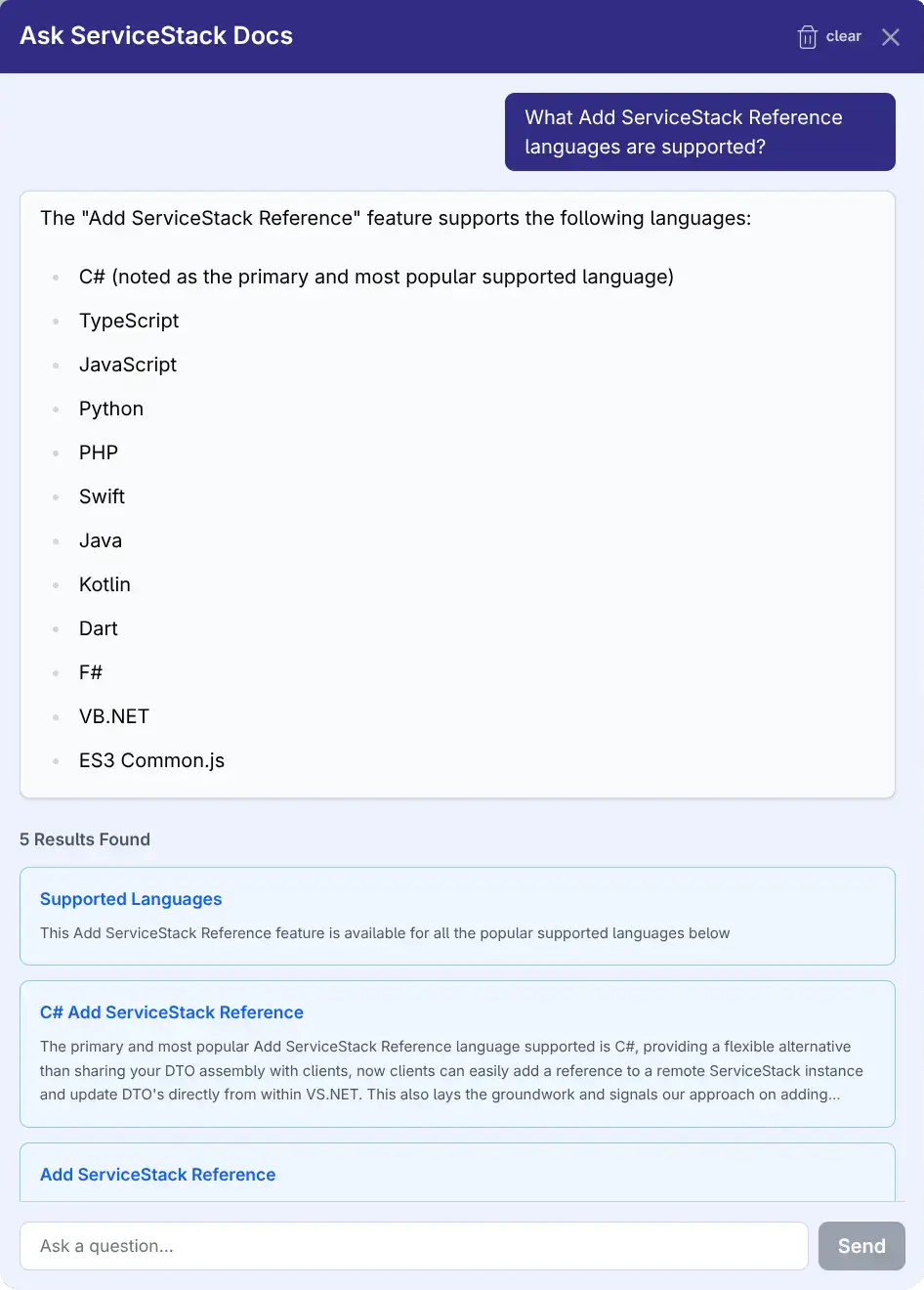
AI Search leverages Typesense's advanced Conversational Search API that uses Retrieval-Augmented Generation (RAG) of our docs combined with an LLM to provide intelligent, context-aware answers directly from our documentation.
AI Search vs Instant Typesense Search
AI Search is ideal for when you need conversational answers, explanations of concepts, or help understanding
how different features work together. The AI excels at synthesizing information across multiple documentation pages
to answer complex how do I... questions.
Otherwise the existing instant Typesense Search is still the best option when you know exactly what you're looking for - like a specific API name, configuration option, or documentation page.
What is Typesense AI Search?
Typesense AI Search is a conversational interface that allows you to ask natural language questions about ServiceStack and receive:
- AI-Generated Answers - Intelligent responses powered by Typesense's conversational model
- Relevant Documentation Links - Direct links to the most relevant documentation pages
- Multi-turn Conversations - Ask follow-up questions within the same conversation context
Key Features
🤖 Conversational Interface
Click the AI Search button (chat icon) in the header to open an intuitive modal dialog. Type your question and get instant answers without leaving the documentation.
📚 Retrieval-Augmented Generation (RAG)
The AI doesn't just generate responses - it grounds its answers in actual ServiceStack documentation. Each response includes:
- AI-Generated Answer - Contextual explanation based on your question
- Search Results - Up to 10 relevant documentation snippets with direct links
- Snippets - Quick previews of relevant content to help find what you need
💬 Multi-turn Conversations
Maintain context across multiple questions in a single conversation:
- Ask initial questions about ServiceStack features
- Follow up with clarifications or related topics
- The conversation ID is automatically maintained for coherent context
- Start a new conversation anytime by clicking on clear links or refreshing
Asking Questions
- Type your question naturally (e.g., "How do I set up authentication?")
- Review the AI answer and explore the suggested documentation links
Following Up
- Ask related questions in the same conversation
- The AI maintains context from previous messages
- Click any documentation link to navigate to the full page
- Start a new conversation anytime by refreshing
Technical Implementation
The AI Search feature was built with:
- TypesenseConversation Component - AI Search UI Vue component
- Indexing - Uses typesense-docsearch-scraper to index content and generate embeddings using custom field definitions defined in typesense-scraper-config.json
- Setup - Conversational Model and Conversation History collection created in setup-search-index.yml Action
- LLM - Typesense sends the query and relevant context to Gemini Flash 2.5 as the Conversational Model
- Backend: Uses Typesense Conversational Search (RAG)
multi_searchAPI
Feedback & Support
We'd love to hear your feedback! If you have any feedback or suggestions for improvements, please let us know!.